To enable the H5P tab in Createspace for your organization, an administrator must create an H5P Basic Link type under the existing H5P Learning Tools Interoperability (LTI) deployment. This one-time setup allows instructors and course designers to access the H5P Content Library directly in Createspace.
Prerequisites
Before configuring the H5P Basic Link, ensure the following:
- An H5P LTI Advantage integration is configured in Manage Extensibility.
- An H5P LTI deployment exists for your organization.
- Createspace is enabled in Organization Tools.
- Creator H5P Integration is enabled in Organization Tools.
Create the H5P Basic Link
The H5P tab in Createspace requires the Basic Launch H5P link type.
- From the navbar, click Admin Tools, and then select Manage Extensibility.
- On the LTI Advantage tab, click the name of your H5P tool.
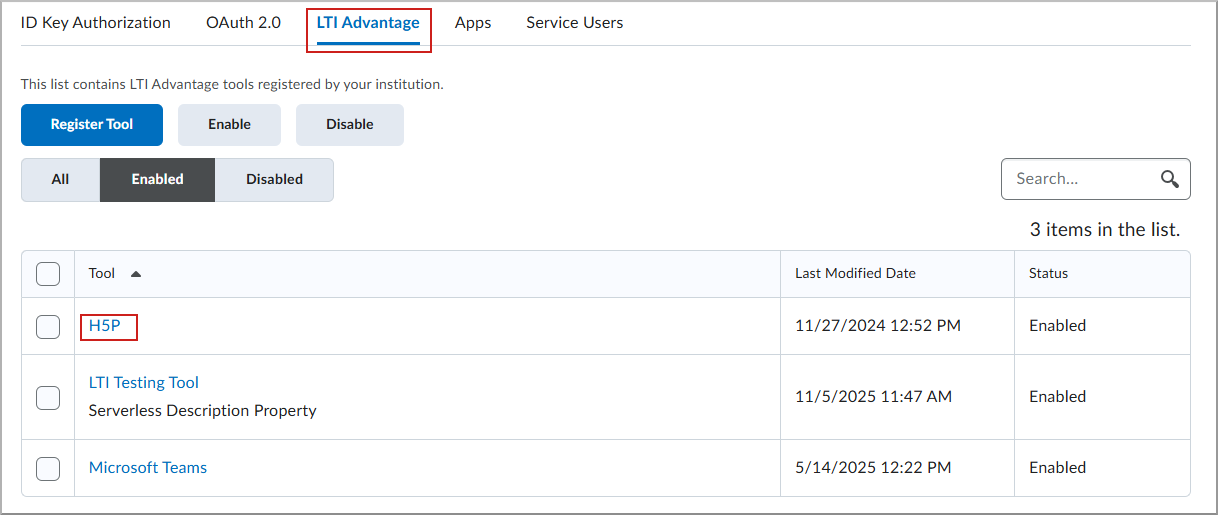
- On the Edit H5P page, scroll to the bottom, and click View Deployments.
- Select your H5P deployment.
- On the Edit Deployment page, under Add Org Units, confirm that Every Org Unit under the Organization is added. If it is not, click the plus sign and select it.
- Click View Links.
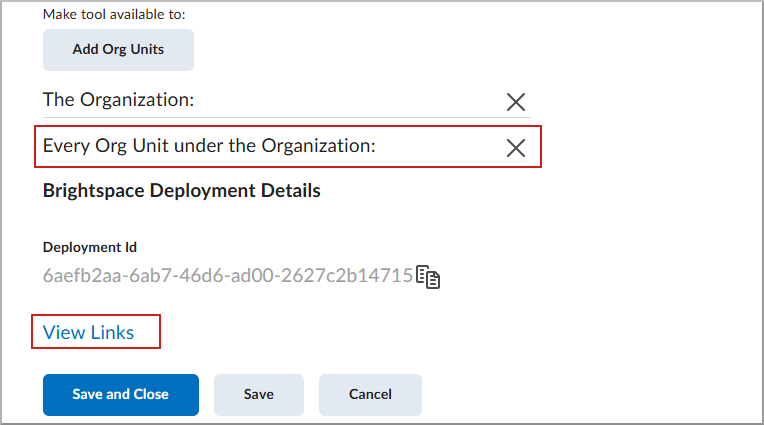
- On the Links page, click New Link, and complete the following:
- Select Save and Close.
Verify user permissions
At the organization level, enable the following permissions for instructor and course designer roles:
- Createspace > View Createspace
- External Learning Tools > Launch External Learning Tool Links

