You can create awards that can be shared across your courses or restricted to the course and its child org units. Restricted awards can only be added to the course offering where they are created and to its child offerings.

|
Tip: Awards can also be managed and shared with users from the Learner Awards widget. For more information, refer to the Homepage Widget Expansion Pack topic. |
Watch this video to learn how to create a badge. Review the written steps below.
Watch this video to learn how to create certificates. Review the written steps below.
Create an award
Awards, which include badges and certificates, can be automatically issued based on release condition criteria or can be manually awarded. Learners receive a pop-up notification when they are issued a certificate or badge.

|
Note: To prevent the pop-up notifications, administrators can disable the d2l.Tools.Awards.DisplayAwardEarnedNotification configuration variable at the Org Unit level. |
If you manually add an award, you must specify the criteria required to earn the award. When the award is automatically issued, the release conditions determine whether learners meet the criteria.
|
Note: To prevent plagiarism and protect an organization's intellectual property and branding, all earned certificates downloaded from the Awards tool are password-protected from editing. Each certificate is generated with a random password that is not displayed to users, preventing anyone from editing the certificate in Adobe® Acrobat® or Adobe Reader®. This makes it unnecessary to manually add password protection to uploaded certificates. |
To create a new award
- From your homepage, do one of the following:
- On the navbar, click Awards.
- Click Course Admin. From the Assessments area, select Awards.
- Click the Course Awards tab and select sharing options for your award:
- Allow users in this course to share earned awards to an external badge repository/backpack to enable the export and sharing of course awards to an external badge repository or as digital credentials.
- Allow users in this course to make earned awards public to enable sharing of course awards as a public link.
- Allow users in this course to share awards to LinkedIn to enable sharing of course awards to learners' LinkedIn profiles.
- Click Add Award To Course.

- Click Create.
- From the New Award page, do the following:
- Enter a Name, Criteria, and Description for the new award. In the Criteria fields, specify what a learner must do to achieve this award.

| Note: You can enter longer text in award fields, and Brightspace preserves line breaks when awards are displayed. The following limits apply: Name (256 characters), Description (1000 characters), and Criteria (1000 characters). |
- From the Award Type drop-down list, select Badge or Certificate.
- In Availability, select how the award is shared. You can:
- make the award available across your courses
- make it available to other award creators
- restrict it to the course and its child org units
| Note: When you select Restrict award to Course and its child org units, issuer details (name, URL, and contact) may be automatically populated using Org Unit-level configuration values. |
- In Expiry, select one of the following options:
- To prevent the award from expiring, select Never. Examples of awards that never expire are certificates of merit for passing a course or badges for perfect attendance.
- To set the award to expire on a specific date, select Fixed date. Examples of awards that will expire on a specific date are certifications for a skill that must be renewed, such as first aid training.
- To set the award to expire on a day relative to the day the award was granted, select Relative Day of the Month. Examples of awards that expire on a relative date are badges for Learner of the Week or for having achieved 100% on a test or assignment.
- To notify the award recipient before an award expires, select Notify Before Expiry and indicate the number of days of lead time.
- In Choose Award Image, do one of the following:
- If the image already exists in the image library, click From Existing Library.
- If you want to add a new icon to the image library, click Upload New Icon.
 | Warning: Baked Badges only support .png format, and the minimum recommended pixel size of the badge is 200 px x 200 px. |
- To launch the OpenBadges website, click Create your own award image.
| Note: OpenBadges is a free website that allows you to create custom icons. |
- If you are creating a new certificate, in the Choose Certificate Template area, do one of the following:
- If the PDF template already exists in the image library, click From Existing Library.
- If you want to add a new template to the image library, click Upload New Template.
| Note:- If you want to add an automatically generated numeric ID to your certificate that uniquely identifies the issued award, check whether the uploaded template has a replacement string {CertificateID}. A unique ID is generated and populated into the replacement string {CertificateID} on an ongoing basis when released.
- To support localization and consistent date formatting across languages, you can use short-form date replacement strings in certificate templates:
- {CourseStartDateShort}
- {CourseEndDateShort}
- {AwardDateShort}
- {AwardExpiryDateShort}
|
- Verify that the Issuer Information is correct.
- Ensure that the Use this award in <current course> now check box is correctly set.
- Click Save.
The award is added to your course awards list.
Add an existing award to a course
Once you have created an award, you must add the award to a course to make it visible to learners from the View Available Awards tab of the Awards tool or the Available Awards tab of the Learner Awards widget.
To add an award to a course
- From the course navbar, click Awards.
- From the Course Awards tab, click Add Award to Course.
To find an award, click the Badges, Certificates, or All buttons to filter the list of available awards. If you are searching for a specific award, use the Search awards function. If you want to filter the list to your own awards, click Show only Awards I Created.

- Select the awards you want to add from the list and click Add.
The selected awards are added to the course.
Manually issue an award
You can manually issue awards (Badges or Certificates) from the Classlist Awards tab. If you manually add an award, you must provide evidence that the users met the criteria required to earn the award.
Issuing an award without selecting Choose Issue Date defaults to the current date and time.
Watch this video to issue an award. Review the written steps below.
To manually issue an award
- On your course homepage, click Awards on the navbar.
- Open the Classlist Awards tab.
- Select one or more users and click Issue.
- From the Issue Award dialog, select an award from the drop-down list.
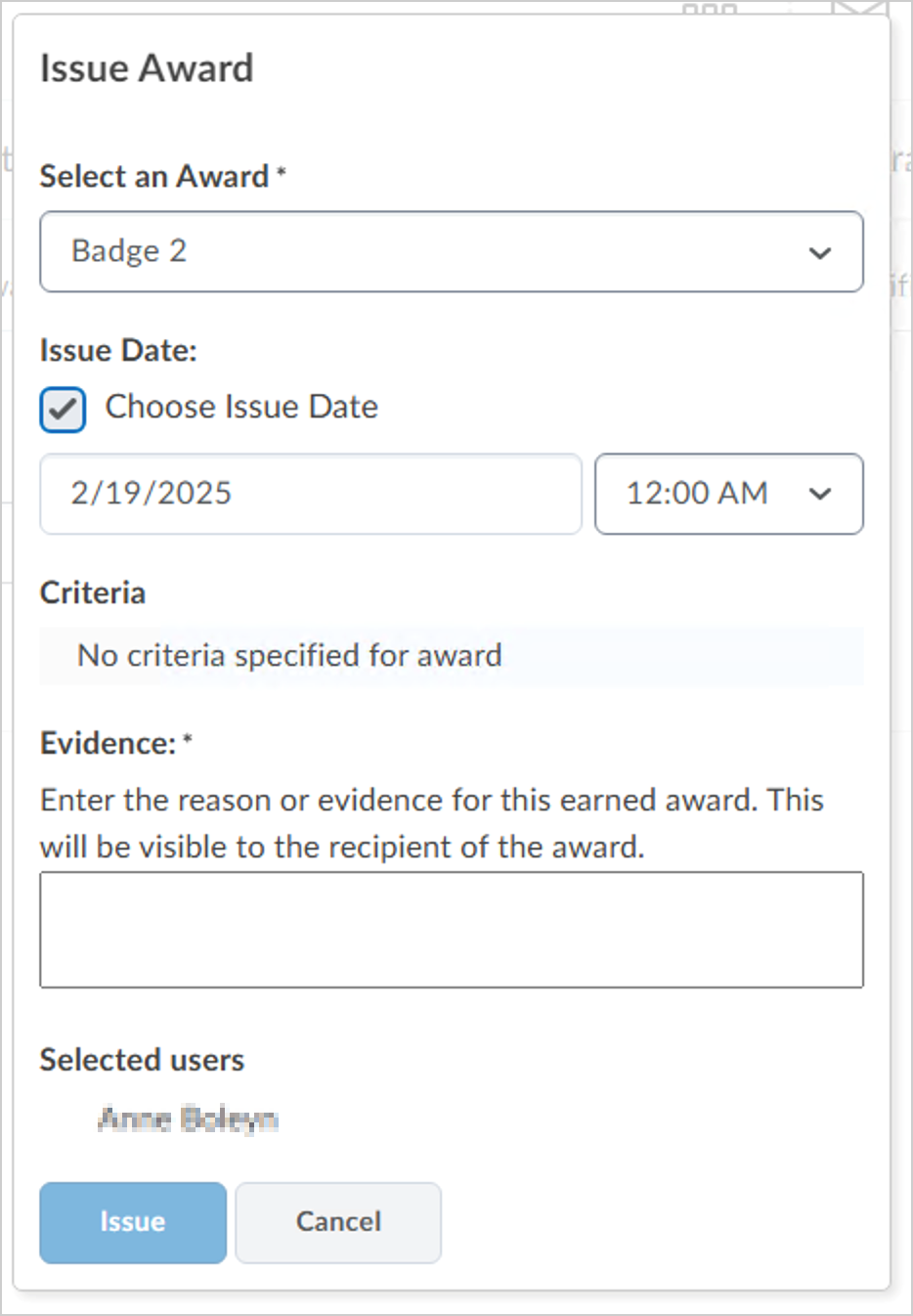
- The Issue Date field defaults to the current date and time. If you need to customize the date the award is issued, select Choose Issue Date and select a date and time.
- Under Evidence, enter the reason why you are issuing the award.
| Note: In Evidence, you can enter up to 1000 characters. Line breaks you enter are preserved when learners and external viewers view the issued award, for example, from a public award link. |
- Click Issue.
Share awards with other courses
When you create an award, you can choose to share it with other courses you teach. By default, new awards are available to all your courses, but you can also share with other award creators in your home org unit or all org units.
To share awards with other courses
- From your course navbar, click Awards.
- From the Course Awards tab, do one of the following:
- If you have not created an award, click Create to open the New Award page and fill in the required fields.
- If you have already created an award for your course, but you haven't added the award to your course, click Add Award to Course and click Edit Award.

- If you have already created and added an award for your course, click Edit Award.

- Under Availability, do one of the following:
- Make this award available to all of my courses: Makes the award available in all courses where you have instructor or administrator-like permissions for Awards. This option allows you to easily reuse awards across your own courses. Note: As the award creator, you will always have access to your awards for use in other courses. The settings on this page simply determine whether others can also use them.
- Make this award available to other award creators and their courses: Makes the award available to all award creators across your organization. Other users can see and add this award to courses in any org unit.
- (Optional) Restrict award to [Org Unit] and its child org units: Further limits the above sharing setting so the award is only available within the selected org unit and its child org units. For example, an award created in a “Math Department” org unit could be restricted so it is only available to math course offerings under that department.
- Click Save and Close.
The award is now available based on the sharing option you selected.
|
Tip: When adding awards to a course, you can use the Show Only Awards I Created filter to quickly find awards you’ve authored. |
Hide an award from users until it is earned
In some cases, you might want to hide an award from a learner until they have earned it. Hiding awards means that the award does not appear on the Available Awards tab of the Awards page. After the learner earns the award, it appears on the Available Awards and My Awards pages.
To hide an award until it is earned
- From your course navbar, click Awards.
- From the Course Awards tab, click Edit Properties for the award you want to edit.
- Select the Award hidden until earned checkbox.

- Click Save.
The award will not be visible to learners until they earn the award.
Add release conditions to an award
You can add release conditions to an award and release other content or another award to learners when they achieve the award requirement that you define.
Watch this video to add release conditions to an award. Review the written steps below.
To add release conditions to an award
- From your course navbar, click Awards.
- From the Course Awards tab, click Edit Properties for the award you want to edit.
- Under Release Conditions, click Create.

- From the Condition Type drop-down list, select a release condition type.
- Under Condition Details, further configure your release condition based on the Condition Type you selected. For example, if you selected Award Earned, select the award you want your learner to earn to trigger release.
- Click Create and then click Save.
Copy an award from another course
You can copy awards from another course. Copied awards include all release conditions originally set to release the award.
|
Note: Sharing awards or adding existing awards through the Awards tool does not include associated release conditions. |
To copy an award from another course
- From the course offering that you want to copy the award to, click Course Admin, and click Import/Export/Copy Components.
- Select Copy Components from another Org Unit and click Search for offering.
- Search for and select the course that you want to copy an award from and click Add Selected.

- From the Import/Export/Copy Components page, click Select Components.

- Select Awards, then do one of the following:
- To include all items, select Copy all items, then click Continue.
- To include only some items, select Select individual items to copy, then click Continue. On the Select Items to Copy page, select the items you want to copy. Click Continue.
- Click Continue.
- Click Finish.
Brightspace notifies you when copying is complete. Awards are copied to your course.
View all issued awards
You can view all awards that you've issued to learners in your course.
To view all issued awards
- From your course navbar, click Awards.
- Click the Classlist Awards tab. All learners that are part of your Classlist are listed. Course Awards are displayed next to each learner.

- To filter the awards that appear in the list, click All, Badges, or Certificates.
- Select the sort order.
- Review the Classlist and associated Course Awards.
Using Awards task to evaluate non-learner roles
When evaluating an award, the user list is limited to only users with the role setting “Display this role in the Classlist” enabled. This is in line with the Awards UI configuration settings. Conditionally released awards now only process users who are visible in the Classlist and, since they are present in the Classlist, in the awards list.
Conditionally released awards are granted to users with the Display users enrolled as this role in Classlist permission.
Revoke an award
In some cases, you may want to revoke a previously granted award.
Watch this video to learn how to revoke an award. Review the written steps below.
To revoke an award
- From the course navbar, click Awards.
- Click the Classlist Awards tab and select one or more learners in the Classlist.
| Note: You can use the Search Classlist function to search for a specific learner. |
- Click Revoke.
- From the Revoke Award dialog, select the award you want to revoke.

- In the Revoke Reason field, enter a reason for revoking the award.
- Click Revoke.
FAQs on Award Sharing
Why is this sharing option unavailable?
This feature must be turned on by an administrator, and instructors can turn it off for their course. It is enabled by the following configuration variable: d2l.Tools.Awards.PublicAwardsEnabled (Org). When the configuration variable is turned ON, a checkbox appears on the Course Awards page that allows the instructor to determine whether awards from that course can be shared via a public link. By default, this sharing option is ON. If the checkbox remains selected, users in the course can create a public link for their award. If the checkbox is cleared, this option is removed for awards issued in that course.
Can I un-share an award once it has been made public?
Yes, you can click the Delete option in the Share Award modal to delete the public URL. If someone visits that URL after it has been deleted, they will see an error.
Do deletions of the award, course, and so on in Brightspace cause the public award to be deleted?
No. Deletions of the award, the course, or the user in Brightspace have no impact on the public award. One exception is if a user or institution formally requests a data purge. In this case, any data purged from Brightspace, such as a user’s name, will no longer appear on publicly shared awards pages.
What happens to the public award if my institution or company stops using Brightspace?
If an institution or company no longer uses Brightspace as their LMS and their entire Brightspace site is deleted, then the public awards pages shared from that site will become unavailable. Continuing to display these awards may be supported in the future, but it is not currently supported.
Are line breaks preserved on the Public Awards page?
Yes. When you enter line breaks in Description, Criteria, or Evidence, Brightspace preserves those line breaks when the award is displayed, including on the Public Awards page.
What happens if my award expires?
The issuer sets the award’s expiration date when they create the award. It can be a static date or a relative date, for example, 3 months after the date the recipient earned the award. The public award page lists the expiration date, and the page continues to persist after the expiration.
What happens if my award is revoked?
If your award is revoked, manually “taken back” from you by your instructor or institution, a message is added to the public award page to indicate that the award has been revoked by the issuer.
Can I share a Certificate as well as a Badge?
Yes. There are two types of Awards in Brightspace: Badges and Certificates. Badges are represented by a badge image, while Certificates include a PDF. You can share the award via a public URL, whether it is a badge or certificate. However, the PDF for the certificate is not currently included on the public page. The information about the award, such as issuer, name, and description, is displayed, but the PDF is not included.
What other options are available for sharing my award?
Sharing options depend on your site's configuration, but if all options are turned on by an administrator via configuration variables, you can share your award in a few ways. You may have the option to share your award internally within Brightspace by adding it to your ePortfolio or your Profile.
Who is the “issuer” of the award?
The Issuer name, email, and website are set by the award creator on an award-by-award basis at the bottom of the Create Award and Edit Award pages. Defaults for these fields are set by an administrator via the following configuration variables: d2l.Tools.Award.IssuerName, d2l.Tools.Award.IssuerContact, and d2l.Tools.Award.IssuerURL. Note that this is existing functionality and has not changed with the introduction of this feature.
How are the award’s “criteria” determined?
If your award is issued automatically in Brightspace by Release Conditions, such as earning a certain score on a quiz or completing certain content topics, then these Release Conditions are listed as the criteria. If your award was manually issued, the issuer could enter the criteria with a statement such as, “The recipient was observed demonstrating XYZ skills.”
How is it determined which language to display on the Public Awards page?
The language of the headers on this page, such as Recipient and Issue Date, is determined by the user’s language preference set in their browser. The language of the award title and description comes directly from how it was entered into Brightspace. For example, if the award creator gave the title of the award a name in Spanish, that name will persist and will not be translated regardless of the viewer’s browser setting.
What version of my name will be shown under “Recipient”?
The Public Award page displays the recipient’s Preferred Name from Brightspace. If no Preferred Name is set for the user, it displays the user’s Legal Name. This is consistent with other areas of Brightspace.
Does the issuer’s logo appear on the public award page?
The issuer’s name appears, as well as the badge image, which can be a custom design that may include the issuer’s logo. Additionally, the page uses a version of the issuer’s URL, and it displays the same favicon as the issuer’s Brightspace site, which may be their logo. However, the page does not contain the issuer’s logo in the header or page content. Instead, the D2L logo appears in the top left corner of the page to represent the system powering the public award.
Troubleshooting: Certificate text is too long
Depending on the template that you use for your certificates, you may find that the text you intend to use extends beyond the text box borders. Some of the text in the certificates is gathered automatically from user and course attributes, and you may need to adjust the template to fit your requirements. Try one or more of the following suggestions:
- Change the field length in the template
- Change the size of the font
- Change date strings to the short-format strings*
- Add word wrap to the text field
- Make the text box larger
|
Note: Any changes you make to the certificate template affect other certificates that have been granted using that template.
*Short-format strings (YYYY-MM-DD):
{CourseStartDateShort}: Inserts the course start date.
{CourseEndDateShort}: Inserts the course end date.
{AwardDateShort}: Inserts the award issue date.
{AwardExpiryDateShort}: Inserts the award expiry date.
|
Awards FAQ
Can I award learners the same badge multiple times?
Currently, Brightspace does not support awarding learners the same badge multiple times.
Do I have to create a new badge each time I want to give the same learner the same badge?
Yes. To award the same badge to a learner multiple times, you must create a new badge each time. D2L recommends creating a new badge and awarding it to the learners whenever they reach out for assistance.
How can I set an expiry date for certificates and allow learners to renew them before they expire?
The Expiry Date is a property of the Certificate itself and is absolute, not relative. To facilitate certificate renewal before expiry, you have two options:
- Remove the Expiry: While this might not be desirable, it would effectively eliminate the expiry date.
- Create a New Award: Generate a new certificate award with a renewed Expiry Date set further into the future. This way, learners can receive the updated certificate before the current one expires.
How can I replicate Awards across courses or to another Brightspace instance, considering that the course Import/Export/Copy tool does not support copying awards directly?
While the course Import/Export/Copy tool does not offer direct support for copying awards, within the same Brightspace environment, you have two effective options for reusing awards across courses:
- Sharing awards with other users
- During the creation or editing of an award, under Availability, choose one of the following options:
- Make this award available to all of my courses.
- Make this award available to other award creators and their courses.
- This enables sharing awards with users in other courses who possess the necessary role permissions to create them.
- Using the Import/Export/Copy Components tool
- Navigate to the destination course where you want to replicate the award(s).
- Using the Import/Export/Copy Components tool, select Copy Components from another Org Unit.
- Choose the source course and copy the award(s) to the desired destination within the same Brightspace environment.
Currently, copying awards between Brightspace environments using the Import/Export/Copy Components tool with the standard course copy option is not supported. Manual recreation remains the alternative in such cases.
Is it possible to add Awards as a Class Progress category for faculty as they currently do not have visibility into the awards learners are receiving?
Currently, Awards is not directly available as a category in Class Progress. However, administrators can grant faculty the ability to view Awards by adjusting permissions at the organization level. To provide faculty with visibility into Awards:
- Adjust role permissions: Identify the role that faculty have in the organization. Grant the necessary permissions for viewing Awards to that role.
- Org level permissions: Assign permissions at the organizational level to ensure faculty have access to view Awards for learners.
In the award certificate generator, what data do the {FirstName}, {LastName}, and {FullName} fields derive from?
The {FirstName}, {LastName}, and {FullName} fields in the award certificate generator derive their data from the user's Legal First Name and Legal Last Name.
What's the difference between a Badge and a Certificate?
Badges are awarded based on any criteria determined by you. They are meant to provide digital markers that represent accomplishment throughout a course or program.
Certificates are also awarded based on criteria determined by you. Certificates are similar to badges; however, they include a PDF that users can print.
To learn more, refer to About Awards.
Why are the Save and Close and Save buttons inactive when I edit an award?
To save changes made to an existing award, you must first ensure that all mandatory fields, marked with an asterisk, are filled in, including the Criteria field, which may be blank in awards created before this field was introduced.