To view the change log for this document, go to Change History.
Video: Release Highlights
You Asked, We Delivered
The following updates were inspired by your submissions to D2L's Product Idea Exchange:
|
API Updates
- This release adds new Courses tool API routes that enable administrators to search for and update the dates and active status of courses in bulk. This feature implements PIE item D13432 (Update without loading first - in Courses).
- This release introduces a new read-only scope for the Org Unit Types API, allowing administrators to retrieve all known and visible org unit types without requiring the broader core:*:* scope. This update provides more granular and secure access control.
- Developers can now create, update, and delete Grade Schemes using new API routes. These APIs enable administrators to manage Grade Schemes programmatically and support scalable grade management workflows from external systems.
- Updates to the Discussions APIs expand capabilities available in the user interface, including forum and topic reordering, post pinning and unpinning, and enhanced data retrieval. This includes access to attachment files for threads and posts, as well as statistics for users, roles, and discussions. We have also introduced endpoints for viewing and restoring deleted discussions and for managing topic exemptions, along with scopes across all Discussions API routes. This update implements PIE item D13396 (Add the ability to retrieve attachments in Discussion Board posts via an API route).
- Updates to the User Management APIs enable enhanced data retrieval, including user and role statistics, as well as enrollment and user tracking logs. We have also introduced scopes across all User API routes to improve access control.
Refer to the Current Release Changes page of Brightspace Developer Platform for details about these updates.
General Announcements
- If you're an H5P or a Creator+ with H5P customer, you can stay up to date with the latest improvements and features by visiting H5P News.
- The D2L Lumi Practitioner Certificate course is now available for new and experienced Lumi users who want to strengthen their skills and earn recognition for their expertise. This asynchronous course includes hands-on activities and assessments that participants can complete over a three-month period. Successful completion of all assessments is required to earn the certificate. This is a paid offering priced at $600 USD per person. For more information, contact your CSM, CSE, visit D2L's LearnStore, or refer to Let's Talk About the New D2L Lumi Practitioner Certificate.
- In this release, the Brightspace Editor is updated from TinyMCE version 7.7.0 to 8.4.0 for test-type instances, including Test, Dev, and Staging. This update includes TinyMCE defect fixes but no functional changes, and resolves a known license key error for users on unsupported Safari browser versions. It does not resolve the license key error for users with the Survey Junkie app or extension installed. Those users must use a browser without Survey Junkie installed, or remove the app or extension. The update is planned for production instances in the August 2026/20.26.08 release. We recommend that users review their edited HTML course content in the Brightspace Editor to ensure it functions as expected.
- The Arabic language pack now includes corrected terminology and improved language consistency across Brightspace. These updates provide a more accurate and consistent experience for Arabic-speaking users across supported tools and workflows.
- D2L is continuing to unlist outdated Brightspace Tutorial videos that no longer reflect the current interface and workflows. Updated tutorial videos are embedded in the documentation to align with the latest features. To review the list of added, unlisted, and removed videos, refer to the article: Brightspace Tutorial Video Updates: Added, Unlisted, Removed.
- D2L's Third Party Sub-Processor list now includes information changes related to Amazon Web Services (AWS) and certain AI processing activities. We also made routine updates to our optional sub-processors and internal applications used for business operations.
Analytics Builder – Brightspace Data Sets Major Version 11 is now default | Updated

|
Analytics Builder is part of the Performance+ package. For more information, contact your D2L Client Sales Executive or Account Manager. |
Brightspace Data Sets (BDS) Major Version 10 is no longer supported in Analytics Builder. Authors must adopt BDS Major Version 11 by updating their custom datasets and analyses that rely on BDS Major Version 10.
For step-by-step instructions, refer to the Author Workflows in Analytics Builder documentation.
After the version update and a full data set run completes in Data Hub, BDS Major Version 11 becomes available in Analytics Builder. BDS Major Version 10 updates will end, and anything mapped to BDS Major Version 10 will continue to function but will have outdated data. Analytics Builder will attempt to auto-upgrade datasets and assets from Major Version 10 to Major Version 11. If the auto-upgrade fails, Authors will receive a Brightspace notification, and the impacted assets will be moved to a dedicated Assets to Review folder in Analytics Builder.
BDS data contracts follow a clear change management policy to ensure consistent and predictable updates. For more information, refer to the Brightspace Data Sets (BDS) Change Management Policy in Brightspace Community.
Technical Details
Impact:
Availability:
- This feature is available to clients with the Performance+ package and clients who have provisioned their instance of Analytics Builder.
To enable:
- This functionality is automatically enabled for clients with Analytics Builder.
- Ensure the d2l.Tools.BrightspaceDataSets.Version configuration variable is set to version 11.4.
- Authors must have the Analytics Builder > Can Manage Analytics Builder permission at the org level and must be granted an Author license.
Awards – Awards Administration | New
Awards Administration is a new administrative tool in Brightspace that centralizes awards configuration settings. Administrators can manage awards-related configuration variables from a single location without requiring access to multiple Config Variable Browser settings.
Administrators can access this tool from the Admin Tools menu with the appropriate organization-level permission. The value configured in Awards Administration creates override values for the organization and applies to its descendant org units.
For organizations using Distributed Administration, this tool is also available to Sub-org administrators. With the appropriate Sub-organization level permission, Sub-org administrators can configure settings specific to their org unit. Values configured in Awards Administration create override values in the designated configuration variable for the selected org unit and will cascade the values to its descendant org units, enabling more flexible and localized configuration.

|
Note: In distributed administration environments, we do not recommend using this tool in the following scenarios because they may result in undefined behavior:- highly complex, multi-layered organization structures with more than two vertically nested sub-organizations
- sub-organizations assigned to multiple parent org units
|
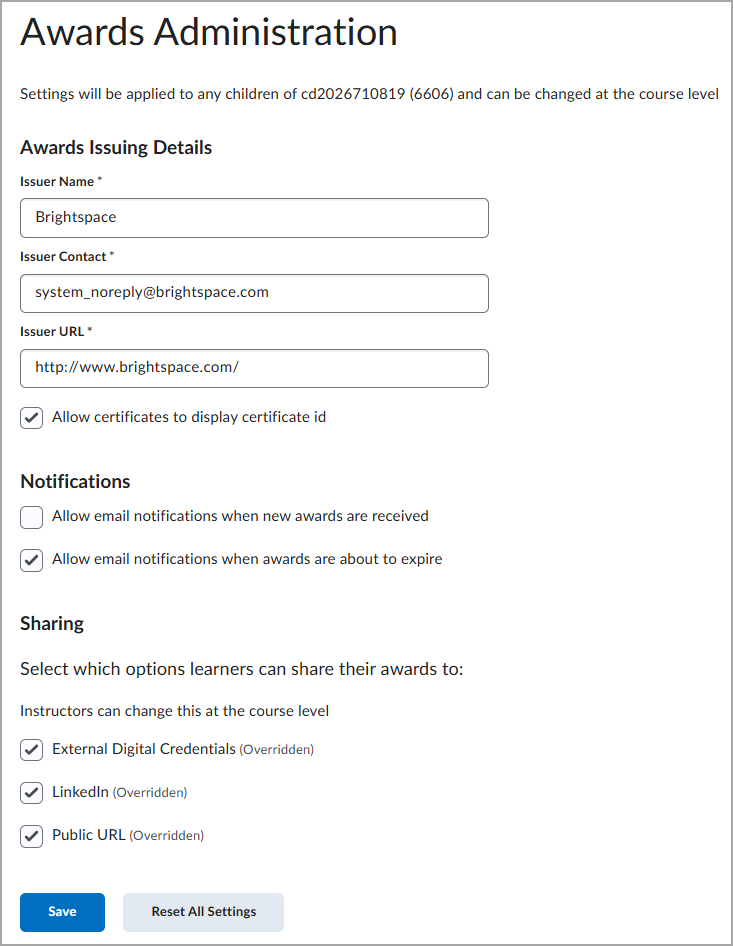
Figure: From Admin Tools menu, navigate to Awards Administration.
Technical Details
Impact:
- Slight impact to administrators and Sub-org administrators due to new functionality.
Availability:
- This feature is available to all clients.
To enable:
- The Awards Administration tool is dependent on the Awards > Manage Awards Administration Settings permission.
- This functionality is not dependent on any new or existing configuration variables.
Brightspace – Rubric Icon in Assignments, Discussions, and Quizzes | New
Instructors can now identify which Assignments, Discussions, and Quizzes include attached rubrics directly from list pages, helping instructors and administrators quickly audit assessments, confirm rubric setup, and reduce configuration errors.
When a rubric is attached to an activity, a rubric icon appears beside the item in the Assignments, Discussions, and Quizzes list pages. Written response questions in the Quiz Creation page also display a rubric indicator when a rubric is attached. Activities that include both rubrics and learning outcomes continue to display the rubric icon.
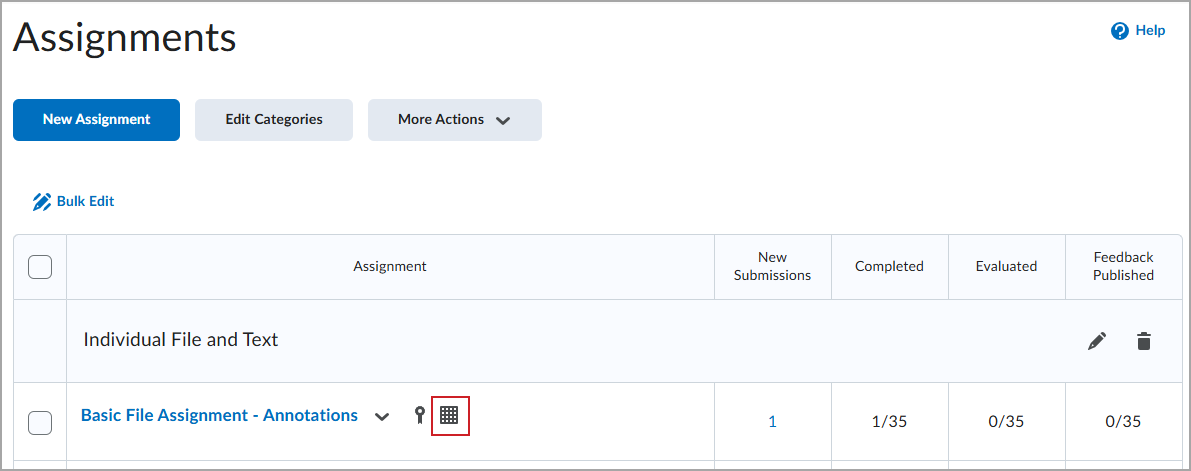
Figure: Rubric icon displayed beside assignment in Assignments list.
The rubric icon is informational only and does not link to the rubric, consistent with other informational icons such as release conditions and anonymous marking.
Administrators can control this functionality using the d2l.Tools.Activities.ShowRubricsIcon configuration variable.
|
Note: This configuration variable is currently scheduled for removal in the September 2026/20.26.09 release. |
This feature implements the following PIE item:
This PIE item is found on the old Product Idea Exchange (Brightspace Community Idea Site (Read-only)). You must log in to PIE to access it.
Technical Details
Impact:
Availability:
- This feature is available to all clients.
To enable:
- Set the configuration variable d2l.Tools.Activities.ShowRubricsIcon to ON. The default value is OFF.
- Planned for July 2026, the configuration variable will be set to ON by default, with the option to opt out.
- Planned for September 2026, the configuration variable will be set to ON by default with no option to opt out.
D2L Lumi Remix – Review in full-screen mode | New
|
This feature is part of the D2L Lumi Pro for Brightspace add-on solution that must be purchased separately. For more information, contact your D2L Client Sales Executive or Account Manager. |
A new full-screen option is available in Lumi Remix. Users can now click View Fullscreen in the upper-right corner of the Modify Page Content With AI window to expand the review pane to full-screen mode. Iteration controls remain available and functional in full-screen mode.
In full-screen mode, an Exit Fullscreen option appears in the upper-right corner, allowing users to return to the standard Remix view at the same iteration.
Previously, users could review changes only in the right pane.
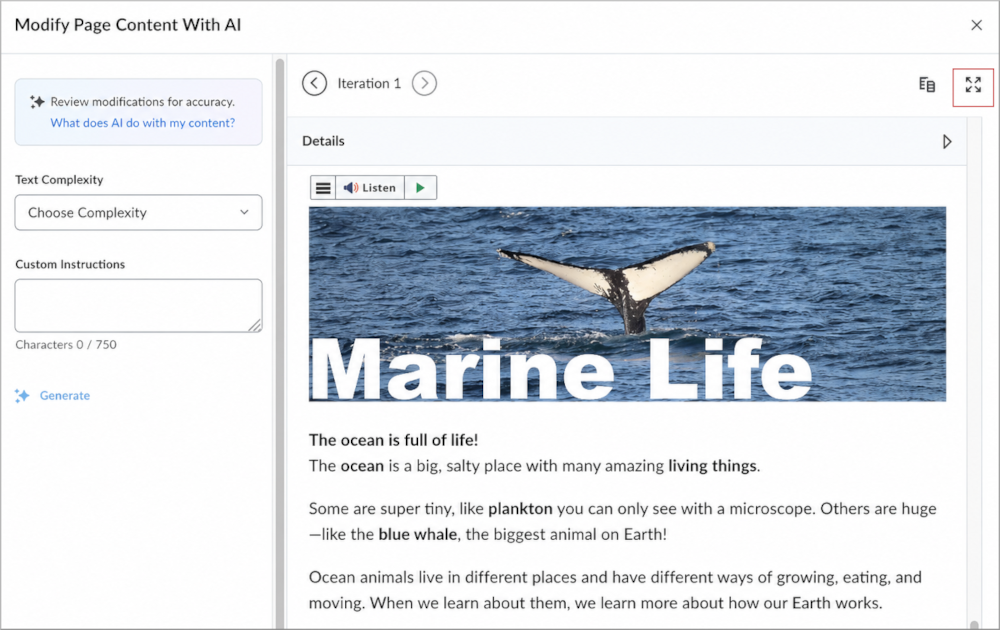
Figure: The View Fullscreen option in the Modify Page Content with AI window.
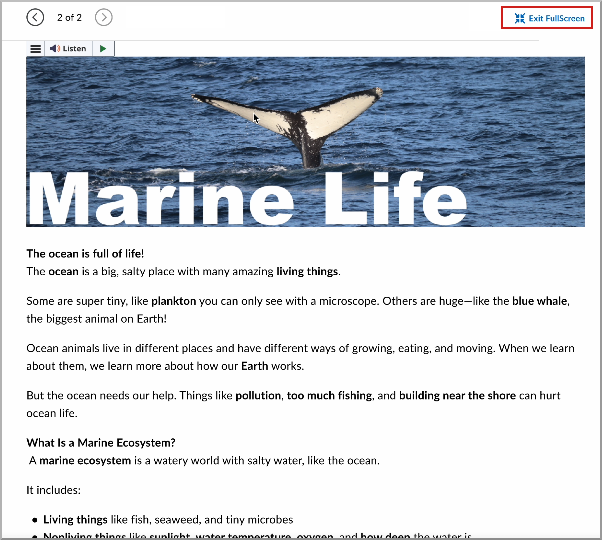
Figure: Full-screen review mode with the Exit Fullscreen option.
Technical Details
Impact:
- Slight impact to instructors using Lumi Remix. Instructors can now expand the review pane to full-screen mode when reviewing AI-generated content changes.
- Slight impact to administrators. There is no change to the generation consumption with this update.
Availability:
- This feature is only available to clients who have purchased the D2L Lumi Pro for Brightspace add-on solution. For more information, contact your D2L Client Sales Executive or Account Manager.
To enable:
- This functionality is automatically enabled for all Lumi Remix users.
- This functionality is not dependent on new or existing permissions or configuration variables.
D2L Lumi Remix – Review side-by-side in split view | New
|
This feature is part of the D2L Lumi Pro for Brightspace add-on solution that must be purchased separately. For more information, contact your D2L Client Sales Executive or Account Manager. |
Users can now review changes in Lumi Remix using a split view. In Full Screen mode, users can click Compare in Split View to compare iterations side-by-side.
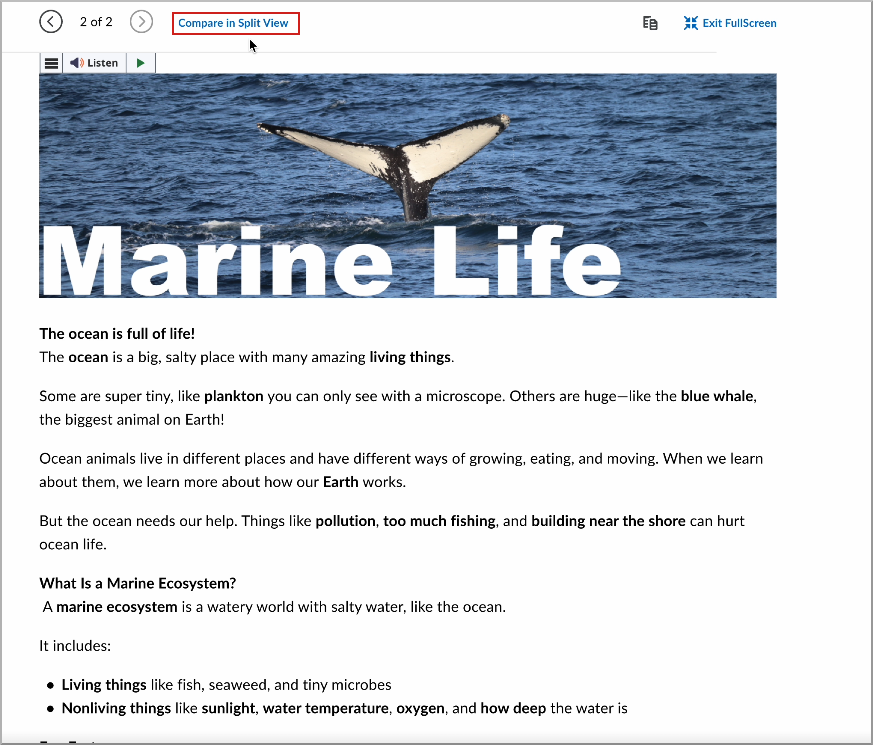
Figure: The Compare in Split View option in Lumi Remix full screen mode.
In split view, the source iteration appears on the left and the current iteration appears on the right so users can compare versions simultaneously. This workflow makes reviewing changes easier without switching between iterations.
Users can click Return to Single View to return to the single-pane review.
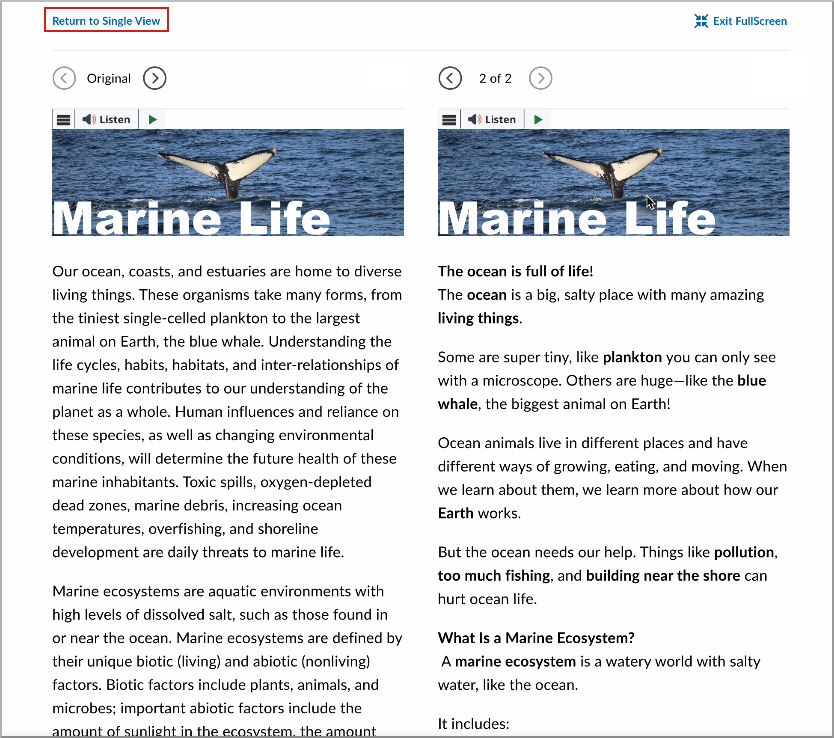
Figure: Split view showing the source iteration on the left and the current iteration on the right with the Return to Single View option.
Previously, users reviewed iterations individually and could not compare them side-by-side.
Technical Details
Impact:
- Slight impact to instructors who review changes in Lumi Remix.
- Slight impact to administrators. There is no change to the generation consumption with this update.
Availability:
- This feature is only available to clients who have purchased the D2L Lumi Pro for Brightspace add-on solution. For more information, contact your D2L Client Sales Executive or Account Manager.
To enable:
- This functionality is automatically enabled for all D2L Lumi Pro users.
- This functionality is not dependent on any new permissions or configuration variables.
D2L Lumi Study Support – Study Support settings included during course copy | Updated
|
This feature is part of the D2L Lumi Pro for Brightspace add-on solution that must be purchased separately. For more information, contact your D2L Client Sales Executive or Account Manager. |
With this update, Lumi Study Support quiz configurations are included in course copy workflows. When a course is copied, quizzes with Study Support enabled retain their Study Support configuration in the destination course.
This update reduces manual setup and helps administrators and instructors scale adaptive learning experiences across multiple courses.
Previously, quizzes copied to another course did not retain Lumi Study Support settings. Administrators and instructors had to manually re-enable Study Support for each quiz in the destination course.
|
Note:
- When Study Support is enabled on a quiz for the first time, one generation is consumed. This applies when the quiz is newly configured or copied from another course.
-
Lumi Study Support course copy requires all associated content, questions, and outcomes (if used) to be copied along with the quiz. If these associated items are not copied, the quiz still copies successfully, but Study Support is not enabled automatically.
|
Technical Details
Impact:
- Slight impact to administrators due to reduced manual configuration during course copy workflows.
- Slight impact to instructors due to reduced manual configuration for Study Support on copied quizzes.
Availability:
- This feature is only available to clients who have purchased the D2L Lumi Pro for Brightspace add-on solution. For more information, contact your D2L Client Sales Executive or Account Manager.
To enable:
- This functionality is automatically enabled for all D2L Lumi Pro users.
- This functionality is not dependent on any new permissions or configuration variables.
D2L Lumi Tutor and Feedback – Context-aware, accessible, and configurable updates | Updated
|
These features are part of the D2L Lumi Tutor and Feedback for Brightspace add-on solutions that must be purchased separately. For more information, contact your D2L Client Sales Executive or Account Manager. |
The following updates are available for D2L Lumi Tutor and Lumi Feedback.
Data integrations and workflow enhancements
- External User Data: Administrators can now connect external data sources, including CSV, Microsoft Entra, and Learning Tools Interoperability (LTI) data, to enrich Lumi Tutor conversations with learner-specific information such as program, campus, and enrollment status. Administrators can map fields, create aliases, and display them in the Inbox.
- External Data in Flow Conditions and Actions: External data fields from CSV uploads or Entra/Active Directory (AD) integrations can now be used directly in flows. Student attributes such as program, enrollment status, grade point average (GPA), or assigned advisor can conditionally trigger flows for specific users and can also be referenced in search instructions, custom messages, notifications, and email actions. Data is used to personalize responses without exposing it verbatim in conversations.
- Expanded Metadata in Flow Email Actions: Flow email actions now support additional template variables, including conversation summaries, conversation history, user location, launch Uniform Resource Locator (URL), Internet Protocol (IP) address, and system metadata.
- Expanded Flow Targeting: The Flows editor now includes controls for defining who sees a flow and where it appears. Administrators can limit flows to specific user roles, Brightspace pages, or defined date ranges such as enrollment periods or exam seasons.
- Proactive Notifications in Flows: Administrators can now configure Lumi Tutor to proactively contact users without requiring users to initiate a conversation. Notifications can trigger when users load a page, remain on a page for a specified time, or open the interface. Notifications appear in the user's Inbox and can optionally allow immediate replies. Administrators can configure notifications to display once per user, once per session, once per page, or every time conditions are met.
- Flow Creation UX Improvements: The Lumi Tutor editor now includes a persistent save bar with a live validation indicator. If required components are missing, the validation panel identifies issues before administrators attempt to save. Notification responses also now enable Allow user to reply by default.
Previously, Lumi Tutor flows and integrations offered limited support for external data usage, targeting controls, proactive messaging, and workflow validation. These updates expand administrator control by enabling deeper personalization, broader automation options, and improved flow configuration experiences.
Knowledge ingestion and integrations
- Brightspace LOR PDF Ingestion: PDF files stored in Brightspace Learning Object Repository (LOR) and embedded in courses are now automatically included in Lumi Tutor knowledge ingestion workflows.
- Articulate Rise SCORM Ingestion: Articulate Rise-authored Sharable Content Object Reference Model (SCORM) packages embedded in Brightspace courses are now ingested automatically by Lumi Tutor as part of the standard course content sync. No additional credentials are required.
- Self-Serve JSON Knowledge Re-import: Administrators can now re-upload a new version of a custom JavaScript Object Notation (JSON) knowledge file directly from the knowledge settings, without contacting the LearnWise team. This applies to Lumi Tutor instances using custom JSON-sourced website knowledge.
- New Knowledge Integrations: Zendesk and FreshService can now be added as knowledge sources, allowing Lumi Tutor to use help center articles and portal content from either platform. Zendesk also supports ticketing and can be connected as an escalation destination from help desk settings.
Previously, Lumi Tutor supported fewer knowledge ingestion sources and required additional support for some content update workflows. These updates expand supported integrations and simplify knowledge management for administrators.
Multilingual and accessible learning support
- MathML for Accessible Math Rendering: Lumi Tutor now renders math expressions using the Mathematical Markup Language (MathML) standard, enabling screen readers to vocalize mathematical notation instead of reading raw markup.
- Multilingual Support for Voice Mode: Voice Mode now supports multilingual dictation and audio playback.
- Automatic Language Detection: Lumi Tutor and Lumi Feedback now automatically display in the language set in a user's Brightspace profile, removing the need for manual language configuration.
Previously, multilingual experiences and accessibility support required more manual configuration and offered reduced compatibility for mathematical content rendering. These updates improve language support and accessibility for a broader range of learners.
Feedback and dashboard improvements
- AI Feedback Improvements: Lumi Feedback now includes an independent draft setting for automated feedback. Automated feedback entries are identified in dashboards and exports, instructor ratings are included in exports, and Lumi Feedback displays animated reasoning steps during feedback generation.
- Feedback Dashboard: The Lumi Feedback dashboard now shows three distinct states for each submission: the student's original draft, the AI-generated feedback, and the final feedback published to the student. Instructors can review the full lifecycle of a feedback submission in one place.
- Collapse Button for Adjust Feedback: Instructors can now collapse the Adjust Feedback section within Lumi Feedback, freeing up screen space on the grading interface.
- Role Filter in Teacher Dashboard: The teacher insights dashboard for Lumi Tutor now includes a role filter, allowing instructors and administrators to view activity and conversations broken down by user role, for example, students versus instructors. This applies to both the general insights view and the conversation log.
- CSAT Data in Exports: Satisfaction ratings collected through Lumi Tutor and Lumi Feedback are now included in Inbox and Insights data exports, making it easier to incorporate this data into existing reporting workflows.
Previously, Lumi Feedback dashboards and instructor tools provided fewer filtering, visibility, and workspace customization options. These updates improve insight visibility, grading workflows, and reporting capabilities for instructors and administrators.
Additional enhancements
- New Ticketing Integrations: Lumi Tutor now supports TeamDynamix, Microsoft Dynamics 365, and Zendesk as ticketing destinations. Administrators can connect these systems through help desk settings, map escalation form fields to ticket properties, and forward student support requests directly into existing workflows.
- Improved Text Answer Matching for H5P: Text-input H5P activities for Lumi Tutor now accept a wider range of valid answers, including minor spelling variations and word-form differences such as verb and noun forms of the same root. This reduces incorrect answer rejections, particularly for non-native English speakers.
- Simplified AI Reasoning: Administrators can now enable a setting that shows a short, plain-language summary of how Lumi Tutor and Lumi Feedback reached their answer instead of the full step-by-step reasoning process. Full reasoning logs remain accessible to administrators for auditing. This setting is available under General > Configuration > Simplified Thinking.
Previously, Lumi Tutor offered fewer ticketing integrations, stricter H5P answer matching behavior, and more detailed AI reasoning visibility by default. These updates improve workflow flexibility, answer recognition accuracy, and configurable reasoning visibility.
Technical details
Impact:
- Slight impact to administrators due to new integrations, flow targeting controls, proactive notifications, and additional knowledge ingestion options.
- Slight impact to instructors due to updated dashboard filtering, configurable feedback workflows, and additional grading interface controls.
- Slight impact to learners due to personalized responses, multilingual support, accessible math rendering, proactive notifications, and improved H5P answer matching.
Availability:
- These features are only available to clients who have purchased the D2L Lumi Tutor and Feedback for Brightspace add-on solutions. For more information, contact your D2L Client Sales Executive or Account Manager.
To enable:
- This functionality is enabled by default.
- This functionality does not require new permissions or configuration settings.
- Administrators must configure integrations and workflows on the LearnWise admin dashboard for flows and new knowledge sources.
Data Hub – End of adoption period for Brightspace Data Sets Major Version 11 | Updated
As part of the Brightspace Data Sets (BDS) Change Management Policy, the adoption period for BDS Major Version 11 has ended.
Major Version 11, announced in February 2026/20.26.02, is now the only supported version. Any clients who are still using Major Version 10 are automatically migrated with this release.
The following Brightspace Data Sets have been replaced and are removed from Data Hub in this release:
- Outcomes Program Details
- Outcomes Registry Owners
Other Brightspace Data Sets impacted by BDS Major Version 11:
- Outcomes Scale Definition
- Question Relationships
- Rubric Assessment Criteria
- Users
For more information about this major version update, refer to Announcing Data Hub Brightspace Data Sets (BDS) Major Version 11 in Brightspace Community.
Technical Details
Impact:
- Large impact to administrators due to disruptive changes to existing data sets.
- Large impact to Analytics Builder and Insights Report Builder Authors who must review and adjust their affected assets. Refer to update instructions for Analytics Builder and Insights Report Builder (English only).
Availability:
- This feature is available to all Brightspace Core clients.
To enable:
- Ensure administrators have the Brightspace Data Sets > Can Access Brightspace Data Sets permission at the org level.
- Ensure the d2l.Tools.BrightspaceDataSets.Version configuration variable is set to version 11.4.
- New and changed data sets appear the first time the data set runs after the version update.
Distributed Administration – Access the Merge Users tab as a Sub-org administrator | New
Sub-org administrators in a Distributed Administration (DA) environment can now access the Users > Merge Users tab to view and merge a user's awards and enrollments at the Sub-org level. Organization administrators can choose the scope of actions a Sub-org administrator can access by setting the appropriate role permissions. Refer to Technical Details > To enable: section for available role permissions.

|
Important: This feature also requires an organization administrator to assign Sub-org administrators the Users tool role permissions detailed in the Distributed Administration – Access the Users tool as a Sub-org administrator | New release note. For more information about Merge Users, refer to the Awards – Improve user merge workflow | Updated release note introduced as part of the May 2026/20.26.05 release. |
Previously, Sub-org administrators could not access the Merge Users tab of the Users tool from the Sub-org level within a Distributed Administration setup. Also, organization administrators had to set role permissions as non-cascading at the organization level.
Technical Details
Impact:
- Moderate impact to organization-level administrators, who must assign Sub-org administrator role permissions to allow access to the User Merge tool at the Sub-org level.
- Moderate impact to Sub-org administrators, who can now view and merge users at the Sub-org level.
Availability:
- This feature is available to all clients.
To enable:
- This feature enables organization-level administrators to assign Sub-org administrators the following role permissions at the Sub-org unit level:
- Users > See the User Management tool
- Users > Search for [user]
- Users > View the Users' Email Address
- Users > View Users' Org Defined IDs
- Users > Can Merge Users
- User Information Privacy > See Email Addresses
- User Information Privacy > See Org Defined IDs
- User Information Privacy > See First Names
- User Information Privacy > See Last Names
- User Information Privacy > See Usernames
- User Profile > View Other Users' Profiles
- This functionality is not dependent on any new or existing configuration variables.
Distributed Administration – Access the Users tool as a Sub-org administrator | New
Sub-org administrators in a Distributed Administration (DA) environment can access the Users tool to create users, search for users, enroll users, or delete users at the Sub-org level. Organization administrators can choose the scope of actions a Sub-org administrator can access by setting the appropriate role permissions. Refer to Technical Details > To enable: section for available role permissions.
|
Important: Sub-org administrators cannot be assigned the Users > Impersonate [user] role permission at the Sub-org unit level and therefore cannot impersonate users at the Sub-org level. |
Previously, Sub-org administrators could not access the Users tool from the Sub-org level within a Distributed Administration setup and organization administrators had to set role permissions as non-cascading at the organization level.
This feature implements the following PIE items:
- D9277 (User tool search scope limitation)
Technical Details
Impact:
- Moderate impact to organization-level administrators, who must assign Sub-org administrator role permissions to allow access to the Users tool at the Sub-org level.
- Moderate impact to Sub-org administrators, who can now manage users within a Distributed Administration setup.
Availability:
- This feature is available to all clients.
To enable:
- This feature allows organization-level administrators to assign Sub-org administrators the following role permissions at the Sub-org unit level:
Users > View the Users' Email Address
Users > View Users' Org Defined IDs
Users > View User Enrollments
Users > Create a User in the Database
Users > See the User Management tool
Users > Can End Active Sessions
Users > Update a User
Users > View Users' Contact Information
Users > View User Tracking
Users > Edit Users' Contact Information
Users > Edit the Users' Email Address
Users > Edit Users' Org Defined IDs
Users > Unlock Locked User Accounts
Users > Can Activate or Deactivate Users
Users > Reset the Users' Passwords in the Edit Tool
Users > Search for Inactive Users
Users > Enroll [user]
- This functionality is not dependent on any new or existing configuration variables.
Distributed Administration – Use Award Administration as a Sub-org administrator | New
Sub-org administrators in a Distributed Administration (DA) environment can now access and use the Awards Administration tool to set default award-related values that are appropriate for their Sub-org level. This enables Sub-org administrators to navigate to Course Administration and select Award Administration to configure options for Awards at the Sub-org level.
Previously, Sub-org administrators could not access and use the Award Administration tool to configure Awards.
Technical Details
Impact:
- Moderate impact to organization-level administrators, who must assign Sub-org administrator role permissions to allow them to access the Awards Administration tool.
- Moderate impact to Sub-org administrators, who can now view, configure, and manage Awards at the Sub-org level using the Awards Administration tool.
Availability:
- This feature is available to all clients.
To enable:
- This feature requires organization-level administrators to assign the new Awards > Manage Awards Administration Settings role permission to Sub-org administrators at the Sub-org unit level.
- This functionality is not dependent on any new or existing configuration variables.
Distributed Administration – View Roles and Permissions as a Sub-org administrator (read-only) | New
Sub-org administrators in a Distributed Administration (DA) environment can now view Roles and Permissions. This enables Sub-org administrators to navigate to Course Administration and select Roles and Permissions to view their users' roles and permissions and troubleshoot issues.
|
Important: Sub-org administrators cannot create or edit role permissions. Access to Roles and Permissions is read-only. |
Previously, Sub-org administrators could not view the assigned roles and permissions of their users from the Sub-org level within a Distributed Administration setup.
Technical Details
Impact:
- Moderate impact to organization-level administrators, who must assign Sub-org administrator role permissions to allow them to view the roles and permissions of their users.
- Moderate impact to Sub-org administrators, who can now view their users' roles and permissions to assist in troubleshooting user issues.
Availability:
- This feature is available to all clients.
To enable:
- This feature requires organization-level administrators to assign the new Security > See Roles and Permissions role permission to Sub-org administrators at the Sub-org unit level.
- This functionality is not dependent on any new or existing configuration variables.
Insights Report Builder – Brightspace Data Sets Major Version 11 is now default | Updated
|
Insights Report Builder is part of the Performance+ package. For more information, contact your D2L Client Sales Executive or Account Manager. |
Brightspace Data Sets (BDS) Major Version 10 is no longer supported in Insights Report Builder. Authors must adopt BDS Major Version 11 by updating their DataFlows, reports, and dashboards that rely on BDS Major Version 10.
For step-by-step instructions, refer to Updating Insights Report Builder for Brightspace Data Sets Major Versions in Brightspace Community.
After the version update and a full data set run completes in Data Hub, BDS Major Version 11 is pulled into Insights Report Builder. BDS Major Version 10 updates will end, and anything mapped to BDS Major Version 10 will continue to function but will have outdated data.
BDS data contracts follow a clear change management policy to ensure consistent and predictable updates. For more information, refer to the Brightspace Data Sets (BDS) Change Management Policy in Brightspace Community.
Technical Details
Impact:
Availability:
- This feature is available to:
- Clients who purchased Performance+ before April 2024.
- Clients who purchased Brightspace Insights in the previous packaging model and have provisioned their instance of Insights Report Builder.
To enable:
- This functionality is automatically enabled for clients with Insights Report Builder.
- Ensure the d2l.Tools.BrightspaceDataSets.Version configuration variable is set to version 11.4.
- Authors must have the Analytics Builder > Can Manage Analytics Builder permission at the org level and must be granted an Author license.
New Content Experience – Assessable Activities Displayed In-Line by Default | New
To create a more streamlined content experience, the New Content Experience now displays assessable activities in-line by default. In this release, the default value for the d2l.Tools.Content.LessonsRenderActivitiesInline configuration variable is set to ON.
As a result, all assessable activities, including Assignments, Quizzes, Discussions, and Instructor Learning Tools Interoperability (LTI) links, display in-line in the New Content Experience by default. This update enables learners and instructors to interact with activities directly within content without opening a separate browser tab.
Previously, when the configuration variable was set to OFF, assessable activities opened in a separate browser tab instead of displaying in-line.
For more information, refer to Introducing New Display Pages for Assessable Activities in New Content Experience.
Technical Details
Impact:
- Moderate impact to instructors and learners because course content may display differently in the New Content Experience.
Availability:
- This feature is available to all clients.
To enable:
- This functionality is automatically enabled for all users
- This functionality is not dependent on any new or existing permissions.
- Administrators can override this behavior using the d2l.Tools.Content.LessonsRenderActivitiesInline configuration variable.
New Content Experience – Enhanced Table of Contents Enabled by Default | New
To provide a more consistent and flexible course navigation experience, the New Content Experience now enables the enhanced Table of Contents by default. In this release, the default value for the d2l.Tools.Content.EnableLessonsEnhancedTOC configuration variable is set to ON.
The enhanced Table of Contents introduces several usability, navigation, and accessibility improvements for instructors and learners, including:
- Support for unlimited depth of content topics and modules
- Learner completion progress tracking indicators on topics and module rollups
- Display of the Course Overview if previously used in Classic Content
- Improved accessibility and keyboard controls to support easier course restructuring
- Ability to expand and collapse modules without navigating away from the current page
- Right click to open content items in a new browser window to support multi-topic viewing
- Condensed display enables improved visibility on smaller devices
- Visual design and behaviors that are more consistent with other Brightspace tools
Technical Details
Impact:
- Moderate impact to instructors and learners because course content may display differently in the New Content Experience.
Availability:
- This feature is available to all clients.
To enable:
- This functionality is automatically enabled for all users.
- This functionality is not dependent on any new or existing permissions.
- Administrators can override this behavior using the d2l.Tools.Content.EnableLessonsEnhancedTOC configuration variable.
To help learners focus on relevant courses, administrators can now choose which semester or department tabs appear in the My Courses widget.
After this release, existing My Courses widgets continue to display all semester or department tabs unless administrators select specific tabs.
The new settings are available under the Customize this widget option. When no semester or department org units are selected, the widget displays all semester or department tabs if the corresponding Group by setting is selected. When administrators select specific semesters or department org units, newly created org units are not automatically visible in the widget. Administrators must manually add newly created org units to the filter selection.
Users can still find all courses they are enrolled in and can access from the All tab or the View All Courses link, regardless of which semester or department tabs appear.
Previously, when the widget was grouped by semester or department, all semester or department tabs appeared.
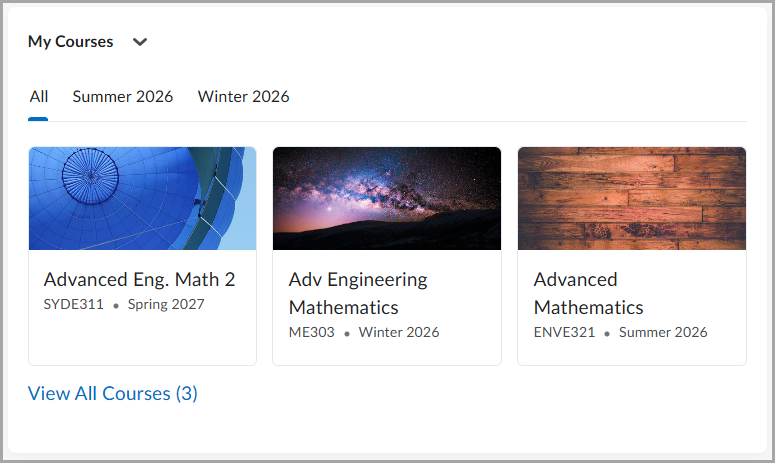
Figure: An example of the My Courses widget, configured to display two semester tabs, while the All tab continues to display all courses the user can access.
This update also reorganizes the Customize Widget settings. Some existing settings now appear under the Display on course cards section heading to clarify that those settings affect only course card information in the My Courses widget.
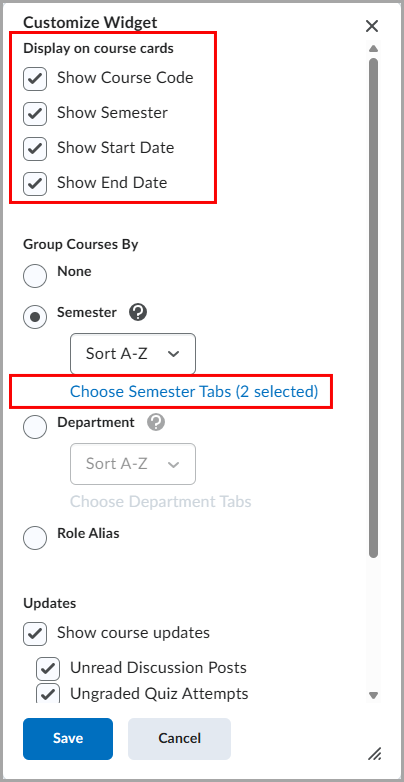
Figure: The Customize Widget setting includes the new Choose Semester Tabs and Choose Department Tabs options. The Display on course cards settings are grouped together.
This feature implements the following PIE items:
- D5154 (Hide older semesters)
- D12843 (Ability to toggle visibility of semesters in the My Courses widget)
Technical Details
Impact:
- Slight impact to administrators due to the new settings for the My Courses widget.
- Slight impact to learners due to a more focused My Courses widget that can show only relevant semester or department tabs.
Availability:
- This feature is available to all clients.
To enable:
- This functionality is automatically enabled.
- This functionality is not dependent on any new or existing permissions or configuration variables.
Change History
14-May-2026 Preview Release Notes published.
4-June-2026 Updated D2L Lumi Tutor and Feedback – Context-aware, accessible, and configurable updates | Updated with additional features released.
4-June-2026 Removed IPSIS – Direct PowerSchool OneRoster Integration for Rostering and Grades Passback | New release note. This feature will be available at a later release.
4-June-2026 Added a new General Announcement about corrections to the Arabic language pack.
4-June-2026 Removed Brightspace – Improved usability of Help text dialogs | Update release note. This feature will be available at a later release.
4-June-2026 Updated image in Awards – Awards Administration | New release note to reflect finalized UI design changes.
4-June-2026 Added a new General Announcement about changes to D2L's Third Party Sub-Processors.