To view the change log for this release note landing page, go to Change History at the bottom of this page.
Video: Release Highlights
You Asked, We Delivered
The following updates were inspired by your submissions to D2L's Product Idea Exchange:
|
API Updates
- New Rubrics API endpoints can be used to create, update, and delete rubrics programmatically. These endpoints support automated workflows between external planning tools and Brightspace, reducing manual setup and streamlining curriculum-aligned assessment workflows.
Refer to the Current Release Changes page of Brightspace Developer Platform for details about these updates.
General Announcements
- If you're an H5P or a Creator+ with H5P customer, you can stay up to date with the latest improvements and features by visiting H5P News.
- In this release, the Brightspace Editor is updated from TinyMCE version 7.7.0 to 8.4.0 for all production instances. This follows the June 2026/20.26.06 release, when the update was applied only to test-type instances. This update includes TinyMCE defect fixes but no functional changes, and resolves a known license key error for users on unsupported Safari browser versions. It does not resolve the license key error for users with the Survey Junkie app or extension installed. Those users must use a browser without Survey Junkie installed, or remove the app or extension. We recommend that users review their edited HTML course content within the Brightspace editor to ensure it functions as expected.
- D2L is continuing to unlist outdated Brightspace Tutorial videos that no longer reflect the current interface and workflows. Updated tutorial videos are embedded in the documentation to align with the latest features. To review the list of added, unlisted, and removed videos, refer to the article: Brightspace Tutorial Video Updates: Added, Unlisted, Removed.
- We are updating the third-party software that powers Assignment Annotations to improve performance when loading and saving annotations. While documents load, a preview of the annotation interface is introduced, which improves performance on slower connections. This update also focuses on resolving the following known issues: 02303237, 02151839, and 02146746.
Brightspace Apps – Incremental improvements and maintenance on the Brightspace Apps experience | Updated
To simplify Brightspace App deployment, app publishers can now use the All User Information check box on the Deployment page when configuring an app deployment to select all user information options at once.
For apps that use dynamic registration, app publishers can also publish their apps with the Institution Role and Context Copy options enabled. When administrators install these apps, the Institution Role setting on the LTI Registration page and the Context Copy setting on the Deployment page are automatically enabled. Previously, these settings had to be configured manually during installation.
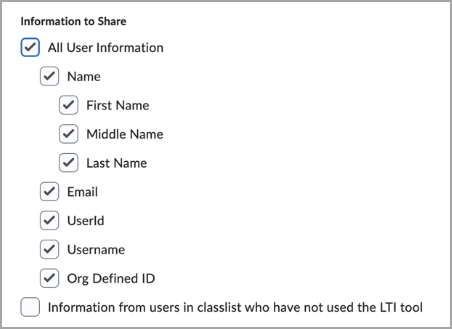
Figure: From the app Deployment page, under Information to Share, select All User Information to automatically select all child user information options.
Technical Details
Impact:
Availability:
- This feature is available to all clients.
To enable:
- This functionality is automatically enabled for all users.
- This functionality is not dependent on any new or existing permissions.
- This functionality is not dependent on any new or existing configuration variables.
Createspace – Now available upon request | New
Createspace provides a centralized workspace where instructional design teams can create, organize, and manage reusable learning content before deploying it to Brightspace. You can build content once, deploy it across multiple courses, and keep learning experiences consistent by syncing updates from a single source.
Key features of the launch include:
- Centralized Authoring Workspace: Create reusable pages, assignments, discussions, quizzes, and modules.
- Content and Asset Libraries: Organize and manage content and assets using shared libraries and folders, including version management.
- Source Courses: Leverage Source Courses to standardize and scale course development, building master content in a dedicated environment.
- Deployment and Syncing: Deploy reusable content into future or inactive courses and sync changes from library objects to all deployed sections. Note: Quiz Sync is unavailable with this release.
- Folder-based Collaboration: Collaborate securely with your team using folder-level permissions and shared workspaces.
- Outcome Alignment: Map learning outcomes and skills directly to modules and content items within the workspace to create intentional, outcome-driven learning experiences.
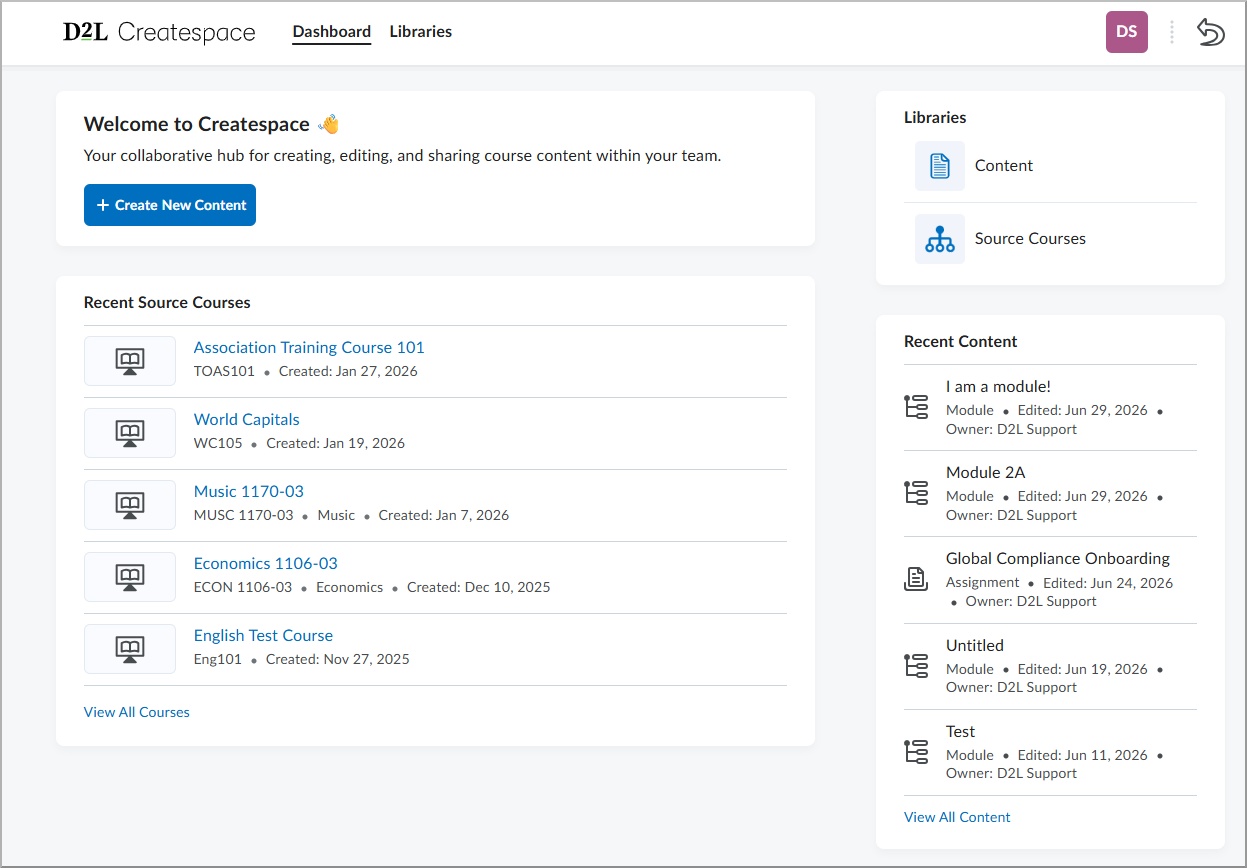
Figure: The new Createspace landing page provides a central hub for content authoring and deployment.
Technical Details
Impact:
- Large impact to administrators and instructional designers by centralizing reusable learning content, reducing duplicate authoring and maintenance effort, and enabling consistent deployment and synchronization across multiple Brightspace courses.
- Slight impact to instructors and learners as after CreateSpace is enabled, Media Library is renamed to Asset Library.
Availability:
- This feature is available by request. For more information, contact your D2L Account Manager or Technical Account Manager.
To enable:
- This functionality must be enabled by D2L. For more information, contact your Account Manager or Technical Account Manager.

|
Note: After Createspace is enabled, the Media Library is renamed to Asset Library. This is a name change only; the functionality remains the same. |
Data Hub – Improvements to Discussion Forums Brightspace Data Set | Updated
The Discussion Forums Brightspace Data Set (BDS) now includes updates to support version control and improve consistency with other data sets.
- New column: Version (bigint, non-nullable)
- Name column is now nullable
- IsDeleted column is now non-nullable
- EndDate column is now nullable
When a discussion forum is permanently deleted (using Data Purge or Course Reset), the data associated with that forum is now handled as follows:
- OrgUnitId is unchanged.
- ForumId is unchanged.
- Name is set to an empty string.
- Description is set to null.
- MustPostToParticipate is set to false.
- AllowAnon is set to false.
- IsHidden is set to false.
- RequiresApproval is set to false.
- SortOrder is set to 0.
- IsDeleted is set to true.
- DeletedDate is set to null.
- DeletedByUserId is set to null.
- ResultId is set to null.
- StartDate is set to null.
- StartDateAvailabilityType is set to null.
- EndDate is set to null.
- EndDateAvailabilityType is set to null.
Technical Details
Impact:
- Moderate impact to administrators due to the addition of a new column and changes to existing column properties in existing Brightspace Data Sets.
Availability:
- This feature is available to all Brightspace Core clients.
To enable:
- Ensure the Brightspace Data Sets > Can Access Brightspace Data Sets permission is granted to administrators at the org level.
- Ensure the d2l.Tools.BrightspaceDataSets.Version configuration variable is set to version 11.6.
- New and changed data sets appear the first time the data set runs after the version update.
Data Hub – Improvements to Discussion Topics Brightspace Data Set | Updated
The Discussion Topics Brightspace Data Set (BDS) now includes updates to support performance and improve consistency with other data sets.
- OrgUnitId column is now nullable.
- Name column is now nullable.
- IsDeleted column is now non-nullable.
- Version column is now a Computed Modification Version column. The data type is still bigint, but the numbers are larger and the first differential after this release will be larger than usual.
- AIUtilization column is now nullable.
When a discussion topic is permanently deleted (using Data Purge or Course Reset), the data associated with that topic is now handled as follows:
- OrgUnitId is set to null.
- ForumId is unchanged.
- Name is set to an empty string.
- Description is set to null.
- MustPostToParticipate is set to false.
- AllowAnon is set to false.
- IsHidden is set to false.
- RequiresApproval is set to false.
- LastPostDate is set to null.
- LastPostUserId is set to null.
- NumViews is set to 0.
- SortOrder is set to 0.
- IsDeleted is set to true.
- DeletedDate is set to null.
- DeletedByUserId is set to null.
- GradeItemId is set to null.
- ScoreOutOf is set to null.
- IncludeNonScoredValues is set to false.
- ResultId is set to null.
- StartDate is set to null.
- StartDateAvailabilityType is set to null.
- EndDate is set to null.
- EndDateAvailabilityType is set to null.
- AIUtilization is set to null.
- DueDate is set to null.
Technical Details
Impact:
- Moderate impact to administrators due to changes to existing column properties in existing Brightspace Data Sets.
Availability:
- This feature is available to all Brightspace Core clients.
To enable:
- Ensure the Brightspace Data Sets > Can Access Brightspace Data Sets permission is granted to administrators at the org level.
- Ensure the d2l.Tools.BrightspaceDataSets.Version configuration variable is set to version 11.6.
- New and changed data sets appear the first time the data set runs after the version update.
Learning Outcomes – Align learning outcomes to content modules and submodules for enhanced course design and coverage visibility | New
Learning outcomes can now be aligned directly to content modules and submodules, extending outcome alignment beyond topics and assessment activities. This enhancement provides a more intentional and structured way to map learning outcomes across the entire course hierarchy.
Administrators and instructional designers can align one or more learning outcomes when creating or editing content modules and submodules. These alignments are also surfaced within the Outcomes Coverage Experience, allowing users to view and manage course-wide outcome coverage across modules, submodules, topics, and assessment activities in a single location within the New Content Experience.
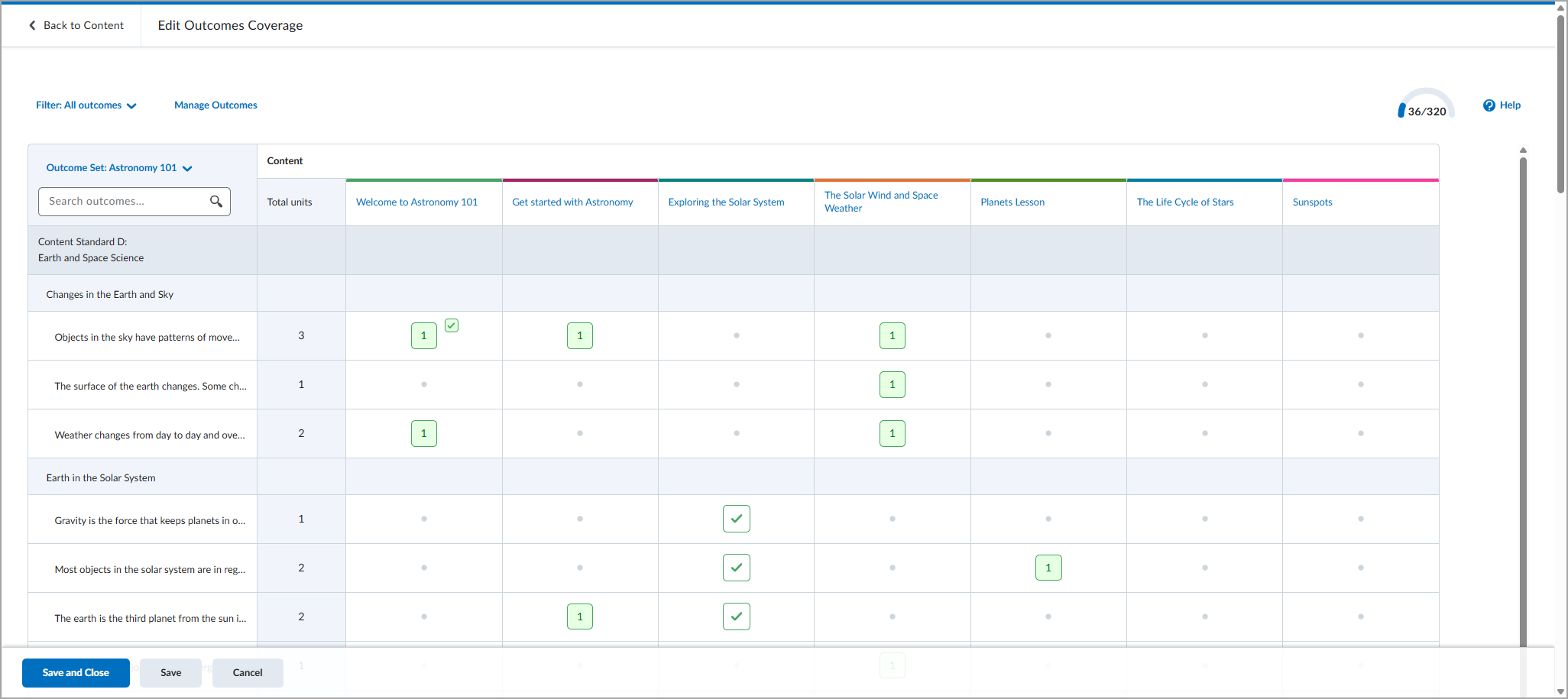
Figure: The Edit Outcomes Coverage page in the New Content Experience displaying learning outcomes assigned to course modules.
Technical Details
Impact:
Availability:
- This feature is available to all clients.
To enable:
- This functionality is automatically enabled for all users.
- This functionality is not dependent on any new or existing permissions.
- This functionality is not dependent on any new or existing configuration variables.
Lumi Feedback – Automated grading via PNS and admin configurability updates | Updated

|
This feature is part of the D2L Lumi Feedback for Brightspace add-on solution that must be purchased separately. For more information, contact your D2L Client Sales Executive or Account Manager. |
This update enhances Lumi Feedback with automated grading, expanded administrator tools, and usability improvements that streamline evaluation workflows.
- Automated Grading via PNS: Submissions can now be graded immediately after submission using Brightspace Platform Notification Service (PNS), providing an alternative to CSV mapping and polling.
- Inbox and Insights Admin Tools: The Inbox now supports filtering by external user data and CSAT ratings. Collaborators can also access Insights, matching their existing access to Assistants, Inbox, and Improvements.
- Course List and Localization: Administrators can now sort the course list by any column, and the chat interface now supports Latvian.
- Accessibility: Accessibility improvements made across the LearnWise admin dashboard, including clearer navigation, improved color contrast, and enhanced screen reader support.
Technical Details
Impact:
- Slight impact to administrators who can configure automated grading through Brightspace Platform Notification Service (PNS).
- Slight impact to instructors and learners who benefit from immediate feedback.
Availability:
- This feature is only available to clients who have purchased the D2L Lumi Feedback for Brightspace add-on solution. For more information, contact your D2L Account Manager.
To enable:
- To enable Automated Grading (PNS):in the LearnWise dashboard, navigate to Assistant > AI Feedback > Automated Assessment and set the Brightspace notifications (PNS) to ON, complete the on-screen checklist, and assign the configuration to an assignment.
- This functionality is not dependent on any new or existing configuration variables or permissions.
Lumi Tutor – Expanded cross-course context, Unified H5P Study Mode, and admin configurability updates | Updated
|
This feature is part of the D2L Lumi Tutor for Brightspace add-on solution that must be purchased separately. For more information, contact your D2L Client Sales Executive or Account Manager. |
This update enhances Lumi Tutor with a unified Study Mode experience, expanded H5P support, improved administrator controls, broader cross-course conversation context, and accessibility improvements.
- Study Mode: A unified Study Mode tab now supports H5P interactive exercises (Drag the Words, Multiple Choice, True/False, and Flashcards) alongside text-based questions. Study Mode can also run without an active Brightspace connection. H5P interactions now appear in the admin inbox and are supported by custom instructions.
- Knowledge and content controls: Administrators can restrict FAQ visibility by Brightspace or Entra role, enable Direct Access for uploaded files, and filter Panopto videos by access level.
- Chat context and history: Cross-course conversations now include inactive courses and past enrollments. Conversation history increases from 10 to more than 30 conversations, and tawk.to is supported as a live chat escalation option.
- Accessibility: Accessibility improvements made across the LearnWise admin dashboard, with clearer navigation, improved color contrast, and enhanced screen reader support. H5P completions in Study Mode are WCAG 2.2 AA contrast compliant.
Technical Details
Impact:
- Slight impact to administrators who can manage unified Study Mode settings, configure role-based FAQ restrictions, and configure custom LTI parameters.
- Slight impact to instructors and learners who benefit from expanded H5P study materials, broader cross-course conversation context, and accessibility improvements.
Availability:
- This feature is only available to clients who have purchased the D2L Lumi Tutor for Brightspace add-on solution. For more information, contact your D2L Account Manager.
To enable:
- To enable Study Mode Unification, in the LearnWise admin portal, set Study Mode, and H5P Interactive Exercises to ON in the AI Tutor tab.
- To enable Lifetime Enrollment History, in the LearnWise admin portal, enable Lifetime Enrollment History in the Tutor settings to include inactive course context.
- To enable Role Restrictions for FAQs, in Knowledge > FAQs, select the appropriate roles for each FAQ.
- To enable Direct Access for Files, during file upload in Knowledge or Courses, select Direct Access to allow source files to open from responses.
- This functionality is not dependent on any new or existing configuration variables or permissions.
Quizzes – Improved filter and source dropdowns in Question Library | Updated
This update improves the source and filter dropdowns in the Browse Existing Questions dialog to better align with Brightspace standards and provide a more consistent experience.
Both dropdowns now include a search option, helping instructors find sources and filters more quickly.
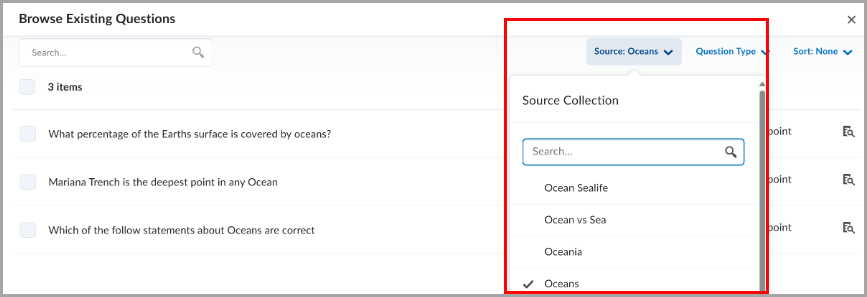
Figure: The Source dropdown with a search field in Question Library.
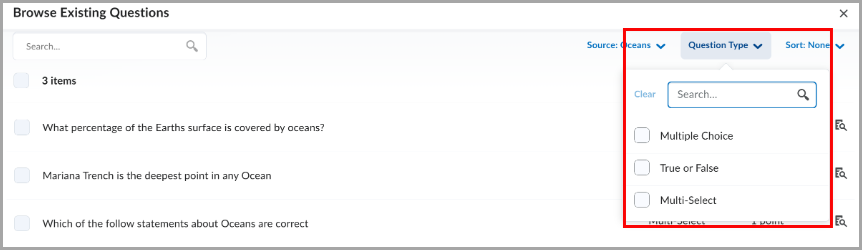
Figure: The filter dropdown with a search field in Question Library.
Technical Details
Impact:
- Slight impact to instructors due to improved usability when searching and selecting sources and filters in Question Library.
Availability:
- This feature is available to all clients.
To enable:
- This functionality is automatically enabled for all users.
- This functionality is not dependent on new or existing permissions or configuration variables.
Quizzes – Flag questions and strikethrough answer options | New
This release introduces the question annotation option in Quizzes. Learners can flag quiz questions to revisit later and apply strikethrough formatting to answer options to help narrow their choices.
Learners can select the bookmark icon  beside a quiz question to flag it for review. Flagged questions appear in the left navigation, allowing learners to quickly return to them.
Learners can also select the strikethrough icon  beside answer options to eliminate choices they believe are incorrect.
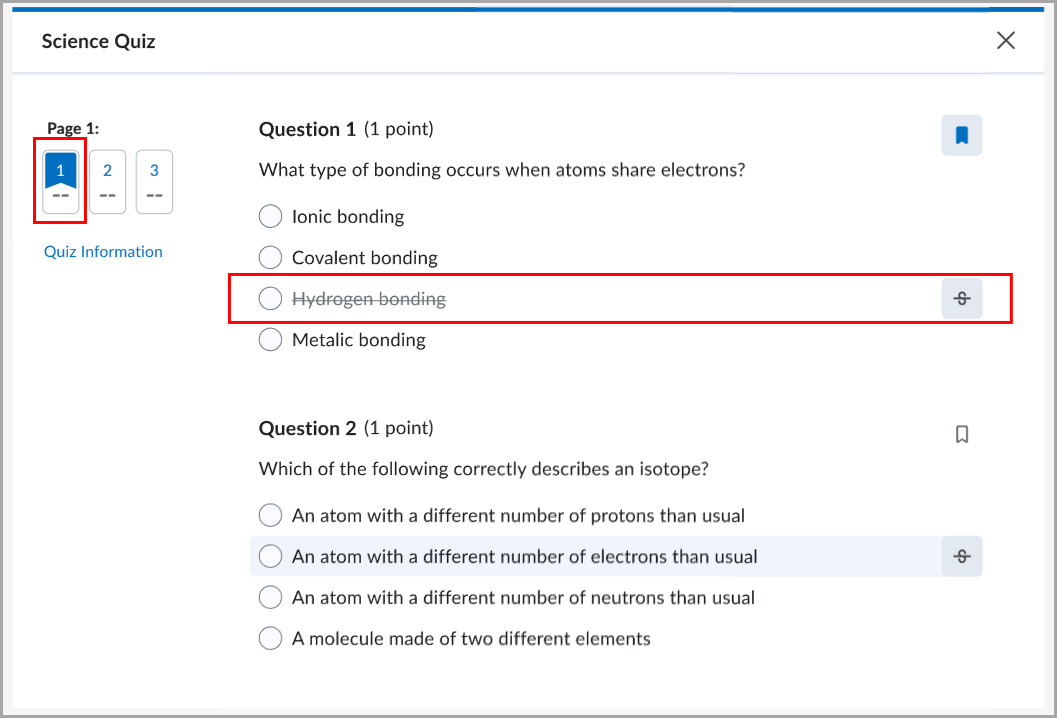
Figure: A flagged quiz question with an answer option shown in strikethrough.
Instructors can disable these tools for learners by selecting Hide question annotation tools in the Timing & Display section of the quiz edit page.
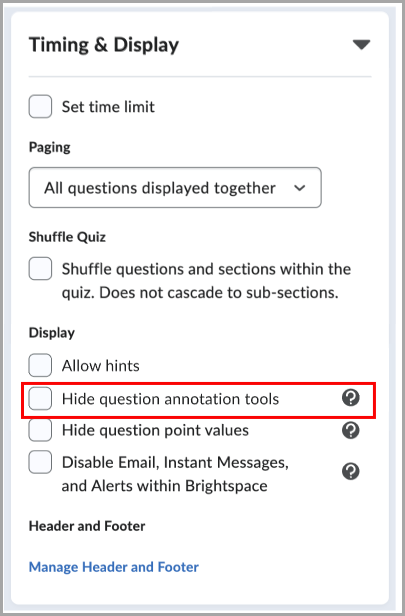
Figure: When creating or editing a quiz, in the Timing & Display section, select Hide question annotation tools to disable question flagging and answer option strikethrough for learners.
This feature implements the following PIE item:
- D7075 (Highlight, strikeout, and flag quiz questions and answer choices)
Technical Details
Impact:
- Slight impact to administrators due to the ability to disable question annotation tools for all users by turning the d2l.Tools.Quizzes.AnnotationTools (OrgUnit) configuration variable OFF.
- Slight impact to instructors due to the ability to show or hide question annotation tools for learners on a quiz-by-quiz basis.
- Moderate impact to learners due to the ability to flag quiz questions for review and use strikethrough formatting to narrow answer choices.
Availability:
- This feature is available to all clients.
To enable:
- This functionality is automatically enabled for all users. Administrators can disable it by turning the d2l.Tools.Quizzes.AnnotationTools (OrgUnit) configuration variable OFF. The default value is ON.
- This functionality is not dependent on any new or existing permissions.
Work To Do widget – Evaluation activities are hidden by default | Updated
The Work To Do widget now helps learners with multiple roles, such as teaching assistants, focus on upcoming and overdue work by hiding evaluation activities by default. Previously, the widget displayed both personal course due dates and evaluation tasks for users with multiple roles, making it more difficult to track learner deadlines.
This feature implements the following PIE item:
- D8285 (Allow users to show/hide assignments by Role in Work to Do Widget)
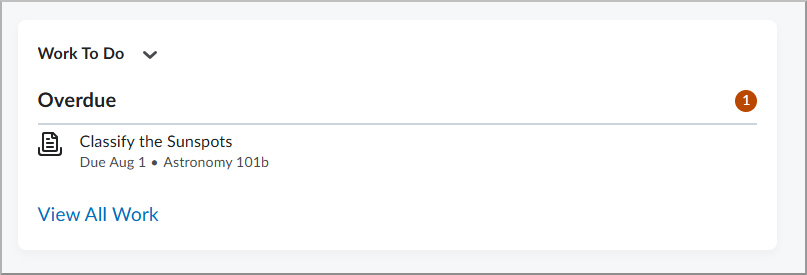
Figure: The Work To Do widget now filters out evaluation activities by default for users with multiple roles.
Technical Details
Impact:
- Slight impact to administrators due to the ability to restore the previous behavior and display evaluation activities in the Work To Do widget.
- Slight impact to instructors and teaching assistants who also have learner enrollments, as they no longer see evaluation tasks in the Work To Do widget by default.
Availability:
- This feature is available to all clients.
To enable:
- This functionality is automatically enabled.
- To restore the previous behavior and display evaluation activities in the Work To Do widget, set the d2l.Tools.WorkToDo.ShowEvaluationActivities (Org) configuration variable to ON.
- This functionality is not dependent on any new or existing permissions.
Work To Do widget – Automatically marks modules as complete | Updated
This release updates the Work To Do widget so that when learners complete all activities in a module, the module is automatically marked as complete and removed from the widget.
Learners now see only activities that still require completion, reducing clutter in the widget.
Previously, completed modules that have due dates could continue to appear as overdue because the module itself was not automatically marked as complete. As a result, learners could see overdue modules that no longer required action and could not be manually dismissed.
|
Note: This change applies only to modules completed after this release. Existing modules that are already overdue continue to appear as overdue. |
This feature implements the following PIE item:
- D8813 (Work to Do - Remove Completed Module Dates)
Figure: In the Work To Do widget, completed modules no longer appear after all module activities are completed.
Technical Details
Impact:
- Slight impact to learners using the Work To Do widget, as completed modules are automatically removed from view.
Availability:
- This feature is available to all clients.
To enable:
- This functionality is automatically enabled for all users.
- This functionality is not dependent on any new or existing configuration variables or permissions.
Change History
16-July-2026 Preview Release Notes published.
6-August-2026 Added general announcements about Brightspace Tutorial videos and the Assignment Annotations update.
6-August-2026 Added the Lumi Feedback – Automated grading and admin configurability updates | Updated release note.
6-August-2026 Added the Lumi Tutor – Expanded cross-course context, H5P Study Mode, and admin configurability updates | Updated release note.
6-August-2026 Updated the Createspace – Now available upon request | New release note with information on what happens to Media Library when Createspace is enabled.
6-August-2026 Updated the Quizzes – Flag questions and strikethrough answer options | New release note to edit information about the d2l.Tools.Quizzes.AnnotationTools (OrgUnit) configuration variable.