Video: Release Highlights
You Asked, We Delivered
The following updates were inspired by your submissions to D2L's Product Idea Exchange:
|
General Announcements
- Brightspace's Respondus LockDown Browser integration will soon support LTI 1.3. Clients must work directly with Respondus to activate LTI 1.3. There is a new d2l.3rdParty.Respondus.LockdownLTI13LinkId variable required as part of the configuration.
- To improve performance and reduce loading times, the My Courses widget is updated with backend enhancements. This update does not change the widget’s functionality or appearance for users.
- The Brightspace Editor 8.0.2 update, initially rolled back due to sporadic license key errors, will be temporarily re-enabled on February 19 at 10 AM EST to support further investigation. Despite extensive testing, the issue could not be reproduced. This action helps ensure long-term stability and compatibility with TinyMCE. For more information, refer to Brightspace Editor – Updating to the latest version across production to assist in troubleshooting efforts of license key errors.
- If you're an H5P or Creator+ with H5P customer, you can stay up to date with the latest improvements and features by visiting H5P News.
- D2L is continuing to unlist outdated Brightspace Tutorial videos that no longer reflect the current interface and workflows. Updated tutorial videos are embedded in the documentation to align with the latest features. To review the list of added, unlisted, and removed videos, refer to the article: Brightspace Tutorial Video Updates: Added, Unlisted, Removed.
To view the change log for this release note landing page, go to Change History at the bottom of this page.
Awards – Longer text fields and preserved formatting for Badges and Certificates | Updated
To provide greater flexibility when creating Awards, instructors can now enter more detailed information in award text fields. This update increases character limits and preserves formatting, allowing clearer criteria, descriptions, and evidence to display consistently across Award views.
The following fields now support increased character limits:
- Name (256 characters)
- Description (512 characters)
- Criteria (1000 characters)
- Evidence (on issued award) (1000 characters)
Previously, text fields had lower character limits, which restricted context and detailed instructions. In addition, line breaks entered in these fields were not consistently preserved when Awards were displayed.
This feature implements the following PIE item:
- D13138 – Awards description field
Technical details
Impact:
- Slight impact to instructors due to the ability to enter more detailed information and preserve formatting when configuring Awards.
- Slight impact to learners and external viewers due to improved readability of Award descriptions, criteria, and evidence on shared and public Award pages.
Availability:
- This feature is available to all clients.
To enable:
- This functionality is automatically enabled for all users.
- This functionality is not dependent on any new or existing configuration variables or permissions.
Awards – Merge user accounts to transfer earned awards | Updated
To support learners with multiple Brightspace accounts, administrators can merge two user accounts and transfer earned awards from the source account to the destination account, allowing the learner’s history and achievements to be consolidated into a single profile.
When accounts are merged, the destination user inherits all earned awards from the source user while retaining existing data. This ensures transcript accuracy and preserves earned achievements.
This functionality is especially valuable for institutions where learners may have multiple accounts due to role changes, forgotten credentials, or transitions between vendors. Consolidating accounts ensures learners have access to a complete and accurate certification transcript.
Previously, Brightspace did not support merging user accounts or transferring earned awards.
Merge details
Awards copied to the destination user:
- Earned awards (both active and expired)
- Award metadata
- Awarded by
- Criteria
- Evidence
- Issued date
- Expiry date
Awards not transferred:
- Revoked awards
- Awards created by the source user
Additional transfer rules:
- The destination user is enrolled in course offerings that the source user was directly enrolled in.
- Cascading enrollments are not transferred.
- Class progress is not transferred.
Post-merge process:
- The source user is deleted.
- Data sets are updated to reflect changes in user status, course enrollments, and issued awards.
This feature implements the following PIE items:
- D560 (Merge User Accounts)
- D10040 (ADMIN Tool: Account Merge)
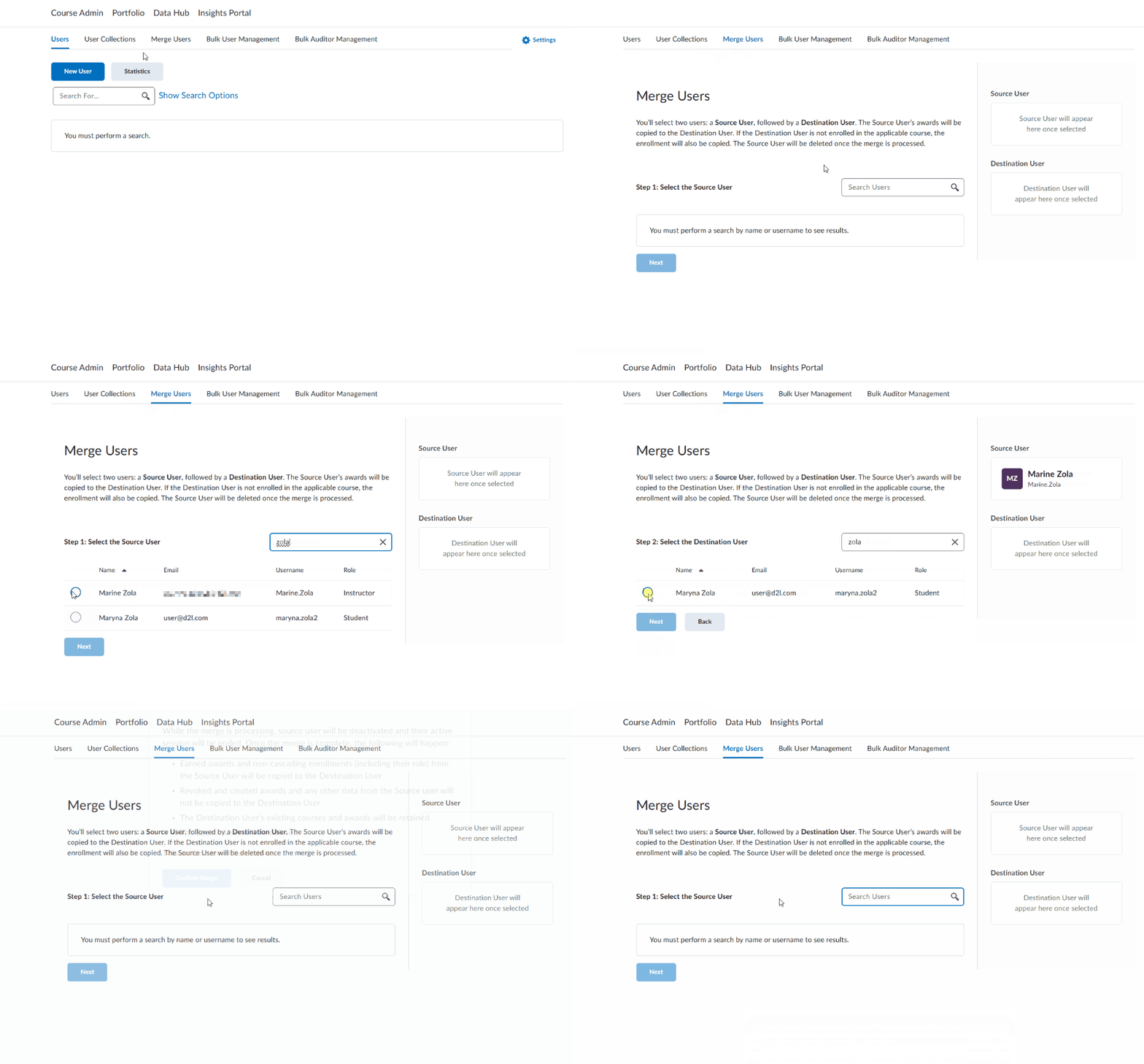
Figure: From the Users tool, navigate to Merge Users to initiate the process of merging two user accounts.
Technical details
Impact:
- Moderate impact to administrators due to expanded control over account management and certification integrity.
Availability:
- This feature is available to all clients.
To enable:
- Grant the following permissions:
- Users > Can Merge Users
- Users > See the User Management tool
- This functionality is not dependent on any new or existing configuration variables.
Brightspace – Updates to data management terminology | New
As of this release, Brightspace updates its user interface terminology to better reflect users’ understanding of how data is stored and deleted. This is to ensure that the Brightspace experience aligns with our user's mental models and understanding of data management and archiving actions in Brightspace.

|
Important: Customized language terms are unaffected by this update. If your instance of Brightspace is using custom language terms, those terms remain the same. Only the default language terms are updated. |
Specifically, the following tools in Brightspace are updated:
Courses tool
-
Any instance of the term Delete is replaced with the term Archive when conducting Course, Course Templates, and Source Course actions.
-
The following Manage Courses role permission names are also updated:
- Manage Courses > Delete Course Offering and Templates is updated to Manage Courses > Archive Course Offering and Templates
- Manage Courses > Delete Source Course is updated to Manage Courses > Archive Source Course
Data Purge
- Any instance of the term Archive is replaced with the term Export.
- The Configuration Variable Browser text descriptions for the following configuration variables are updated to use the term Export; their functionality and names remain unchanged:
- d2l.Tools.DataPurge.ArchiveLocation
- d2l.Tools.DataPurge.ArchiveWorkDirectory
- d2l.Tools.DataPurge.PerSubTaskThrottleTimeInMs
Org Unit Editor
- Any instance of the option Move to Recycle Bin is replaced with the option Archive.
- The Recycle Bin button is renamed to View Archive.
- The Recycle Bin page title is renamed to Archived Org Units.
Previously, these areas of Brightspace did not align with users’ expectations. Actions suggested that courses and data were “Deleted,” when in fact Brightspace only archived them and did not remove them from the instance.
Technical Details
Impact:
- Slight impact to administrators and instructors due to changes in the terminology related to archiving actions in Brightspace.
Availability:
- This feature is available to all clients.
To enable:
Classlist – export Classlist details to CSV and improved Print output | New
Instructors can now export Classlist details to CSV. The Export button enables full or partial user exports, mirroring Classlist view content for offline or administrative use.
Printed Classlists now include pronouns (if visible) and course identifiers, providing more complete context for in-person workflows and record keeping.
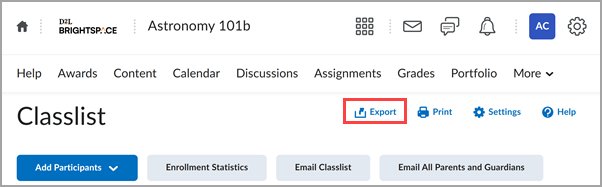
Figure: A new Export button appears on the Classlist page.
To allow for more control over access, this update includes two new permissions that control visibility of the Print and Export buttons in the Classlist:
- Classlist > Can Print Classlist (enabled by default for users who have the Classlist > Has Access to the Classlist permission enabled)
- Classlist > Can Export Classlist (disabled by default)
This feature implements the following PIE items:
- D9855 (Printing Classlist with pronouns)
- D9391 (Classlist – allow export of pronouns)
- D2124 (Export of Classlist)
- D6948 (Classlist to Excel or CSV)
- D2658 (Include course title with Classlist printout)
- D9215 (Show course offering code on exported or printed Classlist)
- D6667 (Classlist export)
Technical details
Impact:
- Slight impact to instructors who can export Classlist details to CSV and view additional information, such as pronouns and course information, when printing the Classlist.
- Slight impact to administrators who can manage new permissions to control access to print and export functionality.
Availability:
- This feature is available to all clients.
To enable:
- This functionality relies on the existing Has Access to the Classlist permission along with the following:
- Classlist > Can Print Classlist (enabled by default for users who have the Classlist > Has Access to the Classlist permission enabled)
- Classlist > Can Export Classlist (disabled by default)
- This functionality is not dependent on any new or existing configuration variables.
Courses – Auto-generate a unique course code for every source course re-offering | New
To help distinguish course re-offerings more clearly, course re-offerings now include a unique code for each manual or automatic instance in the Courses user interface.
This code is based on the source course and includes a random four-character alphanumeric suffix. For example, a re-offered course might appear as:
Security Training 1A2B.
Course re-offerings remain linked to their source course via the original code, while the suffix differentiates them.
Previously, course re-offerings shared the same code as their source course, and users had to manually update the course code to make it unique.
This feature implements the following PIE items:
- D13203 (Reoffer Source Course)
Technical Details
Impact:
- Slight impact to administrators who can now search and filter course re-offerings without manually changing codes.
Availability:
- This feature is available to all clients.
To enable:
- This functionality is dependent on the existing Manage Courses > Re-offer Courses permission to re-offer source courses and access the Code field for a course re-offering.
- This functionality is not dependent on any new or existing configuration variables.
Course Publisher – Accurate tracking based on Brightspace course completion | Updated
The Course Publisher tool now respects Brightspace-defined course completion settings, ensuring accurate learner progress tracking across external learning management systems (LMS).
Previously, courses accessed via Course Publisher were marked complete on first access, creating inaccurate records and compliance risks.
This enhancement delays completion until the learner finishes the Brightspace course.
This update aligns with learning outcomes tracking and ensures accurate reporting when content is shared with external learning management systems.

|
Note:
|
Technical details
Impact:
- Slight impact to administrators who now benefit from improved tracking accuracy and reduced manual oversight.
- Slight impact to learners whose progress is now accurately recognized across platforms.
Availability:
- This feature is available to all clients using Course Publisher.
To enable:
- This functionality is automatically enabled.
- This functionality is not dependent on any new or existing configuration variables or permissions.
Course Updater – End of life for Course Updater tool | Removed
As of this release, the Courses tool fully replaces the Course Updater tool, which is no longer available. Administrators must navigate to Admin Tools > Courses and select Edit Status to update active or inactive statuses, or select Edit Dates to change start and end dates in bulk.
Previously, Administrators used the Course Updater tool to bulk update course statuses and dates.
The introduction of the Courses tool and the plan to end of life the Course Updater tool was first announced as in the Course Management – Enhanced workflow and user experience in test environments | New release note as part of the February 2025 / 20.25.02 release.
Technical Details
Impact:
- Moderate impact to users with permission to access the Courses tool. Users with permission must use Courses tool to complete bulk updates to courses.
Availability:
- The Course Updater tool is removed for all clients.
To enable:
Data Hub – Brightspace Email Log Brightspace Data Set | New
To allow administrators to gather data about emails in Brightspace, the new Brightspace Email Log Brightspace Data Set (BDS) captures the following details for all Brightspace emails sent since 1 January 2024:
- Unique ID of the email
- Email address of the sender
- User ID of the sender
- Email address of the recipient
- Recipient's field type (To, Cc, or Bcc)
- Date and time the email was sent
- Subject line of the email (truncated)
|
Note: Each row of the data set contains one recipient only. If a user sends a Brightspace email to four other users, that email appears as four rows in the data set. |
This feature implements the following PIE item:
- D5771 (Email Brightspace Data Set)
Technical Details
Impact:
- Moderate impact to administrators due to the addition of a new Brightspace Data Set.
Availability:
- This feature is available to all Brightspace Core clients.
To enable:
- Ensure the Brightspace Data Sets > Can Access Brightspace Data Sets permission is granted to administrators at the org level.
- Ensure the d2l.Tools.BrightspaceDataSets.Version configuration variable is set to version 10.11 or 11.1.
- New and changed data sets appear the first time the data set runs after the version update.
Data Hub – Intelligent Agent Objects Brightspace Data Set improvements | Updated
The Intelligent Agent Objects Brightspace Data Set (BDS) now displays accurate schedule data for hourly and one-time run agents.
Updated columns include:
- ScheduleType now supports the values ‘OneTimeRun’ and ‘Hourly’.
- StartDate now displays the start time for one-time runs.
- EndDate is now null for one-time runs.
Previously, these agents appeared in the data set but were often missing information about their schedule frequency and timing.
Technical Details
Impact:
- Moderate impact to administrators due to the addition of new values to existing Brightspace Data Set columns.
Availability:
- This feature is available to all Brightspace Core clients.
To enable:
- Ensure the Brightspace Data Sets > Can Access Brightspace Data Sets permission is granted to administrators at the org level.
- Ensure the d2l.Tools.BrightspaceDataSets.Version configuration variable is set to version 10.11 or 11.1.
- New and changed data sets appear the first time the data set runs after the version update.
Learning Tools Interoperability (LTI) – Anonymous Assignment evaluations supported in third-party tools | Updated
Assignments now share anonymity status with integrated third-party tools to support anonymous marking workflows. This allows tools to hide personally identifiable learner information, aligning with Brightspace anonymity settings.
Previously, anonymity was not detected, which could cause unintentional identity disclosures or prevent the use of anonymous evaluation workflows. This update builds on LTI Asset Processor functionality.
|
Note: Tool providers must support anonymous workflows. Contact your provider for details. |
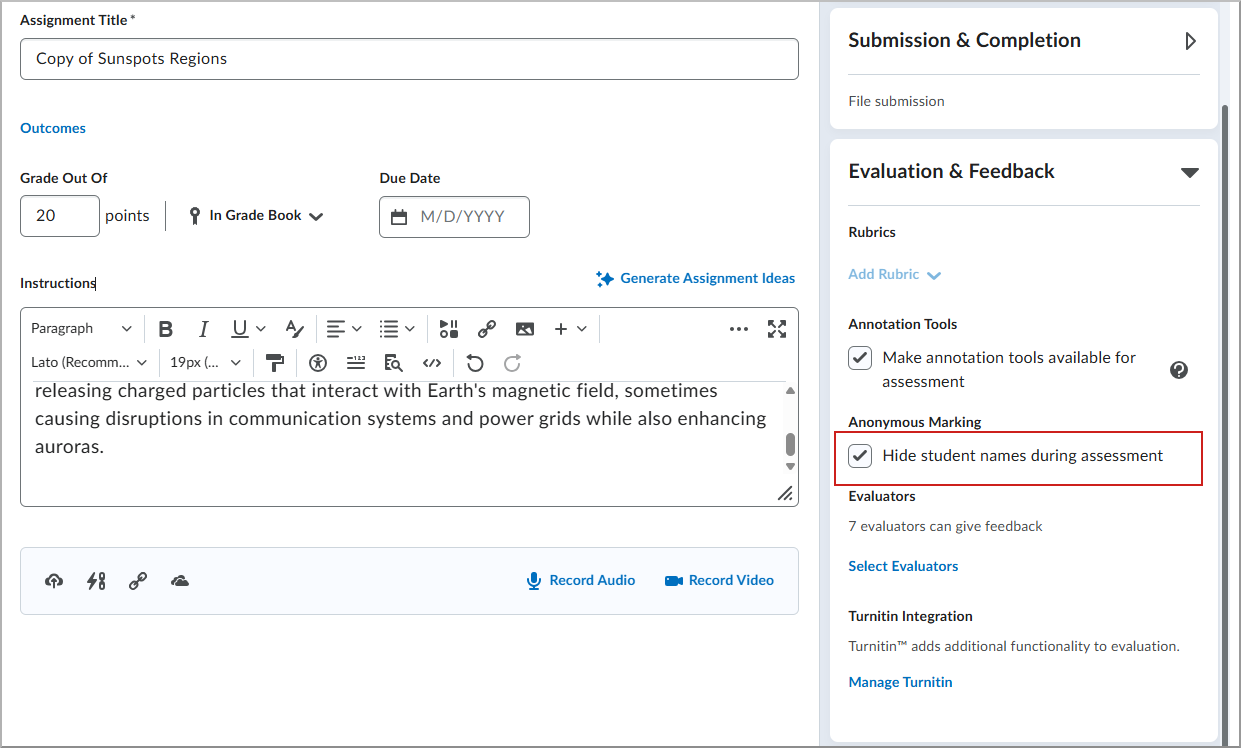
Figure: On the assignment creation page, select Hide student names during assessment to enable anonymous evaluation.
Technical details
Impact:
- Moderate impact to administrators due to expanded control over evaluation workflows and improved alignment with institutional privacy and assessment policies.
- Slight impact to instructors who benefit from consistent anonymous evaluation experiences when using supported third-party tools.
Availability:
- Available to all clients using LTI Asset Processor.
To enable:
- This functionality is automatically enabled.
- Set configuration variable d2l.Tools.System.Features.AnonymousMarking to enabled.
- This functionality is not dependent on any new or existing permissions.
Learning Tools Interoperability (LTI) – Earlier access to service endpoints via Context Copy Notice | Updated
Third-party Learning Tools Interoperability (LTI) tools now receive additional Context Copy Notice details. This enables discovery of LTI service endpoints before tool launch, improving integration workflows and reducing setup delays for instructors and administrators.
Previously, tools only detected services after launching in the destination course. This enhancement sends that information earlier, enabling proactive tool readiness.
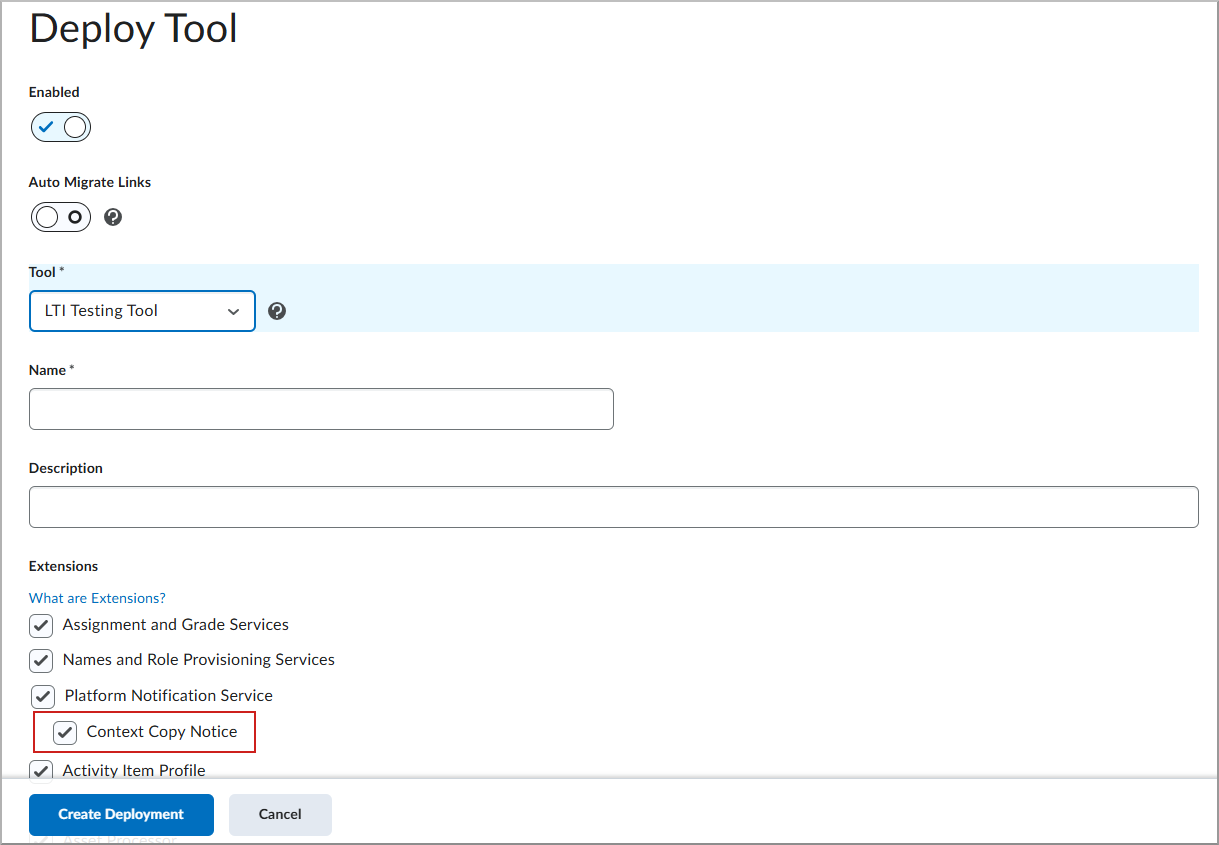
Figure: On the Deploy Tool screen, enable Context Copy Notice.
Technical details
Impact:
- Slight impact to administrators and instructors who benefit from improved tool readiness and reduced setup time.
Availability:
- Available to all clients.
To enable:
- This functionality is not dependent on any new or existing configuration variables or permissions.
Pulse – Engagement tracking improvements | Updated
This release improves the reliability, timeliness, and consistency of engagement tracking from Pulse. This enhancement ensures that engagement data more accurately reflects how learners are interacting with their courses across platforms.
Engagement related events in Pulse are now logged immediately. For example, when a learner taps on a course to open it, the Course Access details are sent to the database, the Last Accessed date in Classlist updates, and an Intelligent Agent that checks for course engagement knows not to notify the instructor. Downstream tools that report on learner engagement now represent both Web and Pulse activity equally.
Previously, Pulse events were sent asynchronously in batches, resulting in missing or late engagement tracking data and discrepancies between different tools.
Key improvements:
- System Access Start events are sent immediately when the app is launched.
- System Access Start events are decoupled from System Access End events.
- When the app is in the background or idle, System Access End events are sent after 30 minutes of inactivity.
- Course Access events are sent immediately when a user clicks into a course.
For more detailed definitions of engagement metrics, refer to About engagement and session length data.
|
Notes:
Intelligent Agents
- Intelligent Agents are configured to use Login Activity criteria trigger based on authentication data. Refer to User Logins BDS for more information.
- Intelligent Agents configured to use the Course Activity criteria trigger are based on combined course access data from Brightspace as well as Pulse. Refer to Course Access BDS and Course Access Log BDS for more information.
- Missed or delayed triggers caused by late arriving events are now resolved as Pulse activity is sent immediately.
Classlist “Last Accessed”
- Classlist > Last Accessed displays the most recent date/time a user accessed the course either via Brightspace or Pulse.
- Teachers can easily confirm whether a student accessed the class, regardless of device.
Class Progress Course Access
|
This feature implements the following PIE item:
- D13317 (Use both Web and Pulse login for Course Activity)
Technical Details
Impact:
- Slight impact to administrators and instructors due to improved accuracy in app reporting.
Availability:
- This feature is available to all Pulse clients using:
- Android version 2.2601.2.1003322 or later
- iOS version 2.2601.1019 or later
To enable:
- Learners must update their Pulse app to the latest version to ensure that their data is accurately aggregated.
- This functionality is not dependent on any new or existing permissions or configuration variables.
Quizzes – The New Quiz Evaluation Experience configuration variable removal | Removed
To streamline system settings and reduce administrative complexity, the d2l.Tools.Activities.CEQuizzesOptIn (Org) configuration variable for the new Quiz Evaluation Experience has been permanently removed.
As of July 2025/20.25.07, all clients have been using the new Quiz Evaluation Experience by default, with no option to revert to the legacy version. The d2l.Tools.Activities.CEQuizzesOptIn (Org) variable was no longer functional, and its removal simplifies system settings and reduces maintenance overhead.
There is no change to the user interface or functionality. This update only removes an outdated configuration variable that is no longer in use.
Technical Details
Impact:
- Slight impact to administrators who can reduce clutter in their configuration settings.
Availability:
- This feature is available to all clients.
To enable:
- The d2l.Tools.Activities.CEQuizzesOptIn (Org) configuration variable is automatically removed.
- This functionality is not dependent on any new or existing permissions.
12-February-2026 Preview Release Notes published.
5-March-2026 Added a new General Announcement referring Creator+ and H5P customers to the H5P news site.
5-March-2026 Added the Awards – Longer text fields and preserved formatting for Badges and Certificates | Updated release note.
5-March-2026 Added the Pulse – Engagement tracking improvements | Updated release note.
5-March-2026 Added a new General Announcement about updates to the Brightspace tutorial videos.
5-March-2026 Fixed the Change History link.