Video: Release Highlights
You Asked, We Delivered
The following updates were inspired by your submissions to D2L's Product Idea Exchange:
|
General Announcements
To view the change log for this release note landing page, go to Change History at the bottom of this page.
Courses – Customize Load More increments up to 250 courses at a time | New
Administrators can now load up to 250 courses at a time to perform bulk actions more efficiently. Administrators can choose how many additional courses are populated when they click Load More. This makes it easier to select a larger number of courses to apply bulk actions to, such as changing course visibility or adjusting start and end dates. The Load More increment in the Courses tool is controlled by the new d2l.Tools.Courses.LoadmoreIncrement (OrgUnit) configuration variable.
Previously, administrators could load only 50 courses at a time using Load More, making bulk actions slower.
Technical Details
Impact:
- Slight impact to administrators, who can now load up to 250 courses at once and perform bulk actions across more courses.
Availability:
- This feature is available to all clients.
To enable:
- This functionality is not dependent on any new or existing role permissions.
- This functionality is dependent on the new d2l.Tools.Courses.LoadmoreIncrement (OrgUnit) configuration variable, which can be set to 50, 100, 150, 200, or 250.
Courses – Removal of Source Course enrollment forwarding | Removed
The enrollment forwarding functionality in Source Courses is removed due to minimal usage across clients. With this removal, administrators must enroll learners directly into the desired re-offered course offering.
Previously, enrollment forwarding allowed administrators to enroll learners into a Source Course, automatically pushing those learners to the latest course offering derivative.
Technical Details
Impact:
- No impact to administrators or instructors.
Availability:
- This feature is no longer available to all Brightspace Core clients.
To enable:
- This functionality is automatically removed.
- This change is not dependent on any new or existing permissions or configuration variables.
D2L Lumi Content – Apply HTML templates to multiple pages in bulk | New

|
This feature is part of the D2L Lumi Pro for Brightspace add-on solution that must be purchased separately. For more information, contact your D2L Client Sales Executive or Account Manager. |
Instructors and course creators can now apply HTML templates to multiple D2L Lumi Content pages simultaneously, reducing manual template updates when generating large units.
When reviewing the unit structure in Lumi Content, users can now use the Select Template bulk action to assign an HTML template to multiple generated pages at once.
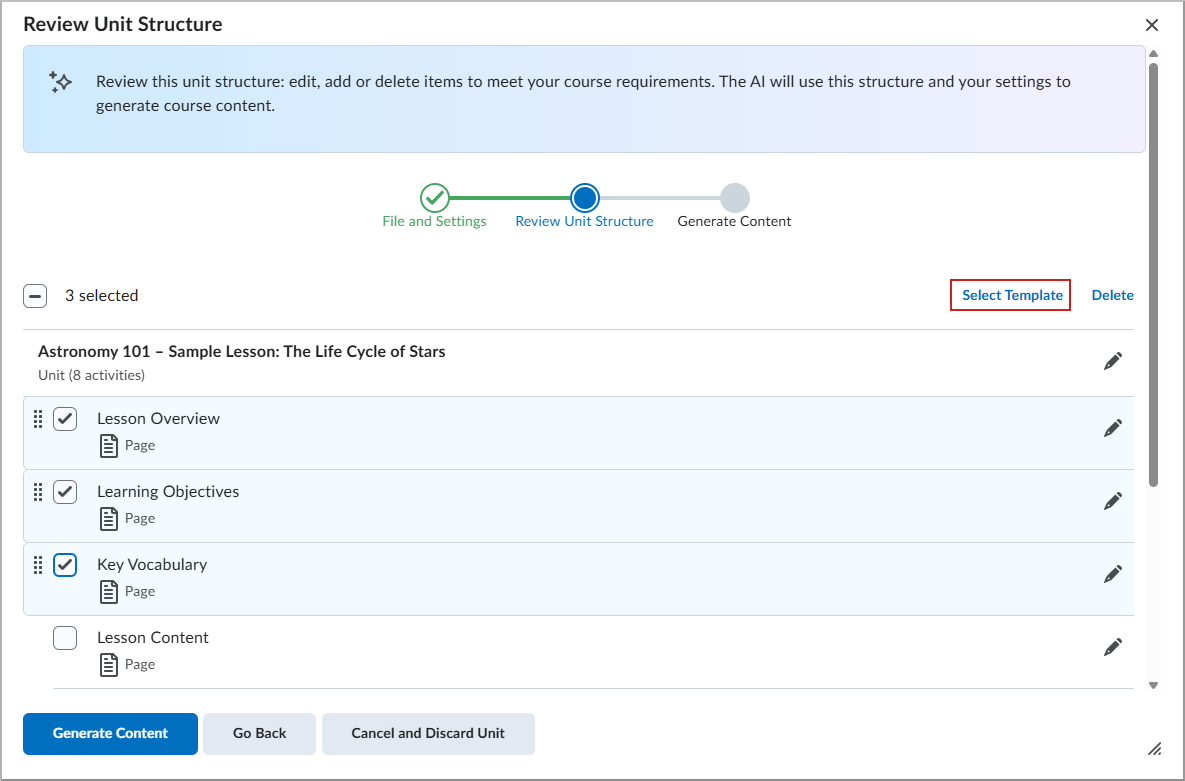
Figure: From Review Unit Structure, select appropriate content pages and click Select Template from the bulk actions row.
Previously, users selected an HTML template for each generated page individually. This update streamlines the workflow and improves efficiency when creating or revising large content units.
This feature implements the following PIE item:
- D12820 (Apply HTML template choice to all or multiple generated content from Lumi)
Technical details
Impact:
- Slight impact to instructors and course creators due to fewer manual steps when applying templates.
- Slight impact to administrators. There is no change to the generation consumption with this update.
Availability:
- This feature is available to all clients using D2L Lumi Pro.
To enable:
- This functionality is automatically enabled.
- Ensure your organization is entitled to D2L Lumi Pro and the Generative AI tool is enabled.
- Grant the Generative AI > Generate Course Content permission to instructors and course creators.
- Enable the D2L.Tools.GenerativeAI.isEnabled configuration variable in the appropriate org unit.
D2L Lumi Ideas – Use custom instructions to guide AI-generated assignments and discussions | Updated
|
This feature is part of the D2L Lumi Pro for Brightspace add-on solution that must be purchased separately. For more information, contact your D2L Client Sales Executive or Account Manager. |
Instructors and administrators can now guide AI-generated assignment and discussion ideas using Custom Instructions in D2L Lumi Ideas.
The idea generation workflow for Assignments and Discussions now includes a Custom Instructions field. This field allows instructors and course creators to specify focus, tone, audience, or style when generating ideas.
Previously, D2L Lumi Ideas generated assignment and discussion ideas without user-supplied guidance. With this update, generated ideas can better align with course objectives and instructional goals while maintaining a streamlined workflow.
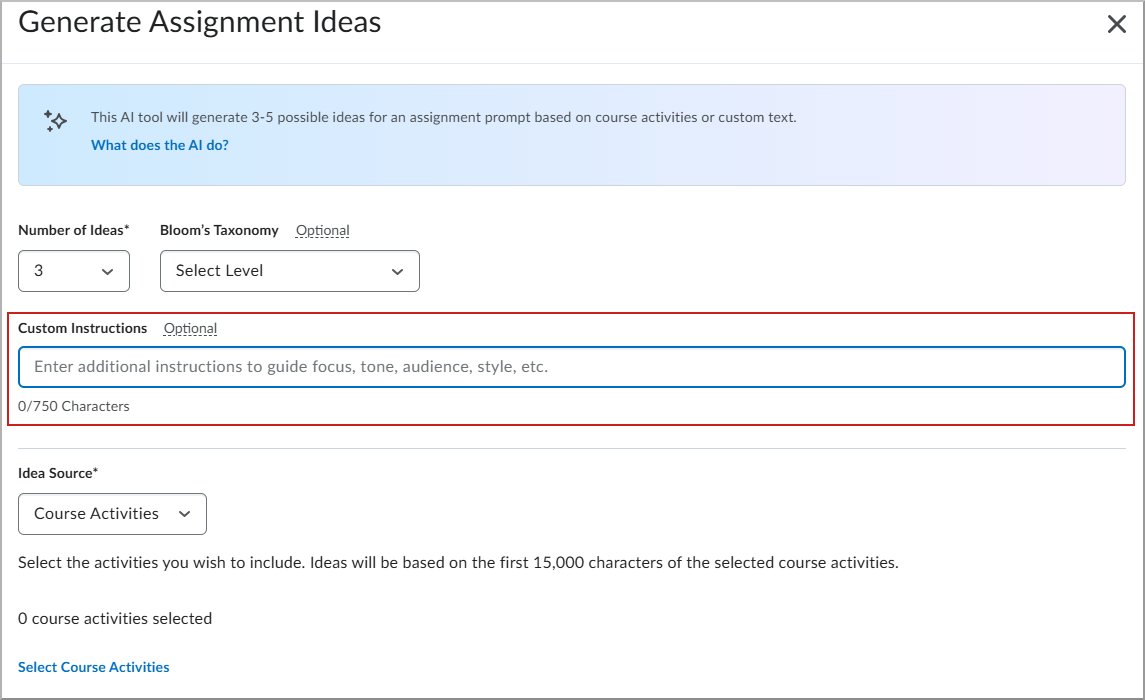
Figure: In the Generate Assignment Ideas dialog, enter guidance in Custom Instructions to control the focus, tone, audience, or style of generated assignment ideas.
Technical details
Impact:
- Slight impact to instructors due to expanded control over AI-generated assignments and discussions.
- Slight impact to administrators. There is no change to the generation consumption with this update.
Availability:
- This feature is available to all clients using D2L Lumi Pro.
To enable:
- This functionality is automatically enabled.
- Ensure your organization is entitled to D2L Lumi Pro and the Generative AI tool is enabled.
- Grant the following permissions to instructors:
- Generative AI > Generate Ideas for Discussions
- Generative AI > Generate Ideas for Assignments
- Enable the D2L.Tools.GenerativeAI.isEnabled configuration variable in the appropriate org unit.
D2L Lumi Quiz – Use custom instructions to guide AI-generated questions | Updated
|
This feature is part of the D2L Lumi Pro for Brightspace add-on solution that must be purchased separately. For more information, contact your D2L Client Sales Executive or Account Manager. |
Instructors and course creators can now guide AI-generated quiz questions using Custom Instructions in D2L Lumi Quiz.
The Generate Questions workflow now includes a Custom Instructions field. This field allows instructors and administrators to specify focus, tone, audience, or style when generating quiz questions.
Previously, D2L Lumi Quiz generated questions without user-supplied guidance. With this update, generated questions can better align with course objectives and instructional goals while maintaining a streamlined workflow.
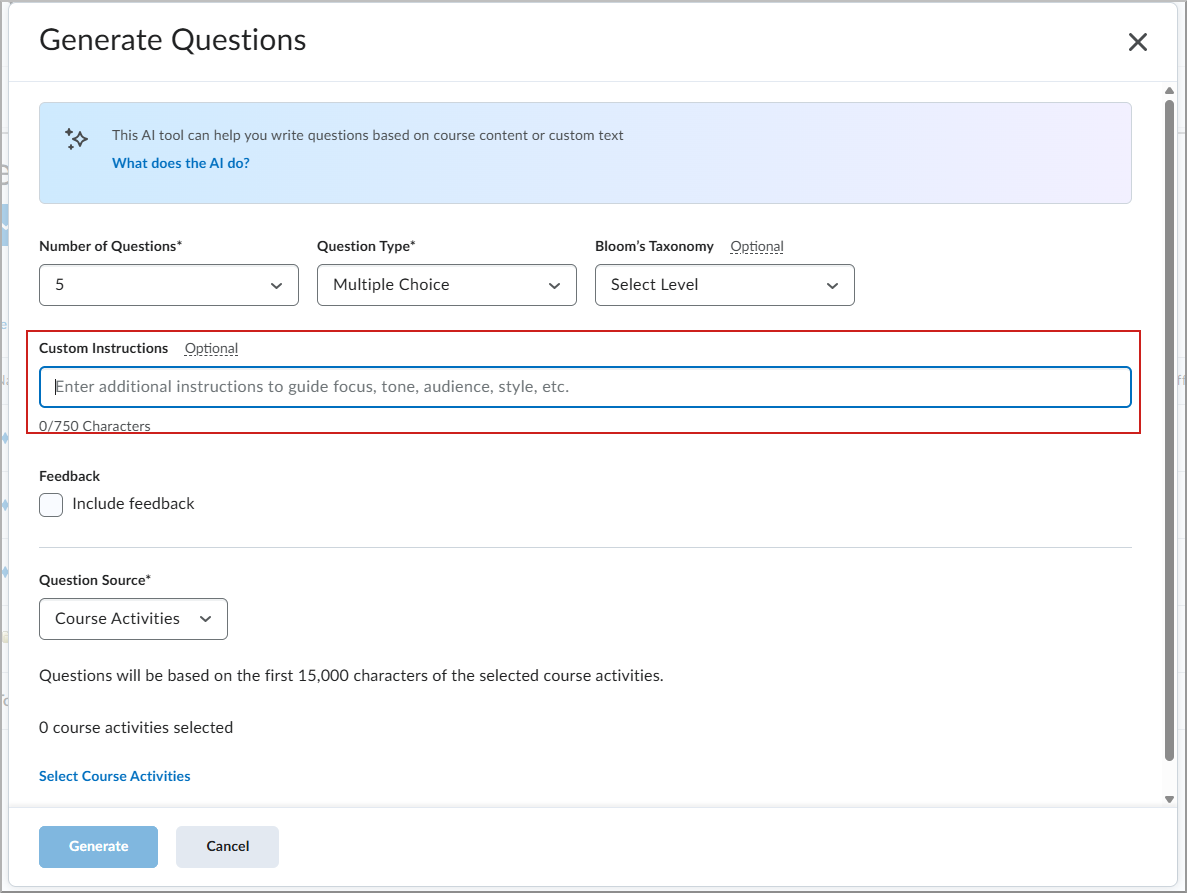
Figure: In Generate Questions, enter guidance in Custom Instructions, then click Generate to create AI-generated questions.
Technical details
Impact:
- Slight impact to instructors due to improved alignment between generated quiz questions and instructional goals.
- Slight impact to administrators. There is no change to the generation consumption with this update.
Availability:
- This feature is available to all clients with D2L Lumi Pro.
To enable:
- This functionality is automatically enabled.
- Ensure your organization is entitled to D2L Lumi Pro and the Generative AI tool is enabled.
- Grant the Generative AI > Generate Questions permission to instructors.
- Enable the D2L.Tools.GenerativeAI.isEnabled configuration variable in the appropriate org unit.
Data Hub – AI Consumption Brightspace Data Set | New
Administrators can now use the AI Consumption Brightspace Data Set (BDS) to gain insight into how D2L Lumi is used within their organization.
The AI Consumption BDS captures the following details for every AI consumption event:
- User ID
- Date of the AI consumption event
- Generation weight or count
- Consumption source (Lumi Pro or Lumi Creator+)
Previously, administrators could only access AI consumption information through the Consumption Dashboard.
Technical Details
Impact:
- Moderate impact to administrators due to the addition of a new Brightspace Data Set.
Availability:
- This data set is only visible in Brightspace instances that are entitled to Lumi Pro or Lumi for Creator+ packages and the Consumption tool is enabled.
To enable:
- Ensure the Brightspace Data Sets > Can Access Brightspace Data Sets permission is granted to administrators at the org level.
- Ensure the d2l.Tools.BrightspaceDataSets.Version configuration variable is set to version 10.12 or 11.2.
- New and changed data sets appear the first time the data set runs after the version update.
Data Hub – Rubric Assessment Brightspace Data Set improvements | Updated
The Rubric Assessment Brightspace Data Set (BDS) now includes updates that provide transparency for deleted or orphaned records and improve downstream reporting.
The following new columns are added:
- ActivityId (bigint, non-nullable)
- IsDeleted (bit, non-nullable)
- Version (bigint, non-nullable)
The following columns are updated:
- RubricId is now nullable
- OrgUnitId is now nullable
- AssessmentDate is now nullable
- DateCreated is now nullable
All bit and datetime2 columns are also updated. Refer to the Enhancing Consistency: Upcoming Updates to Brightspace Data Sets blog post for more information.
Technical Details
Impact:
- Moderate impact to administrators due to the addition of new columns and values to an existing Brightspace Data Set.
Availability:
- This feature is available to all Brightspace Core clients.
To enable:
- Ensure the Brightspace Data Sets > Can Access Brightspace Data Sets permission is granted to administrators at the org level.
- Ensure the d2l.Tools.BrightspaceDataSets.Version configuration variable is set to version 10.12 or 11.2.
- New and changed data sets appear the first time the data set runs after the version update.
Distributed Administration – Target announcements to child org units at the Sub-Organization level | New
Sub-Org Administrators in a Distributed Administration (DA) environment can now target announcements to child org units of the Sub-Org Unit.
To target an announcement to a child org unit, Sub-Org Administrators can navigate to Course Admin > Announcements and click New Announcement. On the New Announcement page, the Make announcement available to section allows Sub-Org Administrators to click Add Org Units to target the announcement to a specific child org unit of the sub-organization. Targeted announcements are also available to descendant org units. If no org units are selected, the announcement applies to the current Sub-Organization.
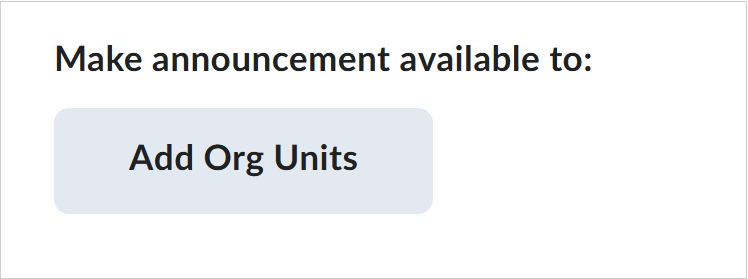
Figure: Sub-Org Administrators can select Add Org Units in the Make announcement available to section to target announcements.
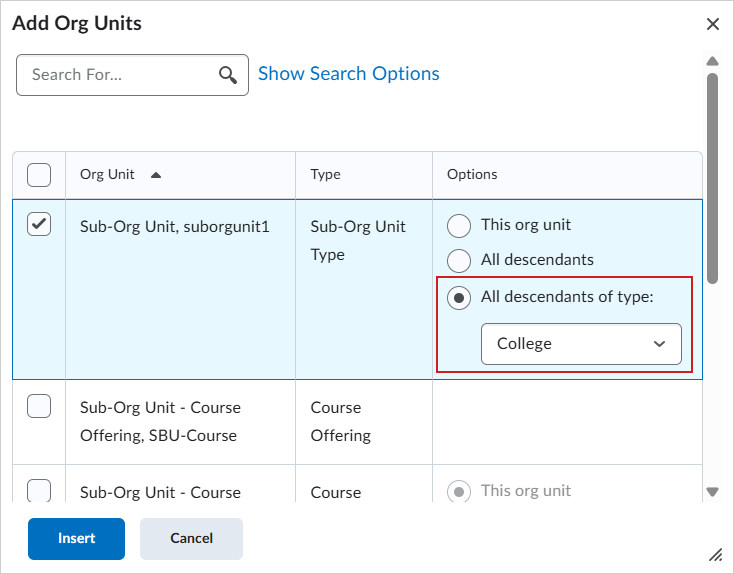

Figure: Sub-Org Administrators can share their announcement from their Sub-Org Unit to specific child org unit descendants. For example, a Course Offering.

|
Important: The Make announcements available to option is only available to a Sub-Org Administrator that is creating an announcement from the Sub-Org Unit level and targeting that announcement to child org units such as Course Offerings. A Sub-Org Administrator cannot access the Make announcements available to option when they are creating an announcement from an Org, Semester, Course Template, Course Offering, Section, or Group. |
Previously, Sub-Org Administrators could not choose to target announcements to org units that were children of their Sub-Org Unit.
Technical Details
Impact:
- Moderate impact to organization-level administrators, who must assign Sub-Org Administrator role permissions to allow access to the Announcements tool at the Sub-Organization level.
- Moderate impact to Sub-Org Administrators, who can now create and target announcements to child org units within a Distributed Administration setup.
Availability:
- This feature is available to all clients.
To enable:
- This feature requires organization level administrators to assign Sub-Org Administrators the Announcements > Add/Edit/Delete Announcements role permissions at the Sub-Org Unit level. Refer to Announcements permissions for details.
- This functionality is not dependent on any new or existing configuration variables.
Quizzes – Improvements to the Quizzes evaluation | Updated
The quiz evaluation experience now includes an Incorrect filter that lets instructors quickly view answers marked incorrect. In addition, feedback fields automatically expand as needed, providing more space to review and enter feedback.
Instructors can now filter the quiz questions to review only the questions a learner answered incorrectly. This enhancement helps instructors identify trends and determine whether updates to questions or instructional materials are needed.
Previously, the available filters were Pending Evaluation and Retaken questions only. With this update, the new Incorrect filter displays only questions marked incorrect.
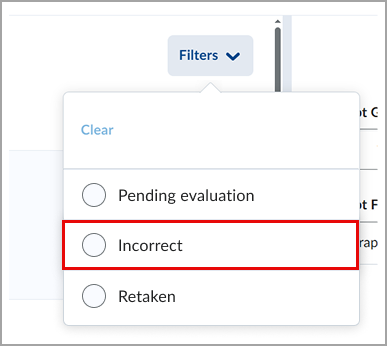
Figure: Filtering options for quiz answers after the update.
Additionally, feedback fields for questions are now displayed as a single line and automatically expand when instructors enter additional comments. Previously, the Feedback field for each question displayed several lines even when no feedback was entered, requiring users to scroll unnecessarily.
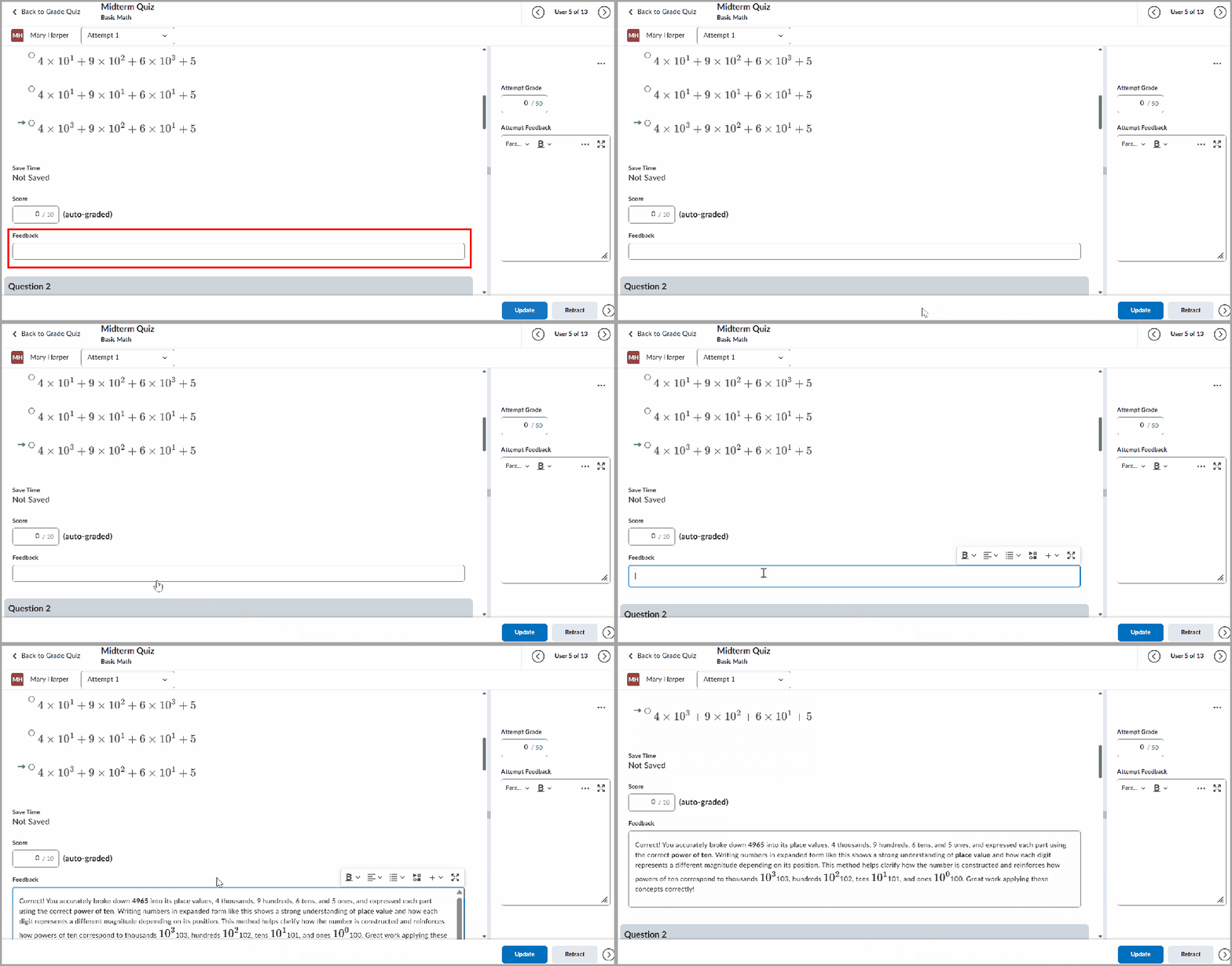
Figure: When evaluating a quiz question, enter additional comments to your Feedback in an automatically expanding field.
This feature implements the following PIE items:
- D1865 (Filter for Viewing only Questions Missed)
- D9123 (Quiz Filter to list only questions that were answered incorrectly)
- D12922 (Quizzes: Filter when marking to only see questions answered incorrectly)
Technical Details
Impact:
- Slight impact to instructors who can now filter the quiz questions to display only answers that were marked incorrect and benefit from reduced scrolling due to the auto-expanding feedback field.
Availability:
- This feature is available to all clients.
To enable:
- This functionality is automatically enabled.
- This functionality is not dependent on any new or existing permissions or configuration variables.
Change History
12-March-2026 Preview Release Notes published.
2-April-2026 Added a new General Announcement referring Creator+ and H5P customers to the H5P news site.
2-April-2026 Updated the Courses – Customize Load More increments up to 250 courses at a time | New release note to remove image.
2-April-2026 Added a new General Announcement advising of the updates to the Danish language pack.
7-May-2026 Updated Quizzes – Improvements to the Quizzes evaluation to fix a typo.
