Best Of
Re: Possible to: (1) Have different time limit restrictions within 1 exam (2) Hide correct answers?
Hi Kay,
Thank you for reaching out to us through the community!
Below are the answers to your queries
Question 1: For now, we don't have the ability to set separate time limits for the different sections of a single exam. Time limits are set against each exam. If you feel this is a new feature to be implemented in the future, you can open an idea in the Product Exchange Idea.
Question 2: As long as the instructors have permission to Grade Submitted Quizzes, they can see the user-submitted quiz answers in the quizzes tool.
Meanwhile, if the results you are sharing with instructors have the quiz questions and learner answers, please check on how the Quiz Results Display is set for that quiz.
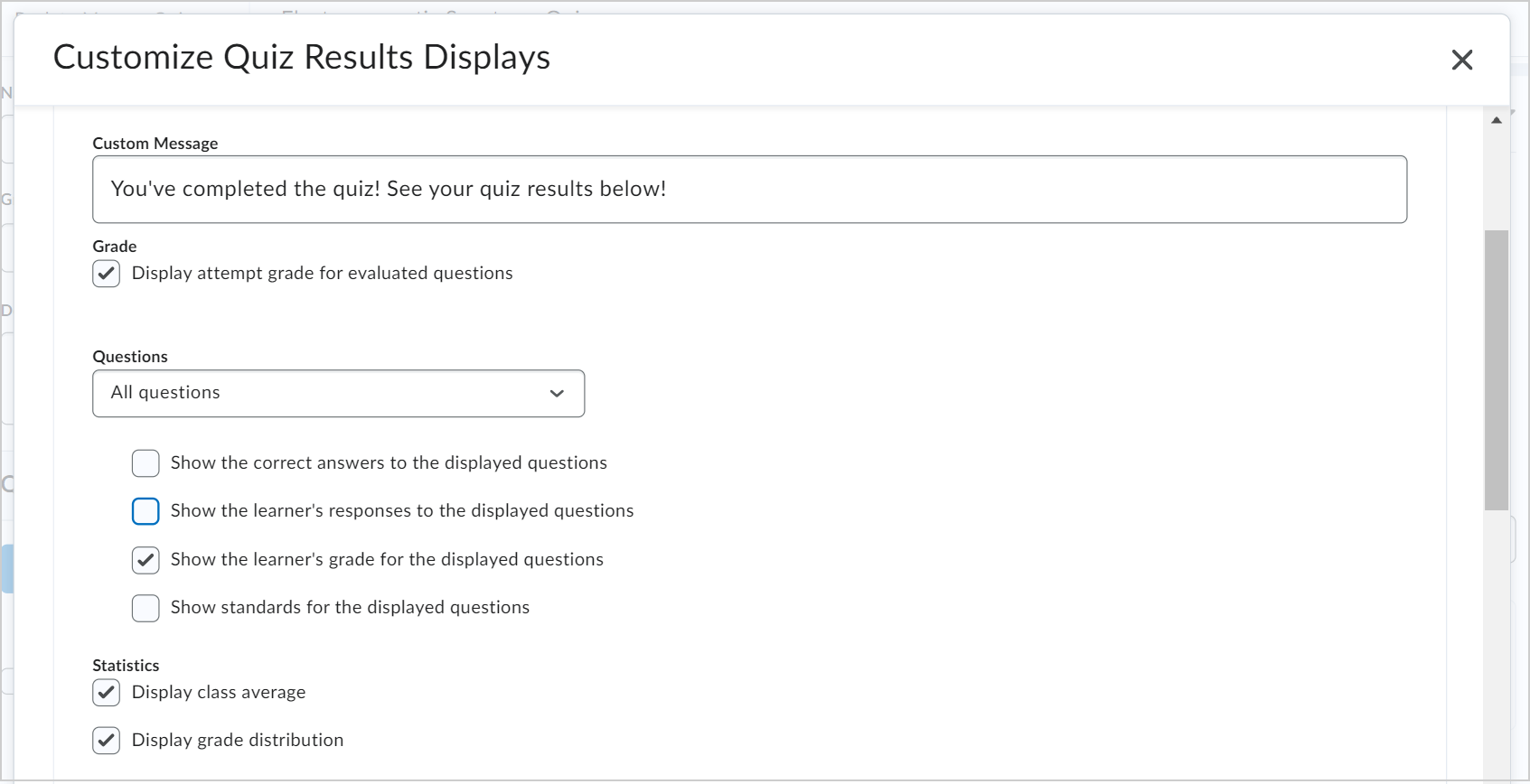
You can read about the same in article below
If this doesn't answer your query, please provide us with more details about query 2, and that will help us assist you better.
Thanks
Sreelakshmi

Re: How do I set due dates on discussion boards
Has the discussion due date been removed altogether in the new content experience? I've got content copied from a previous semester with due dates on discussion content, and the only way I can find to edit/remove the due dates is to temporarily switch back to the old content experience. Is this a bug or just really bad, but intentional, UX?

Re: Assignment submission receipt email
Hello @Samar.A.8205,
Thank you for reaching us through the community.
Based on your description, it appears that there is currently no feature available to turn off the automated Assignment submission receipt email.
If you would like more options, I would highly suggest the submission of a PIE item, or upvoting one that suits your use case.
I have found one similar PIE idea: https://desire2learn.brightidea.com/ideas/D7882
Being able to turn ON or OFF the Automated Submission Receipt Email (D7882)
Submit a PIE: https://desire2learn.brightidea.com/pie/submit
The Product Idea Exchange is designed for direct submission by our clients and end users to our Product Development organization and has the following advantages:
• Allows you to receive direct updates on each request you submit

• Allows other community members to vote on ideas

• Allows other community members to contribute to and collaborate on each idea

• Ensures ideas that have the greatest impact on our clients and end users receive consideration for inclusion in future releases.
We look forward to hearing from you at the Product Idea Exchange!
Kind Regards,
Shobhit Sachdeva

Re: Student unable to see "My Computer" when uploading Assignment Files
Hello @Kira.H.305,
Thank you for reaching out to the Brightspace Community.
Based on what you’re describing, I think it would be a good idea to have a support agent take a closer look at things.
If you are the ASC/ Admin for your Organization, please refer to our documentation for how to log a Support case OR request, and a member of our Support team will be happy to assist you.
Thank you,
Camila

Re: D2L Lumi vs D2L Lumi Pro
Lumi is an all encompassing term for any D2L AI product. Lumi Pro is comprised of a number of different Lumi Tool and Features. D2L customers can pick and choose which Lumi Pro Tools and Features they might like to utilize. Currently, Lumi Pro consists of:
- Lumi Quiz/Question - generating quiz questions
- Lumi Idea - generating assignment and discussion ideas
- Lumi Outcome - aligns outcomes.
- Lumi Content - generates HTML content pages from documents & PowerPoints
- Lumi Study Support - redirects students to specific course content based on quiz results
- Lumi Summary - generates module summaries based on course content
There is also Lumi Chat which is separate from Lumi Pro.
- Lumi Chat - a chatbot help tool
Also Separate from Lumi Pro, there will also be:
- Lumi Tutor - offers study support, course support, and generates practice questions for learners based on course content
- Lumi Feedback - streamlines instructor feedback processes by providing customizable assessment feedback
Resources:
Re: D2L is Reheating PIE!
PIE Is Reheated—Let’s Get You Fully Connected! 🥧
Hi there!
We’ve been busy behind the scenes making sure everyone can access the Product Idea Exchange (PIE)—and now it’s ready for you to dig in!
If you’re seeing an error like “Quicklink unavailable,” don’t worry—we’ve got you covered. Just follow these quick steps to get connected:
✅ Step 1: Update Your Community Profile
This helps us make sure everything’s set up correctly on your end.
👉 Step 2: Select the PIE Quick Link
That’s it! If you’ve already completed these steps and still can’t connect, feel free to reply here or reach out to questions@community.d2l.com
Thanks for being part of our community. We can’t wait to see your ideas in PIE!
Warmly,
The D2L Community Team

Re: Release Notes Updates
@Giles.A.619 I reached out to the team that developed this feature, and their response is as follows:
You are correct that this will only appear in Brightspace system menus. It is not set up for any links that are created by Students/Instructors/Administrators.
I hope this helps!

Re: Are there any Brightspace schools who have interfaced with Populi as their SIS?
Hi @Janet.O.779,
Thanks for the additional info about your situation. I will post an update after we finish our prototyping of the API integration. According to the documentation, it should meet our needs. I'll include details of what we're sending/receiving, the frequency, special circumstances/exceptions, etc.
I agree the Brightspace CSV upload is a powerful tool, and we may need it if we run into scenarios that the API can't handle.

Assignment submission receipt email
Hi everyone,
I’ve noticed that Brightspace sends an automatic email to learners every time they submit an assignment, even though I didn’t add an email address in the Notification Email field when setting up the assignments. I would like to stop this automatic submission receipt email but still want learners to receive emails when awards are unlocked. How can I adjust this?

Re: Assignment submission receipt email
Hi!
The Notification Email setting to which you refer will send to only to email addresses you enter when a learner submits an assignment (typically, sent to those who need to review the assignments promptly). If that has been left blank, but your learners are receiving emails once they submit assignments, I am guessing you have intelligent agents set up for your course. Those can be stopped by Disabling the intelligent agent set up for each assignment submission. Learn more about Intelligent Agents here: