Best Of
Re: Why can't I use respondus lockdown?
Hello @Alexa.V.5782! Sorry to hear you're having trouble with this quiz.
In order to help get this fixed, please reach out to your campus support team who can look directly into the course to understand what needs to be adjusted.
Their contact information can be found here:
Please note that support is available 24/7.
Hope this helps!
~Stephen

Re: Can Brightspace be set up to deliver in-LMS alerts to students on Teams?
Hi Mayra,
Thank you for your question.
Brightspace cannot natively deliver LMS alerts (announcements, discussions, deadlines, etc.) directly into Microsoft Teams.
The Teams Course Connector focuses on provisioning (teams, enrollment sync), not notifications.
Currently, Brightspace notifications are delivered via email and Brightspace Pulse (push notifications), and as you mentioned, Intelligent Agents can automate alerts, but these are limited to email delivery, not Teams.
If this is a feature you’re particularly interested in, we recommend submitting a suggestion to the Product Idea Exchange (PIE) for future consideration. You can create a new PIE item or upvote an existing one using the link below:
👉 Brightspace Community Idea Site: Submissions (brightidea.com)
Submitting your idea or upvoting existing suggestions helps ensure that features with the greatest impact on our clients and end users are considered for inclusion in future updates.
I’ll also share a few relevant Brightspace Community articles below for additional context:

Re: Observed in Person Assignment - Marking it Complete
Hello @Lia.H.3992, thanks for your question!
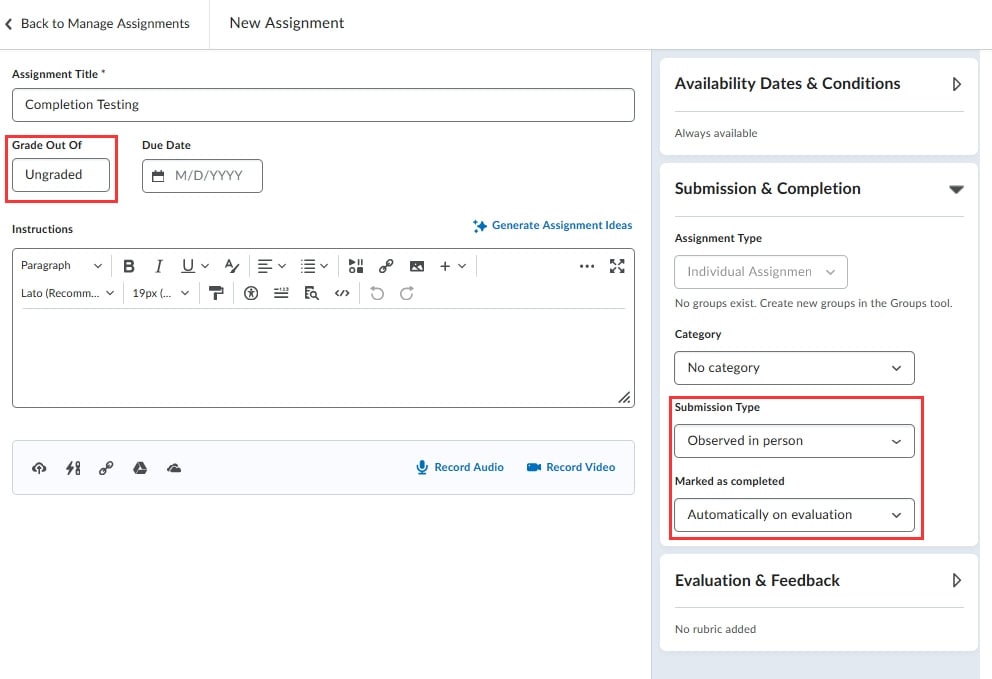
I think you could do this using the Automatically on Evaluation option by leaving the Grade out of setting, within the Edit Assignment area, to Ungraded:
Once you begin to start marking learners as complete by going to View Submissions, you can use the checkbox next to a learners name and then select the Mark as Complete button along the top:
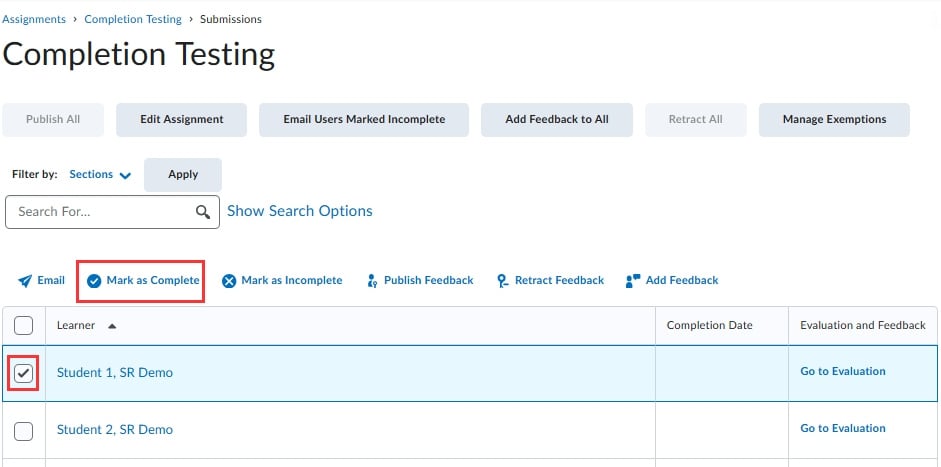
This learner will then be set as complete, and no further action would be required on your part, including the addition of a grade value or comments.

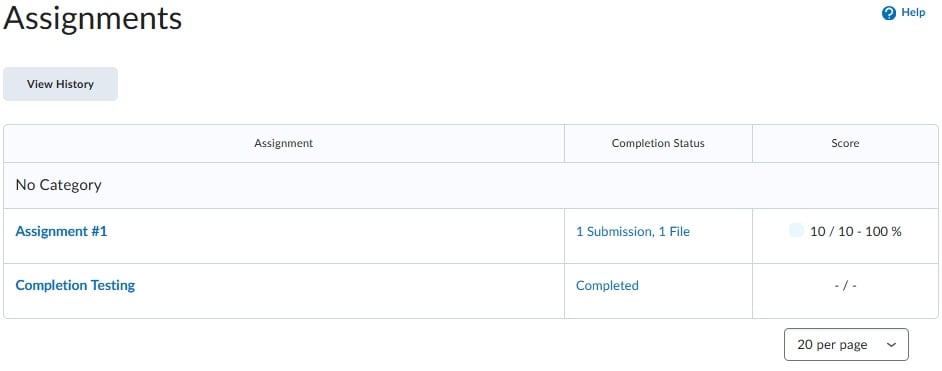
From the learners point of view, they will simply see the Assignment set as complete:
Hope that this will work for your use-case. If you have any questions please let us know!
~Stephen
Re: Feedback Showing on Brightspace Quizzes
Hello @Marc.V.406,
You are most welcome!
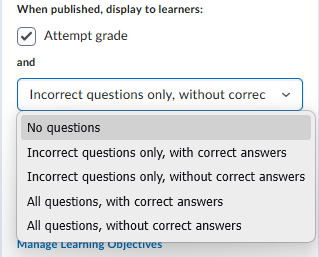
I just ran a test for the ordering question-type and can confirm that the feedback does appear when you have "Incorrect questions only, without correct answers" set for your display option. Here's how it looked for my test:
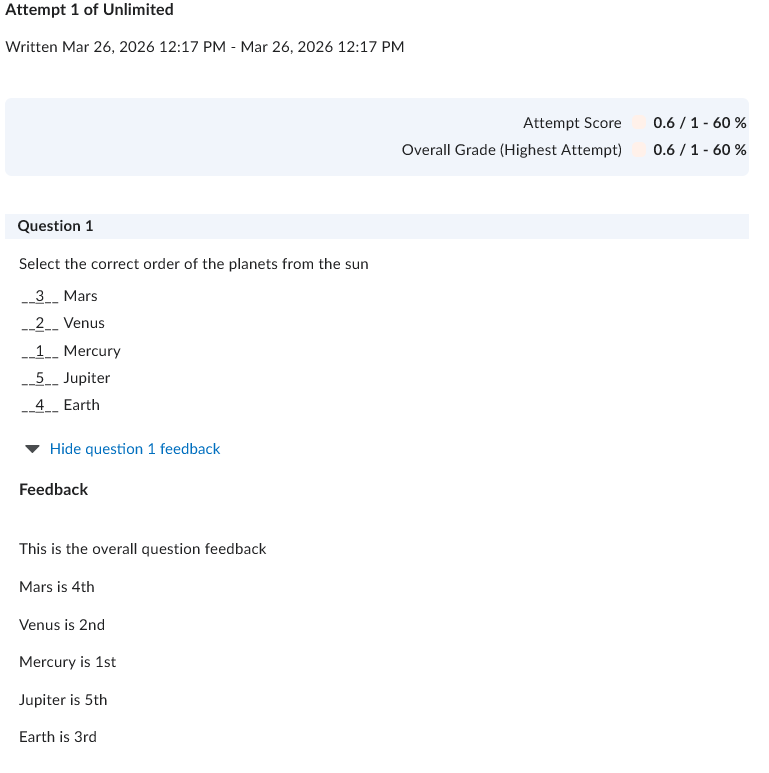
The "this is the overall question feedback" test comes from the Question Feedback field when setting up the question, while the "Mars is the 4th", etc., comes from the individual value feedback fields, in order of how they were displayed while taking the quiz.
To fully check everything, I refreshed my display with all five options enabled, and the only time feedback wont appear is if it's set to "No questions"
~Stephen
Re: Feedback Showing on Brightspace Quizzes
Hello @Marc.V.406, thanks for your question!
Are you working with quiz questions such as multiple choice/true or false?
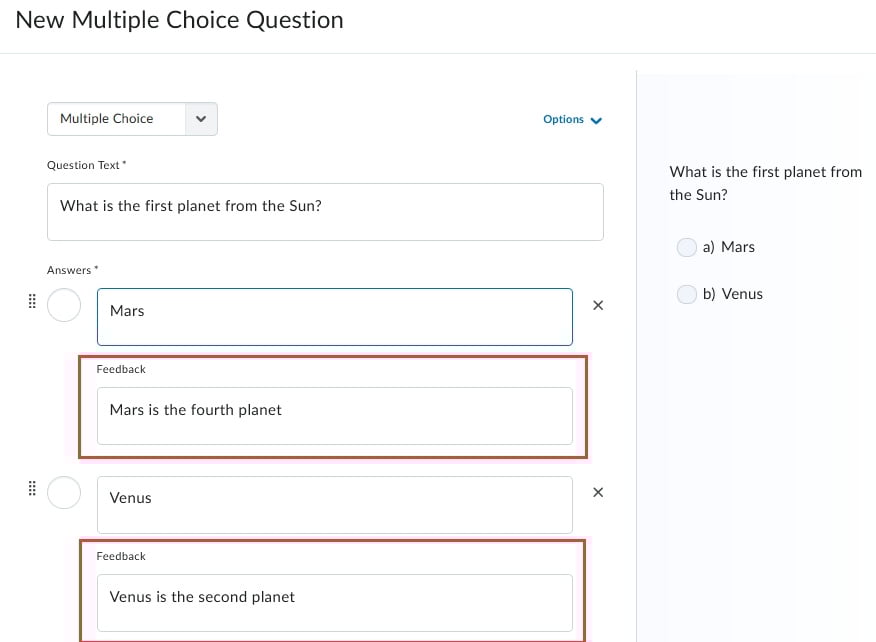
With these question types, feedback added for individual answers will always show if questions are displayed once a learner submits their quiz. Feedback for these questions is intended specifically for students, to help them improve with questions they do get incorrect.
As an example, the feedback within the red box below would be displayed to learners after they submit their quiz:
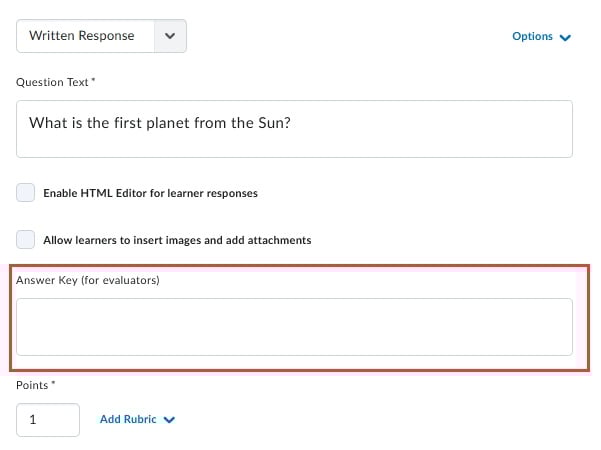
We do have an answer key field within the written response question setup, which wouldn't show to learners following their submission, but remains available for grading reference:
Hoping this helps! If I may clarify anything just let me know.
~Stephen
Re: Competencies and Outcomes
Hello @MaryJane.M.2030, thanks for your question!
It is possible to use a mixture of both Competencies and Outcomes across your institution, but if you are using the tools from the organization level (for example, if you have Competencies/Learning Objectives that are shared from your main org unit to and used in course offerings) it might cause an increase of work to ensure both are managed and any data/results from your learners are captured since both could be in use.
From the course level, it's much easier for instructors to choose one or the other and manage it directly in the course itself.
If your permissions are set correctly, instructors should see both when they interact with a new Course Offering, but once they begin to use one of the tools, the other will be automatically removed from Course Admin. So if you begin using Competencies, Outcomes cannot then be used and won't be available.
For reference, HERE is some documentation for the use of both tools
In regards to your question about which tool can be used with Classic Content, it is specifically attaching Outcomes to content items that is not available in Classic Content, while the New Content Experience allows for both Competencies and Outcomes to be attached to content items.
Hope that this helps!
~Stephen
Re: !!!! Urgent: Brightspace Class Progress – Need downloadable student-level data for AY26S1 co‑marking
Hello,
Thank you for reaching out to us with your request.
Given the details outlined and the urgency expressed, this request would be best handled through our support channels to ensure proper assessment and prioritization.
I would recommend the following next steps:
- Log a Support Case with Product Support so the team can review your use case in detail and advise on any currently supported approaches or workarounds.
- Engage your TAM/CSM to help address this based on the scale and business impact.
- Submit a PIE (Product Idea Exchange) request, as the ability to export or snapshot Class Progress is not currently available and would require a product enhancement.
As a potential workaround, you may also consider leveraging the Content Progress Advanced Data Set (ADS), which provides insight into content viewed by users across org units within a specified date range. While not a direct snapshot of Class Progress, it may help support a more controlled and consistent data extraction approach.
I hope you find this information helpful.

Re: Learner Awards Widget only displays Badges, not Certificates
Thank you, @Stephen.R.50 , for confirming my suspicion. I have voted for the PIE item, but I don't have much hope since it is from 2023 with little traction. I will refrain from using the widget going forward. Appreciate your comment!

Re: Automatic Publishing - flagging late submissions
Hi Kelsey,
As you have noted its not currently possible to delay feedback for late submissions with the auto-publish feature.
The idea described is a good one. To have it reviewed and assessed by the team please make as ubmission into the Product Idea Exchange at
Hope that helps!

Re: Embedding PDFs to display in HTML
Hello @Marshall.H.1186, thanks for your question!
It is possible to have a PDF file render directly on the Content page, even if you're using Creator+ Elements.
Once you upload the file to your Manage Files area, you can edit the HTML of the Content page by selecting the </> button on the toolbar.
Add this to your HTML, change "Path_of_File.PDF" to the path of that uploaded file, and this will enable the automatic rendering within that page:
<p><iframe src="Path_of_File.PDF" width="100%" height="700px"></iframe></p>
As an example, I uploaded a file named Lorem_ipsum.pdf to my test course. The path of that file, which you can get from Manage Files, would mean I need this new text:
<p><iframe src="/content/enforced/12407-SR_1.0_/Lorem_ipsum.pdf" width="100%" height="700px"></iframe></p>
You might need to play around with the width and height if you're embedding this into a Creator+ element.
Please note, however, that this will not override a browser that forces files to be downloaded, and restricts the ability to have them open directly in the browser.
Hope this helps!
~Stephen