Written By: Michelle Tran, Associate Product Manager, Brightspace Product Management
In this blog post, we will highlight the key updates that will be introduced in the July Release 20.26.07. The release brings many meaningful improvements to the Outcome Set management experience in Brightspace. We will explore, how it impacts our users and how it simplified the way Learning Outcomes is created and managed. We will also discuss the migration plan and necessary changes to datasets as a result of this change.
What is improving?
New Outcome Set creation page
From the Admin Tools menu, when navigating to the Learning Outcomes tool, and selecting Create Outcome Set, users are directed to the New Outcome Set creation page. The New Outcome Set has been designed to align with other Brightspace tools, providing a seamless and consistent creation experience. Administrators can now create a New Outcome Set, add outcomes, assign an Achievement Scale all within a single, streamlined layout.
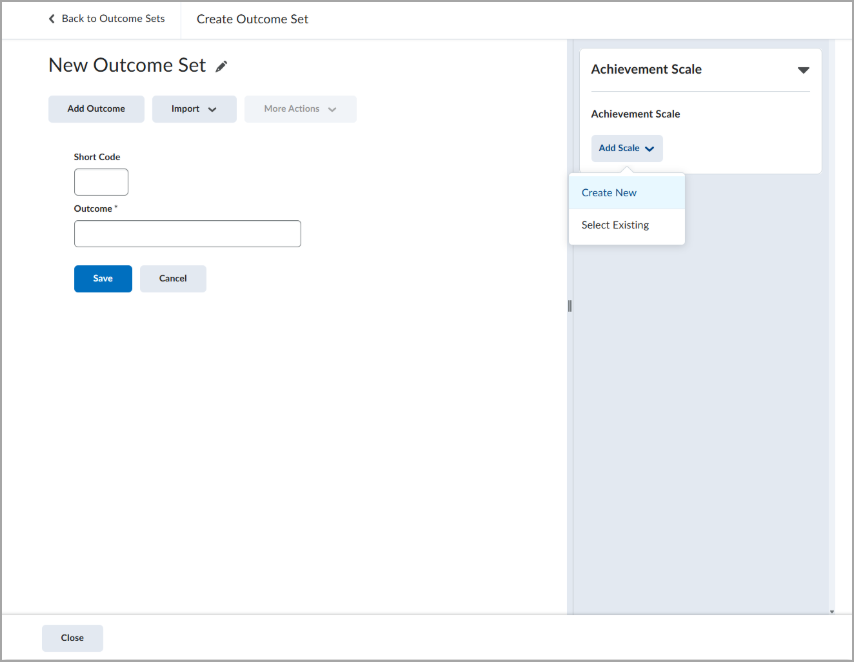
This enhanced workflow simplifies the process of creating and editing Outcome Sets at the organization-level. It eliminates the need for manual configuration of Achievement Scales and Threshold at the course-level, promoting greater consistency across the organization and program-level courses.
Note: Outcome Set and Achievement Scale association can still be overridden at the course level if required.
Achievement Scales
Previously, Achievement Scales were limited to course-level configuration. Now, within the New Outcome creation page, administrators can assign an Achievement Scale directly to an Outcome Set by creating a new scale or selecting an existing scale. This ensures when Outcome Sets are imported into a course, the associated Achievement Scale is automatically applied.
Building on the November release of Enabling Multiple Outcome Sets, a course can support multiple distinct Outcome Sets. This was a key step in enabling Achievement Scales to be associated at the Outcome Set level. Previously, a course could only have one Achievement Scale, and all Outcome Sets within the course were required to use it. Now that Achievement Scales are associated at the Outcome Set level, each Outcome Set can have its own scale, allowing individual courses to support multiple Achievement Scales.
Achievement+ Package: Thresholds
For D2L Achievement+ users, thresholds can now be configured directly at the Outcome Set level. Previously, Achievements Scales' thresholds were manually set at the course level.
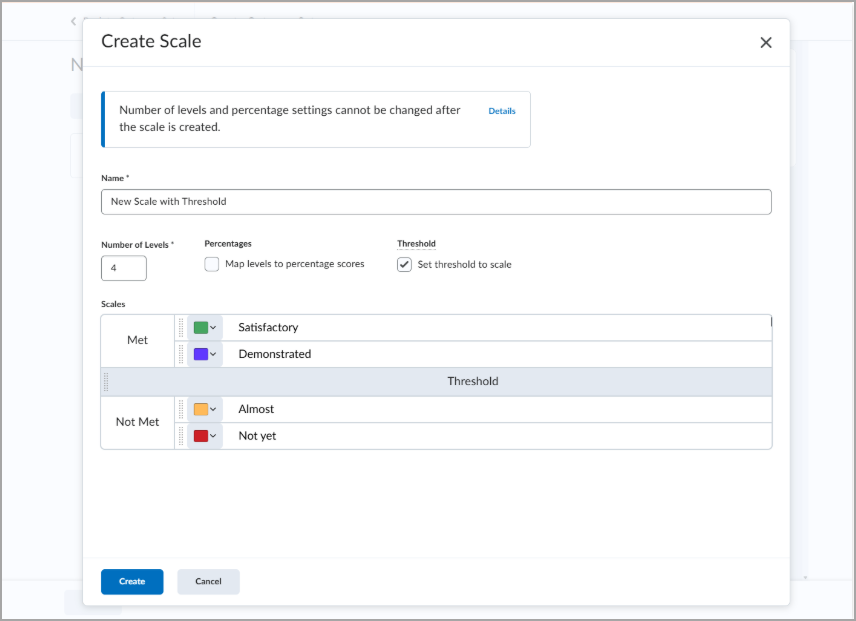
By standardizing Outcome Set configurations, this enables more consistent data across courses. As a result, the Outcomes Achievement Dashboard for Achievement+ can now accurately display threshold achievement across courses. Administrators can ensure consistent aggregation is shown in the Achievement Dashboard.
Migration Plan
The release will affect how Administrators and Instructors manage Learning Outcomes moving forward, as well as existing Outcome Sets with Achievement Scales and Thresholds. To support this, our team will be migrating existing Outcomes Sets in the following ways:
Outcome Sets used across courses with different Achievement Scales
When an Outcome Set is used in multiple courses, the Achievement Scale will be set at the Outcome Set level only if all courses use the same scale.
If various courses use different Achievement Scales, no Achievement Scale will be assigned at the Outcome Set Level. Each course will retain its existing Achievement Scale configuration.
Achievement Scales with varying thresholds across courses
When multiple courses use the same Achievement Scale but have different thresholds, a threshold will only be set at the Outcome Set level, if both Achievement Scale and Threshold Values are consistent across all courses. If they differ, no threshold will be set at the Outcome Set level.
BDS Updates to Outcome Scale Definition, Outcomes Set Course, and Outcome Set Org
To reflect all the July Release (20.26.07) updates, we made the necessary changes to the following Brightspace Datasets:
- Outcome Set Course and Outcome Set Org now includes
ScaleId, which uniquely identifies the scale being used - Outcome Scale Definition now includes
Threshold - indicates the threshold level set within the achievement scale
Please note that all existing data will be preserved during migration. For legacy records, where a ScaleId or Threshold was not previously defined, the field will appear as NULL.
Newly created or updated data will include ScaleId and Threshold at the organization and course levels.
The improvements in this release are inspired by your submissions to D2L's Product Idea Exchange (PIE#:D6605/D9382). Please continue to use the PIE platform to submit your great ideas and suggestions.
To stay informed on Learning Outcomes, please continue to follow our Release Notes.