By: Erica Baldock, Senior Customer Experience Manager
D2L Product Idea Exchange (PIE) provides a vital channel for customers to share ideas and influence D2L’s Product Roadmap.
You will need to be signed into the D2L Community and have appropriate permissions from your organization to access PIE.
How to log into PIE
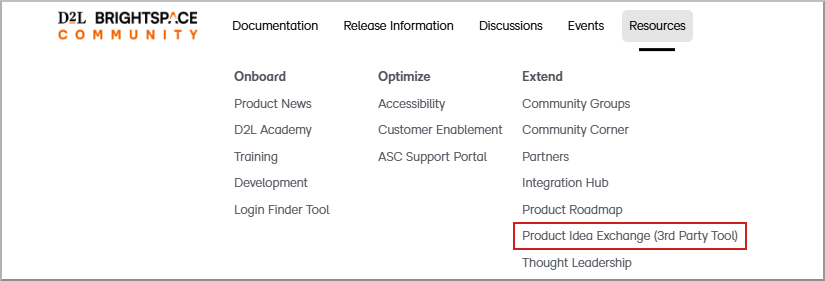
- From Brightspace Community top navigation bar, click Resources.
- Select Product Idea Exchange (3rd Party Tool)

Why is PIE important?
- Creates space for customers to have a voice and engage in future product roadmap.
- Helps D2L build a better product and customer experience.
- Gives our Product Managers more data in how they plan and prioritize their roadmaps.
What can I do in PIE?
In PIE, you can:
- Submit new product ideas for Brightspace and other D2L products.
- View and vote on ideas submitted by other clients.
- Comment on Ideas to support and share specific use cases.
- Track the status of your own ideas as they move through the review process.
- See which ideas are planned or delivered and understand how they align with D2L’s roadmap.
How do I submit a new idea?
For tips on writing high‑quality ideas, refer to PIE: What Makes an Idea Great
You will need to be signed into the D2L Community and have appropriate permissions from your organization to access PIE.
- From Brightspace Community top navigation bar, click Resources.
- Select Product Idea Exchange (3rd Party Tool)

- Browse existing ideas to avoid duplication.
- Select SUBMIT NEW IDEA.
- Complete all required fields, including:
- Summary - A clear, descriptive title
- Product area – Select the product area from the dropdown.
- Problem - A concise summary of the problem or need
- Tags – Add keywords to help others find your submission
- Value - What value would you and your organization receive if this Idea was implemented
- How are you accomplishing this today - Describe any workarounds, partner solutions or approaches you're taking to partially or fully meet this need.
- Attachments – Attach any relevant information (500 MB file limit)
- Review your submission and select Submit.
Guidelines for submitting ideas
To help us get the most from your ideas:
- Focus on the problem or outcome, not just a specific solution
- Be clear and concise, using concrete examples where possible
- Include who is affected (roles, user types) and how often the scenario occurs
- Avoid including any personal, confidential, or student data in your description or attachments
For full guidance, refer to D2L Product Idea Exchange (PIE) Guidelines.
How do I view, vote on, and follow ideas?
You will need to be signed into the D2L Community and have appropriate permissions from your organization to access PIE.
- From Brightspace Community top navigation bar, click Resources.
- Select Product Idea Exchange (3rd Party Tool)
- Select Browse ideas.
- To support an idea:
- Open the idea
- Use the Promote option.

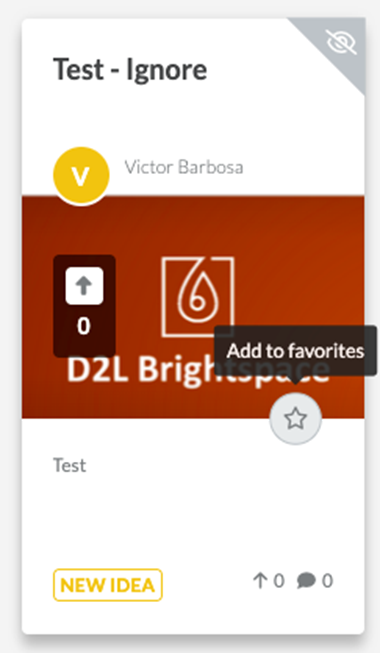
- To follow updates on an idea do one of the following:
- Use the Subscribe
- Add to favourites
How do I check the status of my ideas?
For a description of what each status means, refer to D2L Product Idea Exchange Statuses.
How D2L uses PIE
PIE is one of the key inputs D2L uses to understand client needs and inform product planning. Ideas and feedback from PIE are:
- Reviewed by D2L product teams
- Considered alongside:
- Product strategy and long‑term vision
- Market and industry trends
- Usability research
- Known issues and technical constraints
- Regulatory, accessibility, and security requirements
- Used to identify:
- High‑impact improvements requested by many clients
- Emerging themes and common pain points
- Opportunities to enhance existing features or introduce new capabilities
Not every idea can be implemented, but all ideas help shape our understanding of what matters most to clients.
For more details on how ideas are evaluated and managed, refer to D2L PIE Review Process.
Frequently asked questions
For common questions about eligibility, access, timelines, and how PIE fits with other feedback channels, refer to PIE Frequently Asked Questions.
Having trouble accessing PIE?
If you can’t see or open PIE:
- Make sure you are signed into the D2L Community.
- Confirm with your organization’s D2L administrator that you have the required permissions or role to access PIE.
- If you still cannot access PIE, contact D2L Support or your Customer Success representative for assistance.
Related articles
If you’d like to learn more about how PIE works, start here: