Best Of
Four Practical Checkpoints for Academic Integrity in an AI Era
Academic integrity in the context of AI presents genuine challenges for instructors. From the start, it is essential to recognize that assignment design alone cannot fully eliminate student use of AI-generated text.
What instructors can do is design learning experiences where misrepresentation becomes difficult to sustain over time. Supporting integrity does not require monitoring every step of a student’s process or relying on unreliable detection tools. Instead, it requires making student thinking and decision-making visible in ways that AI-generated work struggles to align with consistently.
This article introduces four high-impact integrity checkpoints that can be implemented directly in Brightspace using tools instructors already know. Together, they provide credible authorship evidence, normalize ethical AI use, and reduce the likelihood of misunderstandings.
Design Goal: Minimum Effort, Maximum Clarity
These checkpoints are based on a simple principle:
If the learning process is visible, integrity becomes the default.
Rather than collecting exhaustive documentation, this approach captures just enough evidence at key moments to demonstrate how students are thinking, researching, and writing.
Checkpoint 1: Topic and Research Question Rationale
Purpose
This early checkpoint captures original intent and prevents integrity issues before they begin.
Tool choice note: For this checkpoint, an Assignment with a text submission is a practical choice. Assignments support exploratory writing, are faster to skim at scale, and align well with the low-stakes, process-oriented purpose of this checkpoint.
This early checkpoint captures original intent and prevents integrity issues before they begin.
What students submit
- A working topic
- A research question
- A short rationale (150–200 words) explaining why the question fits the assignment
AI use documentation
Students include one simple disclosure statement at the end of their submission:
- AI used for brainstorming or wording: Yes/No. If yes, briefly describe how.
Why this matters
Early thinking is difficult to fabricate convincingly with AI. Capturing it provides a clear baseline for authorship and helps instructors guide scope and direction early.
Checkpoint 2: Research Decision-Making
Purpose
This checkpoint makes research judgment visible, not just source collection.
Tool choice note: An Assignment works well when you want a private, assessable record of research decisions. A Discussion can be effective when you want to normalize research struggles and decision-making through peer visibility. Choose based on whether your goal is assessment or shared learning.
This checkpoint makes research judgment visible, not just source collection.
What students submit
- An annotated bibliography (3–5 sources) or
- A short research log describing key decisions
Required focus
Students address questions such as:
- Why was this source chosen or rejected?
- Identify one specific source that changed or refined your thinking. What did you originally think, and what changed after engaging with this source?
- Describe one topic change you made after starting your research (for example, narrowing the focus, shifting the angle, or dropping a subtopic) and explain what prompted that change.
- Describe one question or line of inquiry you initially planned to pursue but later abandoned, and explain what made it less useful or relevant.
AI use documentation
Students explain where AI assisted, if at all, and how they verified or revised its output.
Why this matters
Evaluating sources and explaining decisions requires contextual reasoning that AI tools struggle to replicate authentically.
Checkpoint 3: Drafting Evidence Through Version History
Purpose
This is a passive safeguard that shows writing development over time.
Tool choice note: An Assignment with a file or link submission is the simplest way to collect drafting evidence without increasing workload. It allows instructors to access version history only if questions arise, rather than reviewing drafts routinely.
This is a passive safeguard that shows writing development over time.
What students submit
- A link to a Google Doc or Word Online draft with version history enabled
Student expectations
- Drafting must occur in a tool that records revision history
- Early, incomplete, and revised drafts are encouraged
AI use documentation
No separate form is required. Students may flag sections where AI assisted with clarity or editing.
Why this matters
Version history provides powerful evidence of authorship without adding to instructor workload. It only needs to be consulted if questions arise.
Checkpoint 4: Final Submission with Aligned Process Commentary
Purpose
This checkpoint consolidates integrity evidence by checking for alignment between the final paper and earlier process artifacts. It is not intended to serve as a standalone proof of authorship.
Tool choice note: An Assignment with both file and text submission fields allows students to submit the final paper and aligned commentary together, keeping integrity evidence consolidated in one place.
This checkpoint consolidates integrity evidence by checking for alignment between the final paper and earlier process artifacts. It is not intended to serve as a standalone proof of authorship.
What students submit
- Final paper
- A short aligned commentary (150–250 words)
Aligned commentary prompts
Students respond to prompts that explicitly reference earlier work:
- Identify one substantive change you made between an earlier draft and the final version and indicate where that change appears in the paper.
- Identify one source from your annotated bibliography or research log that most influenced your final claim and explain how that influence is visible.
- Identify one section of the paper that required the most reworking and briefly explain what earlier decision made it challenging.
AI use documentation
Students include a concise disclosure summarizing any AI use across the assignment stages.
Why this matters
Alignment-based commentary is harder to fabricate convincingly than generic reflections. Its value lies in how well it corresponds to documented drafts and research decisions, not in the commentary itself.
What This Approach Does and Does Not Prevent
This approach does not:
- Prevent students from using AI tools to generate text
- Guarantee that every submitted sentence is human-written
- Replace institutional academic integrity policies
- Eliminate the need for instructor judgment
This approach does:
- Make misrepresentation difficult to maintain across time and artifacts
- Surface inconsistencies between drafts, research decisions, and final work
- Normalize transparent, ethical AI use rather than concealment
- Reduce reliance on AI detection tools
- Provide defensible context if integrity questions arise
The goal is not AI-proofing. The goal is alignment-proofing: designing assignments that yield consistent traces of authentic learning and make shortcuts easier to detect through misalignment than through surveillance.
Final Takeaway
Supporting academic integrity in an AI-enabled world does not require more policing. It requires better visibility into learning.
By capturing these four moments in the writing process, instructors gain meaningful insight into student thinking, not just confirmation that a task was completed. These checkpoints are designed to support instructional judgment through visibility, not to function as compliance checks.
In doing so, instructors can protect both themselves and their students while reinforcing the core goal of higher education: meaningful thinking and learning.

Re: Semester Start Readiness Guides for Administrators
These guides are designed to help administrators get ready for the semester, covering everything from Getting Started to Analytics Builder, so you can manage courses and data efficiently.

Re: Unique Homepages for each Department
Hi Naveed!
It sounds like your endgame is to set up custom login logic, here are the docs on how to do that. I am not sure how your org structure is set up in your environment, but I want to flag that you need to make sure that your Learner's can view the level of the org structure where you are setting up these homepages. You may have to add a new level to the org structure (kind of like Distributed Admin). Good luck!

Re: Release Notes Updates
February 2026/20.26.02 Preview Release Notes are now live and ready for review!
Please note, this is only a preview for the upcoming Brightspace version, which we will begin to roll out on February 5, 2026. All features described are subject to change before then.
Also, the January 2026/20.26.01 Release Notes have been republished to include the following change:
- Removed the Classlist – Export Classlist details to CSV and improved Print output | New release note.

pass fail grade item help
Hi, how do i make a pass/fail grade item where pass (100%)/ fail (0%) also includes the option for an exceptional grade (115%)
And the pass grade is 78.9%, this is for a quiz
thanks!!

Re: Can I run a report to list all courses offered in a semester
This seems to be the item I need. Thank you!

Re: Fixed Issues List Updates
A new version of the fixed issues list has been published.
Case # 02280719 (Classlist - January feature for Classlist export has been disabled) was applied immediately, with no new build or hotfix deployment required.
Known Issue Description: In Brightspace, using Classlist, the export feature released in January has been disabled due to customer feedback indicating the need for role-based permission control over who can export Classlist data. This issue applies to (but may not be limited to) 20.26.01.
Fixed Issue Description: The Classlist export feature will be reintroduced in the March release with a new permission that allows institutions to control which roles can access export and print functionality.

Re: D2L Visual TOC
Hi Jeffrey.
Thank you for your response to my question. In looking at the Help Page I noted that I do not have the Edit the Homepage option at the bottom of the screen as shown below. I only have the option to Remove the Browser.
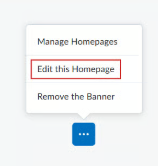
I must have made the edit incorrectly when I changed the Course home page banner image.
Kind Regards.
Brenda

Re: Has anyone had success connecting GitHub Classroom's LIT with D2L?
That's great to hear @Shobhit.S.365
Where would this be posted under Sys Admin or another heading? I'm not sure how to best track the rollout of this as we have some staff eagerly awaiting its release