Best Of
Re: Has anyone had success connecting GitHub Classroom's LIT with D2L?
That's great to hear @Shobhit.S.365
Where would this be posted under Sys Admin or another heading? I'm not sure how to best track the rollout of this as we have some staff eagerly awaiting its release

More detailed view of checklist progress for Instructors?
One of our faculty would like to replace a paper-based checklist-type assessment (it currently looks kind of like a rubric) and would like to adapt it for Brightspace using the Checklist tool.
We believe we can adapt the checklist to suit the purpose but would like to know if Instructor users can have a more granular view if student progress with a checklist. From what we know, Instructors view student progress in a checklist from the Class Progress in Course Admin.
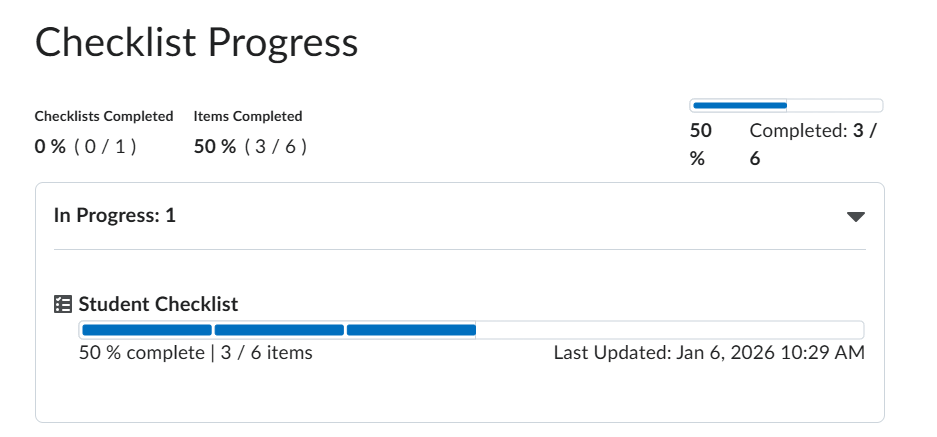
This view doesn't display what the student has completed. The Instructors need to be able to see the student's checklist and what has been completed rather than this generic progress bar-type view.
We're looking for something that looks more like an Instructor view of what the student sees:
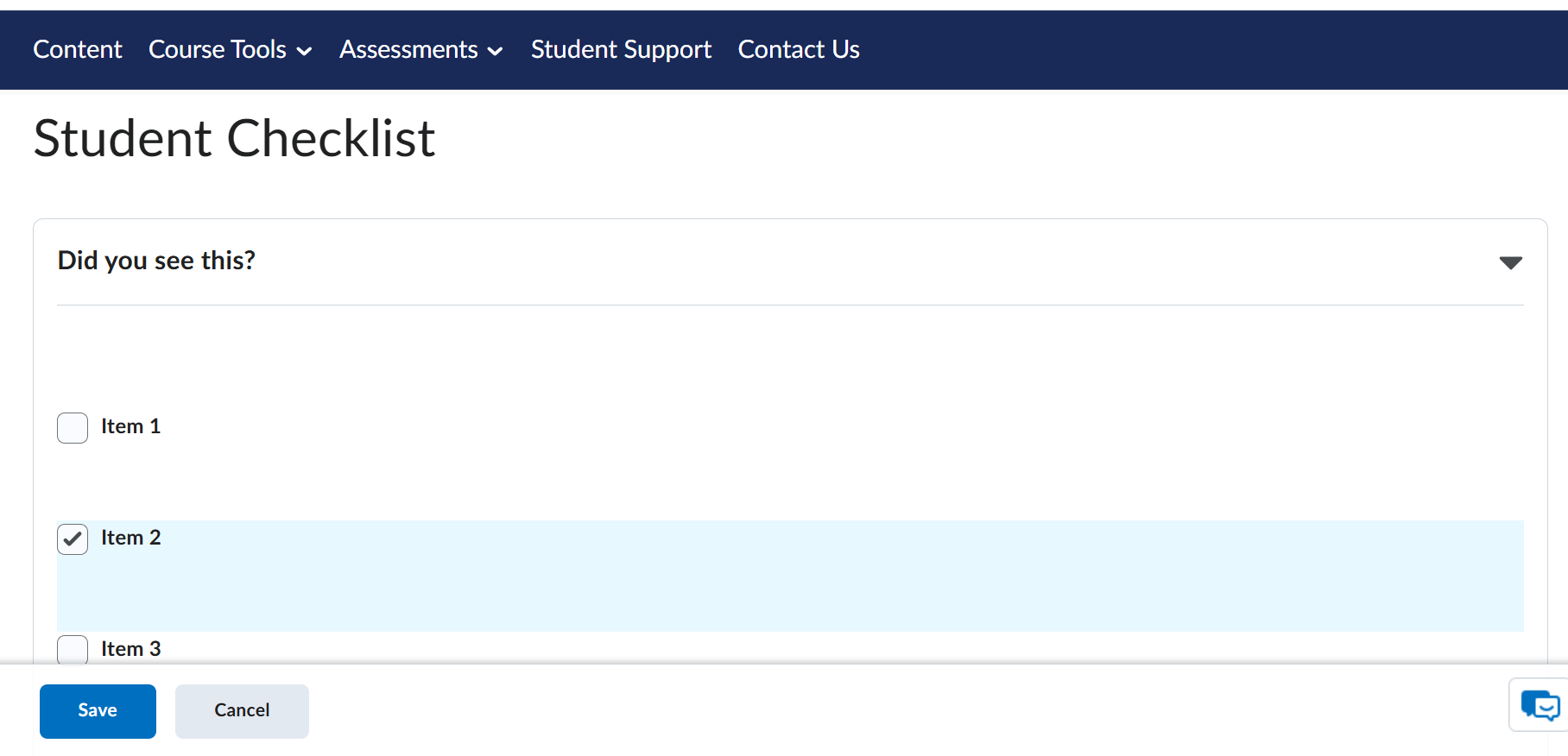
Is there some means of accomplishing this or is it currently the subject of a feature enhancement request?
Thank you for your time!

Re: Image Specs in New Content Experience
Hi Erin,
As a guide I recommend the image sizes that are in the D2L provided HTML templates accessed from the content tool.
Template banner images are 1200 x 300px. The image height is not so much of an issue, but the width is typically the one that matters most. Depending on your content, start with an image 1200px wide and reduce the width from there, testing in content as you go.
Some other information that may be useful listed below:
Homepage Banner
While the display size for the banner is 1170 by 200 pixels, it is recommended that the image you upload is 2400 by 960 pixels to ensure that the image you select displays clearly. Images are automatically resized for the appropriate location and display.
Theme Logo
SVG files are recommended for better scaling. The logo can be up to 260 x 60 pixels but will display at smaller sizes for smaller devices or when viewing a navbar with a course title.
Visual Table of Contents Widget - Unit Images
The widget will display a module image at roughly 238 x 100 pixels. The dimensions of an image should be at least this size but can also be larger. To avoid parts of the image getting cropped, you should maintain the same width:height ratio.
Template Banners
The default HTML templates have a banner width of 1200 and height of 272 – this is not a required size, but it is a good guide / approximation of effective practice.
Quiz Question/Answer Images
Use image files of less than 500 KB for best results.
Hope this helps!

Re: HTML pages open in default browser instead of Pulse app
Hello,
Just wanted to pick up this conversation - so can see in Dec 24 release notes that external links are meant to open in browser.
But surely standard HTML pages of content topics, (We use New Learner Experience) should be opening within the app, so that the user can navigate through the content?
Right now you open the app, select the course, navigate to content, and as soon as I click a topic it opens in browser. To get to the next topic you have to navgiate back to the app, and then select again.
Same with Quizzes - if I click a quiz that opens in browser, and I have to complete the quiz on browser instead
And likewise with Checklists - if a I click a checklist that opens in browser rather than on the app
I can't view my class progress on the app.
It literally feels like the only purpose of the browser is to show you what courses you are enrolled in and what topics are in that courses, but otherwise you need to use a laptop or tablet (on browser) to have a good experience
Its an awful user experience, surely this isn't how the pulse app was designed? If this is how the app was designed you might as well remove it from the app store.
Re: Has anyone had success connecting GitHub Classroom's LIT with D2L?
Thank you for reaching out in the Brightspace Community.
Upon reviewing our internal resources, it appears that Brightspace is currently working on the GitHub Classroom integration. Unfortunately, we do not have an estimated timeline for its implementation at this moment.
Once the integration is completed, our community documentation will be updated accordingly. In the meantime, I recommend keeping an eye on our Community site for any future updates regarding new integrations or feature enhancements.
Please feel free to reach out to us through the community if you have any more questions.
Kind regards,
Shobhit Sachdeva

Request for API Access to Start and Submit Quiz Attempts via REST API
Dear Brightspace Support Team,
We are currently integrating Brightspace with our internal systems and would like to automate the quiz-taking process for users via API. Specifically, we are looking for REST API endpoints that allow us to:
- Start a quiz attempt for a user
- Submit answers to quiz questions programmatically
- Finalize and submit the quiz attempt
We have reviewed the Valence API documentation and were unable to locate endpoints that support these actions. We would appreciate clarification on the following:
- Are there existing or upcoming API endpoints that support quiz attempt creation and submission?
- If not, is there an alternative approach (e.g., LTI, xAPI, or internal APIs) that Brightspace recommends for this use case?
- Is it possible to request access to internal or beta APIs for quiz submission workflows?
Our use case involves securely automating quiz workflows for verified users in a controlled environment, and we are committed to following Brightspace’s best practices for API usage and security.
Thank you for your support. We look forward to your guidance.
Best regards,
Vamsi

Re: How to Keep Line Breaks when using CSV to Upload to Quiz Questions
Hi, Jennifer. The HTML tag does not seem to be recognized within the Answerkey for a CSV file. How is a line feed kept in an Answerkey entry? Thank you.


Re: How to Keep Line Breaks when using CSV to Upload to Quiz Questions
@Wei.J.3309 Are you typing HTML in the next column right after the question text that includes the HTML tags? The CSV file requires that you specify when you are using HTML.

How to Keep Line Breaks when using CSV to Upload to Quiz Questions
or <p></p>, but neither works. Could you please help?