Best Of
Re: Community Updates
📢 New Course Alert: Designing Microlearning Content for Brightspace Support
Customer Spotlight: Designing Microlearning Content.jpg

The Designing Microlearning Content for Brightspace Support course, developed in collaboration with Isadora Mok-Kulakova, Senior Digital Learning Platforms Administrator at the University of Calgary, is now live!
In this course, Isadora shares practical strategies and real-world examples showing how short, focused microlearning videos can become a powerful tool for faculty development, just-in-time support, and Brightspace adoption.
🌟 Highlights:
🎥 Bite-sized video strategies for busy faculty
⚡ Just-in-time support that fits into teaching workflows
🛠️ Practical examples based on real faculty questions and pain points
This course is designed to help teams create scalable, sustainable microlearning content that supports instructors exactly when they need it.
Access the Course
📝 You must be a Brightspace client and logged into the new Single Sign-On for Community to access this resource.
🚌 Access Course
Languages Available: English

Re: What is the current stable version of D2L Brightspace API version?
Hi Suhadini,
Thank you for reaching out to us through community!
For all the above API's the current stable versio is 1.82+
To know more about the API's that are listed above, please refer the references below
Please let us know if you need any further details
Thanks
Sreelakshmi


Create PAT association between tutor and student in course section
The API only has a PAT role when creating an enrolment for a user but the PAT is a one to one association between a tutor and a student. How to set this up with the API?
e.g. in a course section, 006 is a student with the Student role and 007 is a tutor with the PAT role. How to use the API to say that 007 is the PAT for 006?
Re: Competencies Actively Used
Hello Mary, thanks for your question!
I'm thinking I would go a bit deeper than this, so you can actively identify any course where a competency or linked activity has been interacted with, and not just evaluated. This would ensure you're not missing any users who should be contacted.
The Brightspace Data Reports "Competency Objects" and "Competency Log" go together. In Objects, you'll find Learning Objective and Competencies within your system, as well as the object ID and the Org Unit ID. The object ID column can be matched up to the Log dataset. From here, you can see when that object was last updated (and what was done). This is useful since you can make a direct match to the courses, and identify the instructors who have been active with the tool.
Next, "Competency Activities" and "Competency Activity Log" are useful to see if an item has been attached to an evaluation item. The Log dataset will show when something was modified, and you can use the Activity ID column to match up with the "Competency Activities" dataset to see what that assessment type was, and the Org Unit ID where it's at.
CLOE will definitely help you, but I think the above reports will also ensure you're capturing all recent system use which may not be tied to an actual evaluation.
Hoping that this helps!
~Stephen

Re: D2L to D2L LTI Docmentation
Hi Jeff,
Have you tried this documentation:
I hope it helps!

Re: Availability of Course Templates
Hi Jeffrey,
Thank you so much for the response. We will surely explore all the resources you mentioned in your response. It is our first time using the D2L platform. I will surely ask for help again if needed.
Sincerely,
Rakesh

Re: Is it possible to edit a system-wide grade scheme?
Thank you, @Jeffrey.M.844! The more I think of it, the more sense it makes that a grade scheme that is currently in use is not editable. Thanks for your answer, I appreciate it.

Re: Is it possible to edit a system-wide grade scheme?
Hello @Michelle.L.366,
It is possible to edit a grade scheme, even while in use, but only in certain circumstances; namely when used as a representation of a numerical grade entry. By contrast, if the grade scheme is used by a grade object where the symbol is used as an 'input' (i.e select box grade item), then you cannot modify the scheme start %
When this is true for the scheme you're targeting, the edit interface should note this at the top of the interface, and additionally you should see a context/help menu (?) that exposes the list of grade items where this is the case.
example:
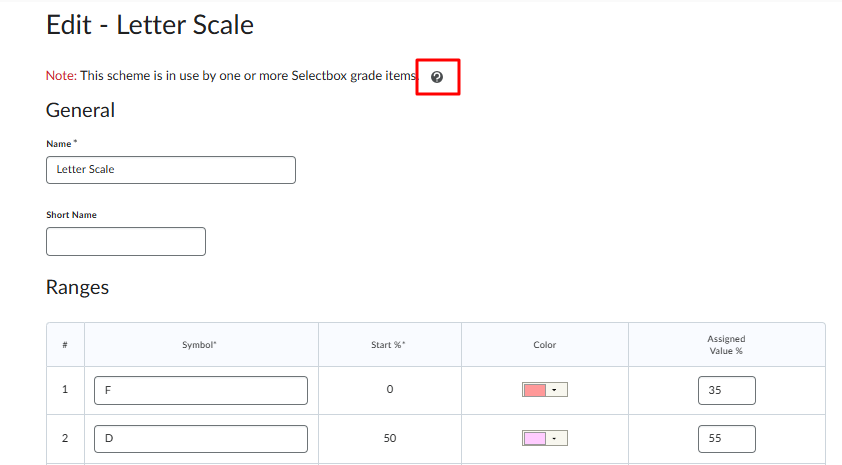
In order for you to be able to edit a scheme where the scheme is already in use in this way, you'd need to first disassociate that scheme from the grade items where its in use; otherwise, the scheme start % is locked.
I hope the helps!
Jeffrey

Re: Fixed Issues List Updates
The Fixed Issues List is now an embedded spreadsheet (login required), updated with every revision. Hotfixes follow your CD schedule, but any urgent fixes will be announced via Hotfix Notification emails. Make sure to bookmark and customize notifications to stay updated.