Hi, how do i make a pass/fail grade item where pass (100%)/ fail (0%) also includes the option for an exceptional grade (115%)
And the pass grade is 78.9%, this is for a quiz
thanks!!
Hello Charmaine. Thanks for your question!
This should be mostly possible, however I think where you'll have a problem is with a grade over 100%.
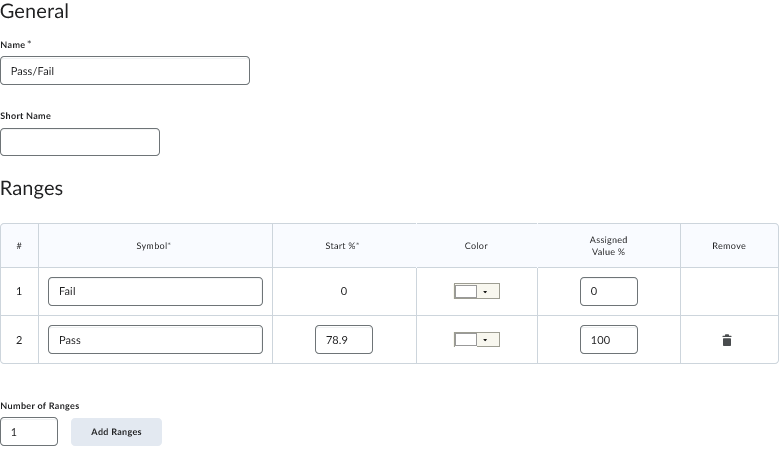
You'll need to set up a new grading scheme within your course. Head to the Grades tool, and select Schemes along the top. This new scheme will be specifically for this requirement of 78.9% to pass.
Select New Scheme and give it a name. You only need two Ranges, so you can delete #3. It's only possible to go to 100%, so this is why it's limited from going to 115%.
For #1, this will be the 'fail' entry. Enter the name required, and under Assigned Value %, enter 0.
For #2, this will be the 'pass' entry. Enter the name, and under Start %, enter 78.9. Then, in Assigned Value, enter 100:
Now, you can set up the grade item itself from within your quiz.
When you set up the quiz, under the Grade Out Of area, you will want to click on the drop down menu and select Edit or Link to Existing.
The name of your quiz will be pulled into this new grade item name. Select Choose Grade Scheme, and select the scheme you set up in the previous steps (it should be at the bottom). Once you save everything you should be good to go.
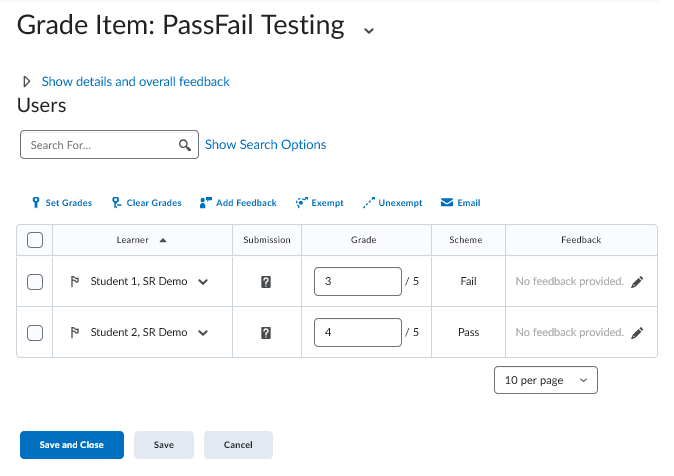
I did a test with two users to ensure that everything works automatically. The first user got 3/5 (60%) on their quiz, therefore they are marked as a fail. The second user got 4/5 (80%) and they are marked as a pass. This happens automatically once they submit their quiz (assuming your quiz settings are to grade automatically, etc.):
In order to get your desired max of 115%, it might be best to create a category for the quiz and add the pass/fail grade item, along with a new grade item that's marked as a bonus, with a maximum points/weight of 15. You would need to add this number manually though.
Hope this helps get you on the right path!
~Stephen
Connect with our Known and Fixed Issue information to learn about improvements made to Brightspace.
Connect with leaders in pedagogy, accessibility, learning experience design and more
The Accessibility category serves as a single point of access to three avenues in Brightspace Community leading to the Accessibility Academy, Accessibility Library and Accessibility Discussions. These avenues offer courses and articles about accessibility to enhance accessibility knowledge and a group of accessibility enthusiasts to stay connected with.
Have questions about how to use Community? Stay tuned with updates, feedback opportunities and more for the Community here!
Connect with and ask questions on how to best use the Brightspace Product to transform the way your users learn!
Connect with product experts to learn more about tools frequently used by Brightspace Developers such as APIs and integrations!
Want to learn more about Brightspace Partners and Integrations? This is the place to be!
Stay up to date with product updates and announcements in this category.
Connect with our release information to learn about monthly improvements and updates to Brightspace.
Learn more about all the upskilling opportunities with courses and resources offered via the Brightspace Learning Center, Brightspace Guided Training and other training opportunities!