Good morning,
I have 2 questions:
Many thanks
Hello @Jessica.T.7773, thanks for your question!
I investigated your multi-select query, but since we don't have custom weights available for the question type, I haven't been able to work out a solution for you. You can only select one option, but I might suggest using the multiple choice question type, since it would allow for custom weights, which you could set to 100 for each answer option.
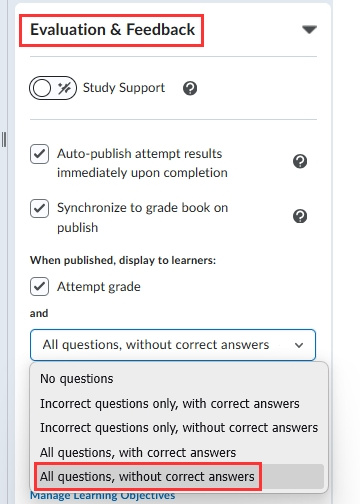
For the display of a completed quiz, without your students seeing the correct/incorrect answer icons, I would set the display options to "All questions, without correct answers". You can find this in the quiz edit area, under Evaluation & Feedback:
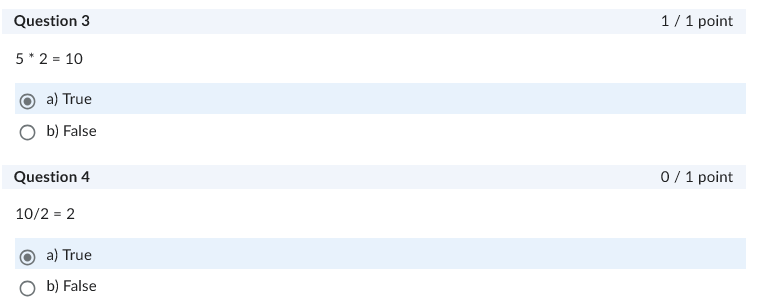
When a student is viewing the quiz, this is how it would look for them:
Hoping that this helps! If you need any further assistance please reach out to us.
~Stephen
Hello @Jessica.T.7773,
Thank you for reaching out to the Brightspace Community!
I would like to add that this functionality is not currently available for Multi‑Select question types, and there are no options to customize how correct or incorrect answers are displayed in Quiz Results.
While this isn't a feature yet, we collect feedback and ideas in Product Idea Exchange (PIE), where educators can submit new ideas and upvote existing ones they'd like to see implemented.
Please note that you must be logged in to the Community to access PIE. We recommend submitting a PIE request for this. You can follow the steps outlined here to access PIE: Community FAQ's❓ - Brightspace
Please also consider using the Multiple‑Choice question type as previously suggested, as it may better support the behavior you are looking for.
Thanks, Ana
Connect with our Known and Fixed Issue information to learn about improvements made to Brightspace.
Connect with leaders in pedagogy, accessibility, learning experience design and more
The Accessibility category serves as a single point of access to three avenues in Brightspace Community leading to the Accessibility Academy, Accessibility Library and Accessibility Discussions. These avenues offer courses and articles about accessibility to enhance accessibility knowledge and a group of accessibility enthusiasts to stay connected with.
Have questions about how to use Community? Stay tuned with updates, feedback opportunities and more for the Community here!
Connect with and ask questions on how to best use the Brightspace Product to transform the way your users learn!
Connect with product experts to learn more about tools frequently used by Brightspace Developers such as APIs and integrations!
Want to learn more about Brightspace Partners and Integrations? This is the place to be!
Stay up to date with product updates and announcements in this category.
Connect with our release information to learn about monthly improvements and updates to Brightspace.
Learn more about all the upskilling opportunities with courses and resources offered via the Brightspace Learning Center, Brightspace Guided Training and other training opportunities!