Observed in Person Assignment - Marking it Complete

Lia.H.3992
Lia.H.3992 Posts: 3 🌱
edited March 31 in Higher Ed / Postsecondary

Hi,

I have been trying to find the answer, but I haven't had much luck. It seems like everything I find partially answers my question or only discusses how to set up in-person/on-paper submissions.

When using an observed in-person/on-paper submission, can you "override" any of the selected "Marked as Complete" options when you are in the assignments tab? I found a post saying that you (an instructor) can mark an assignment as complete or incomplete when "Manually by Learners" is selected, but it doesn't mention the other 2 options. It also doesn't say if it "overrides" the student marking the assignment as complete or if it is in addition to them marking it as complete.

I really don't want to use the "Manually by Learners" or "Automatically on Due Date." "Automatically on Evaluation" is a more suitable option, but I really don't want to have to provide feedback or a score. It is literally a completion item. When the student completes their assignment, or whatever they are supposed to do, I want to mark it as complete. Can I "override" the "Automatically on Evaluation" by manually marking that item as complete or incomplete?

Thank you!

Also, here is the link to the post I am referencing.

Best Answer

  • Stephen.R.50
    Stephen.R.50 Posts: 113 image
    Answer ✓

    Hello @Lia.H.3992, thanks for your question!

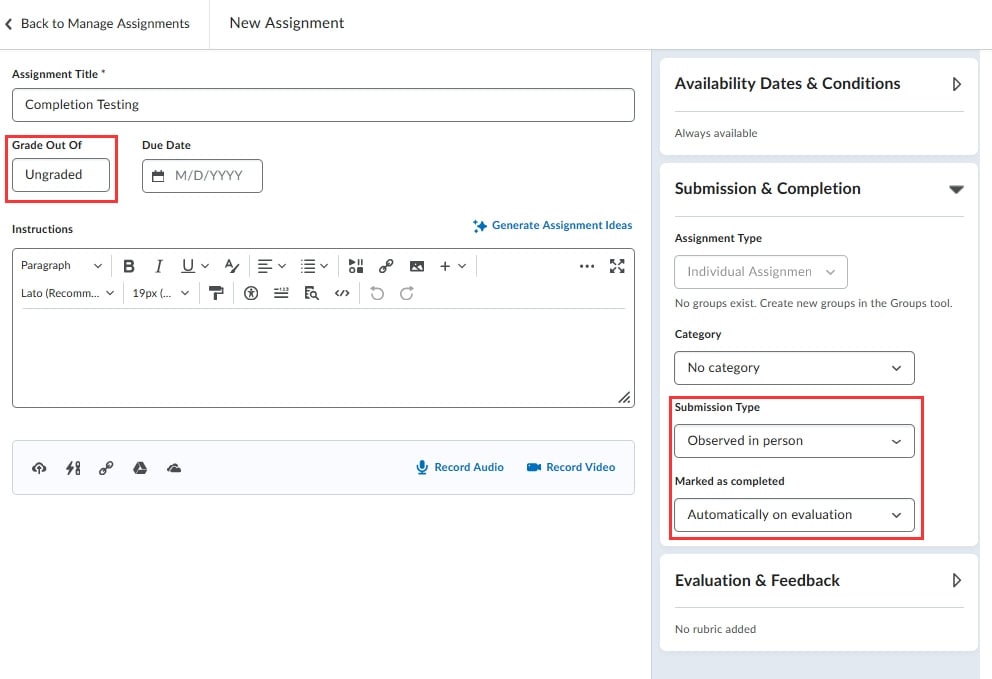
    I think you could do this using the Automatically on Evaluation option by leaving the Grade out of setting, within the Edit Assignment area, to Ungraded:

    2026-03-30-000435.jpg

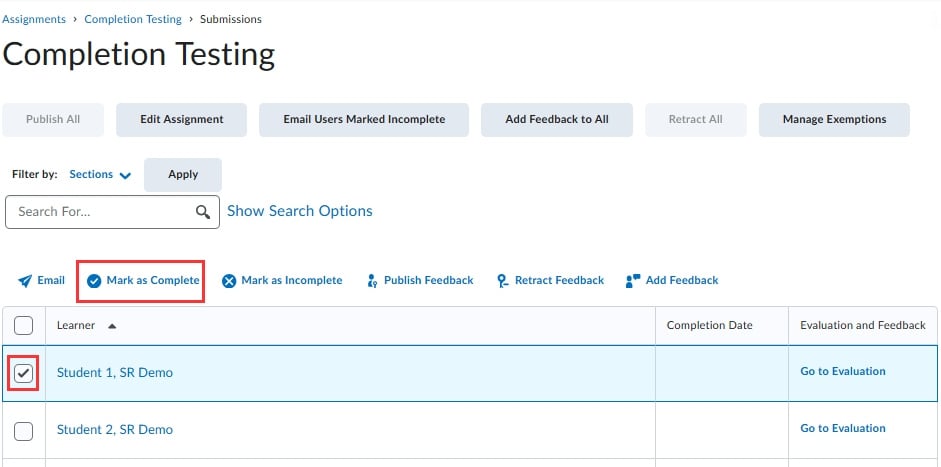
    Once you begin to start marking learners as complete by going to View Submissions, you can use the checkbox next to a learners name and then select the Mark as Complete button along the top:

    2026-03-30-000436.jpg

    This learner will then be set as complete, and no further action would be required on your part, including the addition of a grade value or comments.

    2026-03-30-000437.jpg

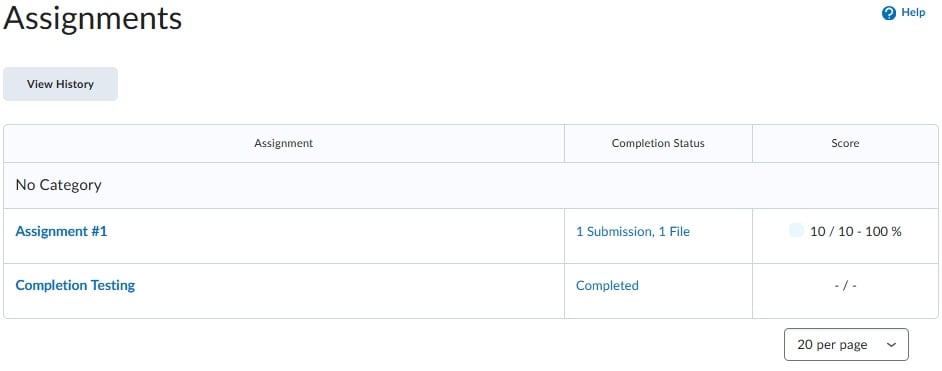
    From the learners point of view, they will simply see the Assignment set as complete:

    2026-03-30-000438.jpg

    Hope that this will work for your use-case. If you have any questions please let us know!

    ~Stephen

Answers

  • Lia.H.3992
    Lia.H.3992 Posts: 3 🌱

    Hello, @Stephen.R.50!

    Thank you so much for your response! I don't have access/don't know how to set up demo students, and I don't have any students enrolled in the course yet to see how everything works once it's live.

  • Stephen.R.50
    Stephen.R.50 Posts: 113 image

    Hi @Lia.H.3992,

    You are very welcome! It also makes it trickier without a demo student while using a complete on evaluation setup, since you aren't able to run through the preview process and 'grade yourself' to see how everything looks, like you would with a regular Assignment setup.

    If we can help further please let us know!

    ~Stephen