What is "Active Display" in the Assignments tool?
In the current (Feb 2026) Release Notes, in one of the changes for the Assignments tool, I see the mention of "Active Display", capitalized, as though this were a brand or other proper name for something. This term is mentioned in a handful of places in D2L's online documentation, but without any real context in any of those cases. I've never seen this term before, and I've been supporting D2L Brightspace for 10 years.
What is it? How do we know if it's something we have, or how/if it's relevant to our situation?
If you are introducing new terms into your documentation, could you please make a point of defining them somewhere (even if only in their first mention), so that the term is searchable, we can find it, and figure out what you're referring to?
Best Answer
-
Hello @Shelley.L.680,
Excellent question, and I agree we can make it clearer what we mean by Activity Display.
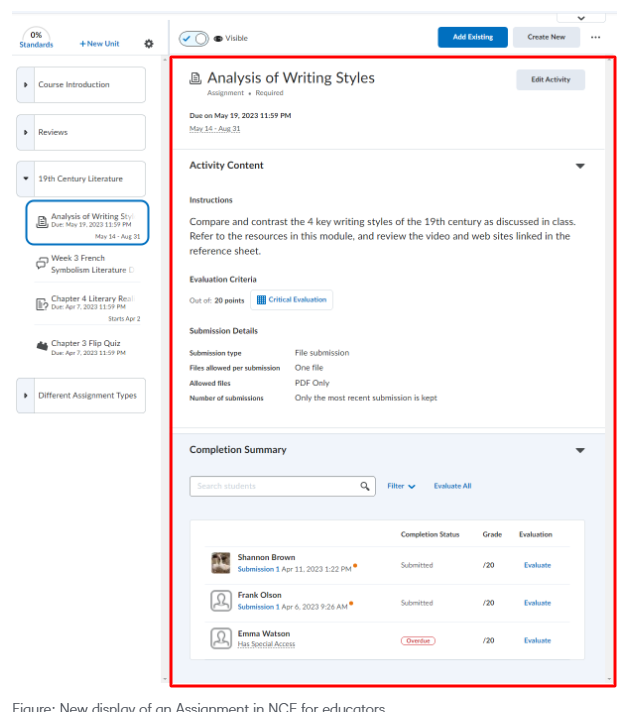
Activity Display refers to the viewing area of a Brightspace activity (i.e. Discussion, Assignment, Quiz) within the content tool when the New Display Pages for Assessable Activities in New Content Experience is enabled — available exclusively within the New Content Experience (NCE). When both are enabled, the Activity Display will look like it does below:
If your organization has not yet enabled or evaluated NCE, here are some resources I recommend reviewing:
I hope that helps!
Jeffrey
Answers
-
Hi Jeffrey,
Thanks for the explanation. We're not ready to switch to NCE right now, but we have started learning more about it, and trying it out in some test shells, in anticipation of forced migration to it in the future.
So, in the context of the February 2026 Release Notes, for the item called "Assignments – Improved error messages when uploading unsupported file types", does this mean that we're not seeing the improved error messages when a student tries to upload an assignment submission that is a file type that is not allowed, because the shell we're testing in does not have NCE enabled? In my testing, we're seeing the same error message(s) as we do in our production instance, which is only on the January 2026 release.I didn't realize that when using NCE, it would influence how other tools in Brightspace look (even if only in subtle ways). If this is the case, this may delay our move to NCE further, because it would require updates to a wider range of our support materials.
Related to the move to NCE, other than the materials that show how NCE looks different (I've already seen all of those materials), is there any information about why NCE would be an improvement in functionality? So far, my experience with NCE doesn't indicate any changes to functionality that would be of benefit to our users. The interface seems more suitable for a K-12 audience than for our post-secondary institution, so we would face a lot of pushback from our users, if we made the switch.
Thanks,
Shelley
-
Hello again,
I'll respond in two parts because your questions about content experiences is a larger conversation that would arguably be better supported through a conversation between your organization and its D2L Customer Success Manager (CSM)
RE: Assignments – Improved error messages when uploading unsupported file types
My understanding of this update — based on what is noted in the release notes — is that this is not necessarily dependent on NCE. Within the release, it describes what one should expect depending on the workflow / UI that is applicable, including: Assignment submission page, Legacy content assignment submission page, and Improved feedback in Activity Display. I will follow-up internally to see if we can update the release with some screenshots of each of these.
RE: New Content Experience and New Display Pages for Assessable Activities
Enabling the New Display Pages for Assessable Activities is dependent on NCE, but is not currently required to be enabled when adopting NCE. This New Display Page for Assessable Activities (aka Activity Display) is currently controlled by config d2l.Tools.Content.LessonsRenderActivitiesInline.
Additionally, enabling NCE and/or the New Display Pages for Assessable Activities does not have any effect on how a user experiences the tool when accessed directly/outside the content tool itself (i.e. via navbar link to Assignments, Discussions, Quizzes etc). It is simply a different view and way to experience activities within the flow of content, when NCE is in use.
To your latter point about there not yet being any clear differentiators that make NCE unique, I would argue that the availability of the New Display Pages for Assessable Activities is one of many (more to come) unique experiences / features that bring value to both the learner and instructor.
I'd like to point you here for more resources that could help with your planning and eventual move to NCE in the future: Content Experience Resources.
Finally, I'll finish where I started — I would recommend that you take this discussion offline and have your organization connect with your CSM to have a discussion about any plans or further questions you might have about NCE.
I hope that helps!
Jeffrey
-
Hi Jeffrey,
Thanks for your detailed response.
I'll keep an eye out for the update in the Release Notes.
I'll take a look at these resources as a part of our eventual migration to NCE. I wasn't aware of "New Display Pages for Assessable Activities", which adds some additional changes I wasn't aware of. That might be something that we consider implementing a little later (after NCE).
We'll definitely chat with our CSM about this, when we get closer to this change.
Best,
Shelley