Quiz - custom feedback based on overall score

I have a series of weekly quizzes for formative assessment. I want to customise the feedback based on the overall score of the quiz e.g. students with over 80% are encouraged to attend a more advanced tutorial group. Is there a way to automate this in the quiz without needing to rely on intelligent agents?
Answers
-
Yes, it is possible to automate this process without using Intelligent Agents within the quiz itself. One way is through displaying different submissions/reports depending on their total quiz score. Those who will have scored 80% and above may receive feedback from the quiz stating their outstanding performance and should attend an advanced tutorial group. Meanwhile, those whose scores fall in between may be encouraged to continue developing their knowledge and skills, while those who did poorly on the quiz may need further assistance. By creating score ranges and assigning feedback for each score, one may allow the quiz to give a suitable response to each individual.
-
Hi Suzy.P.794,
As noted by Veronica.A.7564 yes this is possible.
In Brightspace, go to: Quizzes → select the quiz → Evaluation & Feedback → Customize Quiz Results Displays
From there, you can configure what learners see after submitting, such as score, questions, answers, correct answers, feedback, and timing for additional result displays.
Edit the current view or create an Additional View → put a tick in the checkbox next to A specific attempt and And a specific grade range achieved → Define your grade range → Add your Custom Message → Save and test
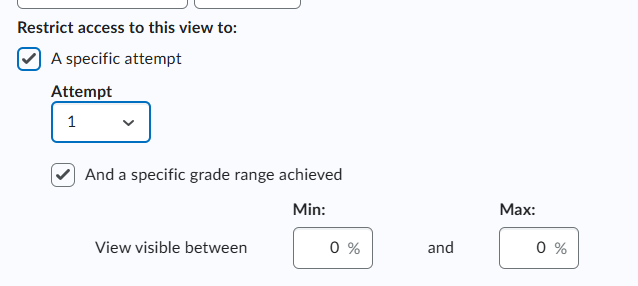
The following D2L Community resource guides you through the steps to follow,
Hope this helps!


