Students within a group given the same grade: Want students to have individual grades
An instructor created a group assignment in which each student submitted their own individual work. However, when she graded the submissions, Brightspace automatically applied the same grade to all members of each group. She now needs to assign individual grades to each student.
To overwrite the auto‑applied group grades, the instructor followed these steps:
How to Manually Override Individual Grades (Gradebook Method)
- Go to Grades.
- Click Enter Grades.
- Locate the column for the assignment.
- Find the student whose grade needs to be updated.
- Click in their grade cell and enter the correct score.
- Press Enter or click Save.
- Repeat for each student who requires an adjusted grade.
The instructor was also given this information:
- If you return to Evaluation on the assignment and republish the group grade, Brightspace may overwrite the individual overrides and assign the same grade to every group member again.
- After overriding individual grades, do not republish the group evaluation unless you intend to reset all students to the same score.
- Brightspace does not allow converting an existing group assignment into an individual assignment once student submissions have been made.
Unfortunately, when the instructor changes the score of one student it still changes all the students' scores to the same grade.
Any recommendations?
Thank you very much for your guidance!
Answers
-
@Kay.H.645 Hi Kay, this method still works for us. The only way the grades for all group members get changed is if the evaluation is published again from Assignments.
Can you check the Event Log for the grade item to see when the grades were changed and by whom? On either the Enter Grades or Manage Grades tab, click the down arrow next to the grade item and choose Enter Grades from that drop-down list. Then click the down arrow again next to the title at the top (it should start with Grade Item: ) and choose View Event Log.
-
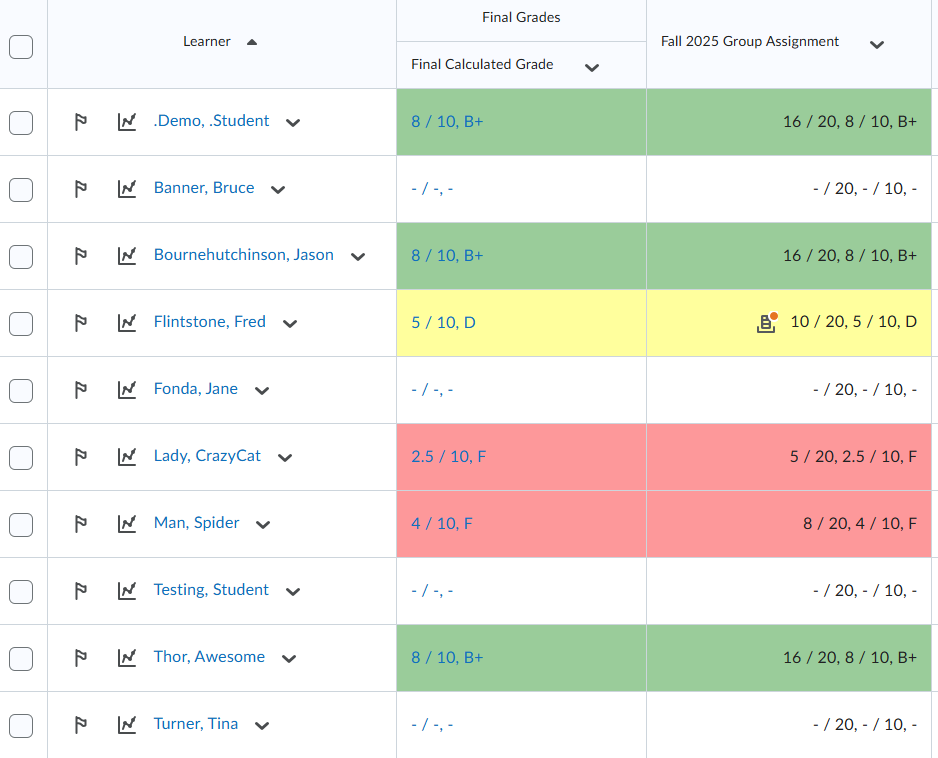
Hi @Kay.H.645 I followed those steps in one of my demo courses and it worked for me (see image): For my Groups you can see where each got an assigned score through groups all giving them the same score per group. Then, I just entered a different score for Fred Flintstone and the others did not change.
I also added different score for Crazy Cat Lady and Spiderman and those too are not changing the rest of their group marks. Is the instructor doing the grading via the Gradebook/Enter Grades?
-
Susan and Jennifer…thank you so much for your responses.
Here's what we discovered. While the instructor entered the individual grades via Enter Grades, the instructor later opened another submission in Assignments to review and add feedback and clicked Save. As a result, Brightspace re-synced the group score from Assignments and overwrote the individual adjustment in Grades. The student’s individual score was replaced with the original group score.
This overwrite appeared to happen if the instructor clicked Save, Update, or Publish in the Assignments tool.