Hello Susana,
Great question!
In Brightspace, there isn’t a way to add conditional logic directly within an analytic rubric. The total is always calculated as a straight sum of the selected levels, so you can’t check for something like “no zeros” as part of that calculation.
You can use a Formula Grade Item in the Grades tool, but it only works with the overall score — it doesn’t have access to individual rubric criteria. So even if you apply a formula, it won’t be able to tell whether any specific criterion was scored as zero.
If you need to confirm that no criterion received a zero, the only reliable option is outside the grading calculation — for example, using Brightspace Data Sets, where rubric criterion-level scores are available for reporting.
Please let me know if you have any doubts.
Raquel
Hello @Susana.C.858, thanks for your question!
I unfortunately don't know of any way for you to directly use a formula to meet your requirement, but I was thinking of possible alternatives.
Depending on how many criteria you have, and assuming that one of those levels is zero, you would be able to specify the overall score to reflect that a certain level needs to be achieved which would preclude any zero's within the rubric
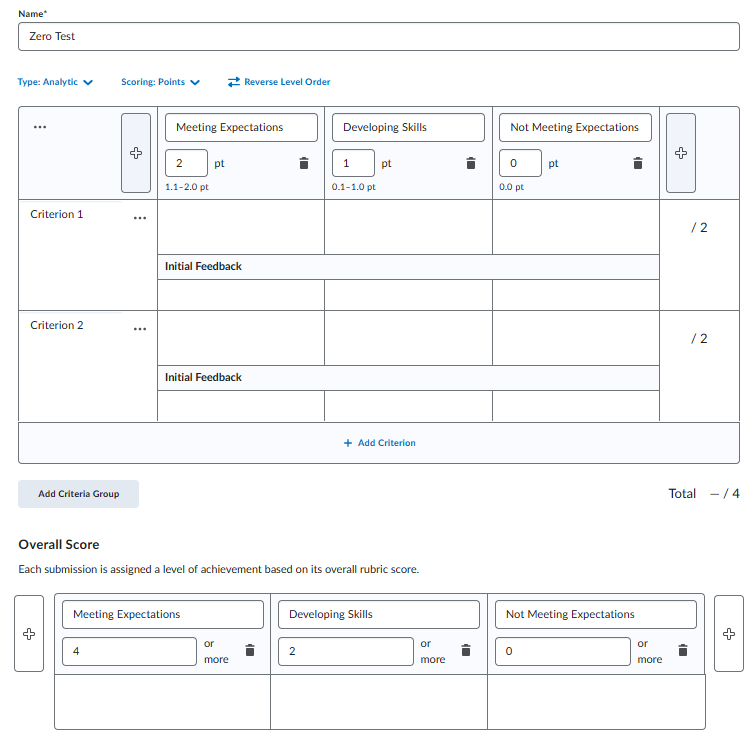
Here's the example I created:
Since I have two criteria, the only way a student would not receive any zero selections if if they have 2 points or above, which is also reflected in the "Developing Skills" Overall Score.
There's then three ways I'm thinking of that you could identify when a student received a zero or "Not Meeting Expectations":
Hope one of these options may help you. Let us know should you have any further questions!
~Stephen
Connect with our Known and Fixed Issue information to learn about improvements made to Brightspace.
Connect with leaders in pedagogy, accessibility, learning experience design and more
The Accessibility category serves as a single point of access to three avenues in Brightspace Community leading to the Accessibility Academy, Accessibility Library and Accessibility Discussions. These avenues offer courses and articles about accessibility to enhance accessibility knowledge and a group of accessibility enthusiasts to stay connected with.
Have questions about how to use Community? Stay tuned with updates, feedback opportunities and more for the Community here!
Connect with and ask questions on how to best use the Brightspace Product to transform the way your users learn!
Connect with product experts to learn more about tools frequently used by Brightspace Developers such as APIs and integrations!
Want to learn more about Brightspace Partners and Integrations? This is the place to be!
Stay up to date with product updates and announcements in this category.
Connect with our release information to learn about monthly improvements and updates to Brightspace.
Learn more about all the upskilling opportunities with courses and resources offered via the Brightspace Learning Center, Brightspace Guided Training and other training opportunities!
![Photo of [Deleted User]](https://w1.vanillicon.com/v2/1b5f73b1b5f5d5ad698288147f32158a.svg)