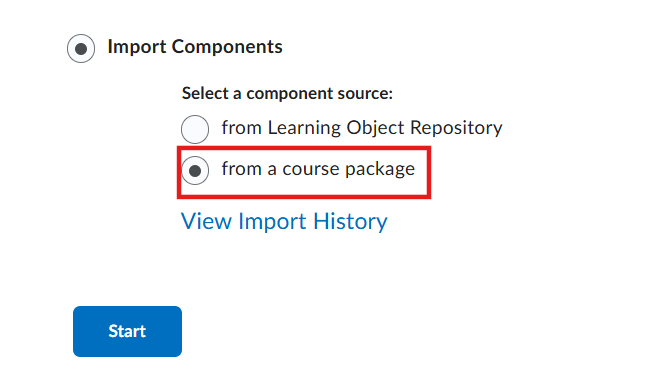
We have been working with our Math department to see if we can convert an .imcss file into a .cvs file with the MyOpenMath pre-made items. As MyOpenMath does not currently have an LTI integration, we are open to ANY ideas.
Thanks for your help!
I misunderstood the instructor. They were wanting to use Respondus Lockdown Browser with the MyOpeMath's LTI integration. Has anyone done this?
Hi @Jane.O.1385!
Thank you for reaching out to the Brightspace Community!
Considering that Respondus LockDown Browser “locks down" only the Quizzes tool in Brightspace and not External LTI tools and prevents navigation to other sites or applications, the launching of the MyOpenMath, which may occur outside Brightspace, may not be locked down or controlled in the same way as in native quizzes created in Brightspace.
Therefore, if the instructor wishes to use MyOpenMath’s native assessments, the Respondus LockDown Browser may not secure external LTI tools in case the assessments launch externally.
We hope this helps, and please feel welcome to reach out with more questions.
Best regards
Miguel B,
@Miguel.B.106 ,
Thank you for this reply! Here is the follow up question: when we tried to import the quiz as an .imscc file in the question library, into her files, and in the LOR. It wasn't readable.
I've tried to find a converter for .imscc to .cvs file upload, but I've had no luck. Other than hand keying in all the questions, do you have any other suggestions on how the instructor can import the quiz into Brightspace?
Hi @Jane.O.1385👋,
Thank you for following up!
Brightspace supports .imscc files based on the IMS Common Cartridge standard, including all supported versions of the format. However, the import and conversion process relies on source-specific plugins for recognized LMS platforms (such as Canvas, Schoology, Jenzabar, etc.).
.imscc
In practice, this means the following:
Since MyOpenMath is most commonly integrated through LTI, another option would be to configure it as an external LTI tool, so quizzes are launched directly from MyOpenMath rather than imported into Brightspace. That said, based on your original requirement, this approach would not support LockDown Browser.
To investigate the import issue further, I would recommend opening a support case so we can review the package structure and confirm whether the format is fully supported or if there are any issues with the exported package itself. Kindly reach out to your Helpdesk to have one initiated.
We hope this helps, and please feel free to reach out with any additional questions.
-Isidora☺️
Connect with our Known and Fixed Issue information to learn about improvements made to Brightspace.
Connect with leaders in pedagogy, accessibility, learning experience design and more
The Accessibility category serves as a single point of access to three avenues in Brightspace Community leading to the Accessibility Academy, Accessibility Library and Accessibility Discussions. These avenues offer courses and articles about accessibility to enhance accessibility knowledge and a group of accessibility enthusiasts to stay connected with.
Have questions about how to use Community? Stay tuned with updates, feedback opportunities and more for the Community here!
Connect with and ask questions on how to best use the Brightspace Product to transform the way your users learn!
Connect with product experts to learn more about tools frequently used by Brightspace Developers such as APIs and integrations!
Want to learn more about Brightspace Partners and Integrations? This is the place to be!
Stay up to date with product updates and announcements in this category.
Connect with our release information to learn about monthly improvements and updates to Brightspace.
Learn more about all the upskilling opportunities with courses and resources offered via the Brightspace Learning Center, Brightspace Guided Training and other training opportunities!