Is there a way to see the number of views for a specific initial post or reply in a Brightspace discussion?
I see the discussions in this D2L Community site include "views" so why can't the discussions in our courses also have that feature? 🙂
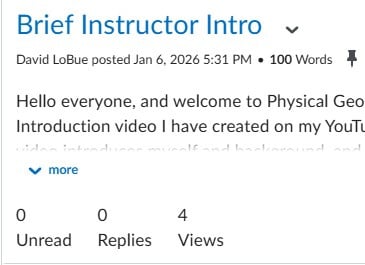
I think that might depend on your school as I am able to see the number of views of a post at my current schools. Unless you are talking about once you are inside an individual thread, then there is no count for specific threads or replies because they are all on the same page and there is no way to tell which specific reply or thread is being viewed. At least that is my guess. The screenshot is from one of my current classes on D2L.
Thanks, David, but that's not what I see in my discussions. Here's a screenshot of my view of a discussion post:
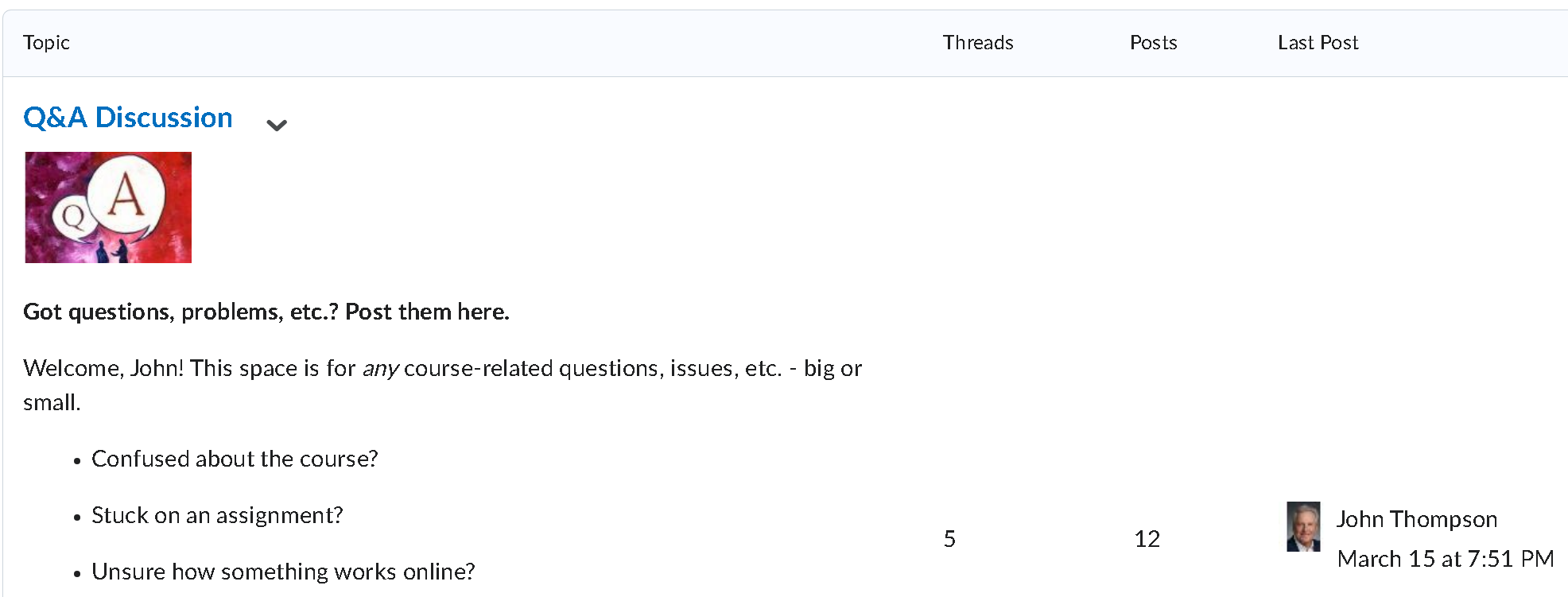
Here's a screenshot of the discussion prompt:
I'd like to see how many students actually view each initial post and reply to the discussion prompt.
Then it is probably how your school has D2L set up. For example, I get a word count for discussion threads at one school, but do not get a word count on discussions at another school. The feature for tracking number of views is obviously available based on my screenshot, but it depends on what your school has paid for or has included in your course shells. I would contact your IT department or D2L help at your school to inquire.
I could be misunderstanding what you are looking for. My screenshot is of an individual thread, whereas your screenshot is of the topic. I have pretty much the same view as you for the topics showing number of posts and threads, but the number of views is tracked for individual threads once you have clicked on the topic and not the topics themselves. My screenshot is stating that 4 students viewed my thread. Your screenshot is showing 5 threads, which I would assume would mean 5 students posted a reply to the discussion prompt and there are 7 replies considering there are 12 total posts.
Currently, however, the only option for tracking of views is by each individual thread and there is no way to know if a student viewed the thread unless they actually click on it and open the thread.
I actually included two screenshots in my post - the first one is for an individual post reply. The second screenshot is for the discussion prompt (truncated for brevity here). I'll connect with my local Brightspace administrator and see what's what.
Connect with our Known and Fixed Issue information to learn about improvements made to Brightspace.
Connect with leaders in pedagogy, accessibility, learning experience design and more
The Accessibility category serves as a single point of access to three avenues in Brightspace Community leading to the Accessibility Academy, Accessibility Library and Accessibility Discussions. These avenues offer courses and articles about accessibility to enhance accessibility knowledge and a group of accessibility enthusiasts to stay connected with.
Have questions about how to use Community? Stay tuned with updates, feedback opportunities and more for the Community here!
Connect with and ask questions on how to best use the Brightspace Product to transform the way your users learn!
Connect with product experts to learn more about tools frequently used by Brightspace Developers such as APIs and integrations!
Want to learn more about Brightspace Partners and Integrations? This is the place to be!
Stay up to date with product updates and announcements in this category.
Connect with our release information to learn about monthly improvements and updates to Brightspace.
Learn more about all the upskilling opportunities with courses and resources offered via the Brightspace Learning Center, Brightspace Guided Training and other training opportunities!