How to enable add rubrics button.

Mehmet.T.4742
Mehmet.T.4742 Posts: 3 🔍
edited April 6 in K-12

Hello, we are attempting to add rubrics to our assessments, but the feature appears to be disabled. Although we can create new rubrics, the 'Add Rubric' button is greyed out and cannot be selected. We haven't been able to find a setting to enable this—could you please assist us in resolving this?"
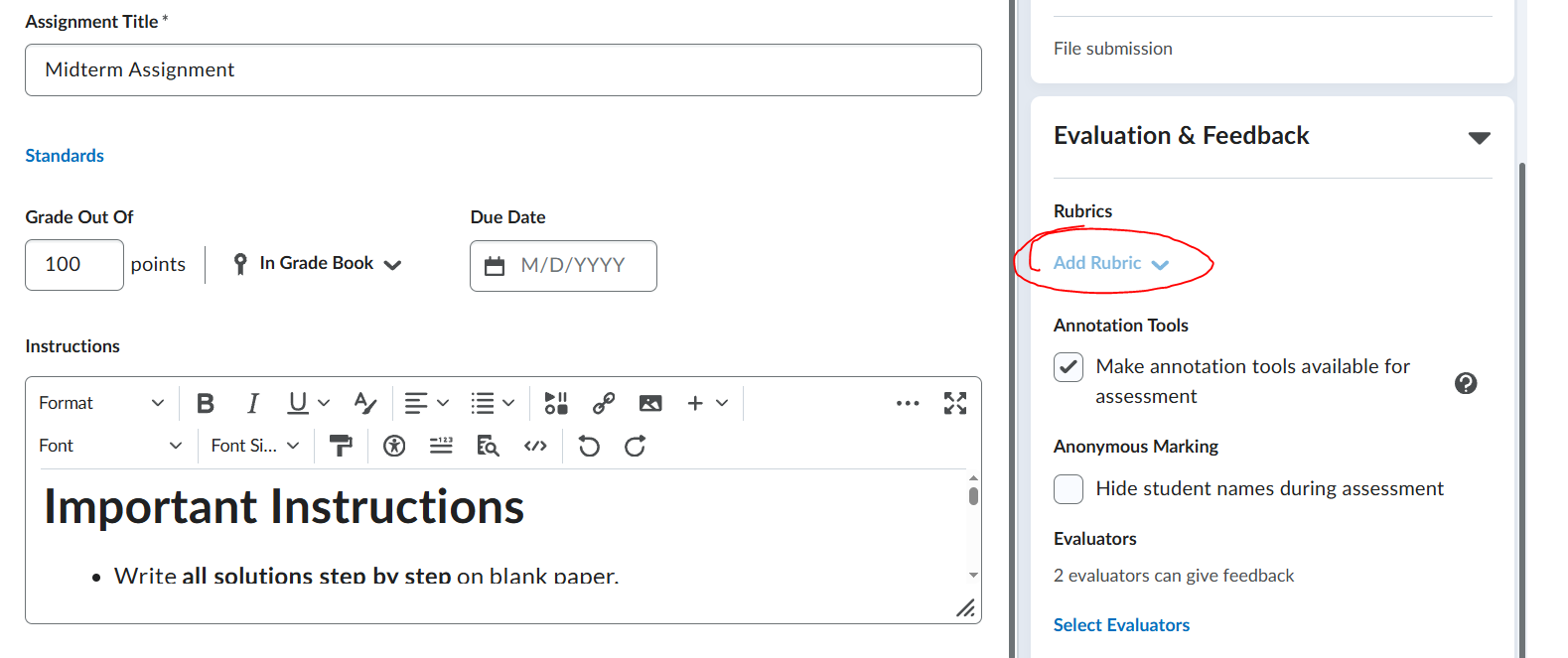
image.png

Answers

  • Chris.S.534
    Chris.S.534 Posts: 398 image

    Hi Mehmet,

    From the dscription provided, assuming you have all the necessary role permisisons in place, it's likey the Rubric status is set to 'Draft'. After changing the Rubric status to 'Published' the option to 'Add Rubric' should become active.

    Hope that helps!

  • Mehmet.T.4742
    Mehmet.T.4742 Posts: 3 🔍

    Hi Chris,

    The rubrics are published, but the add rubrics button is still greyed out. It is disabled and I need a way to enable that. Rubric page works fine, Assignments page works fine, but I cannot do the connection.

    Thank you,

  • Mohit.B.878
    Mohit.B.878 Posts: 91 🤝🏼 image

    Hello @Mehmet.T.4742

    My name is Mohit, and I am a member of the Product Support Team. One of the most common reasons for this issue is that the Competencies tool is not enabled in the course. This can be checked by navigating to:

    Course Admin → Tools → Turn on the Competencies tool

    If this is not the case, I kindly request that you log a support case (if you haven’t already) and provide examples of the affected role and the affected assignment. This will allow us to investigate the issue further.

    Best Regards,
    Mohit Bhargav