Grade items do not show up when try to link
I imported assignments from another class, but the list of them did not appear under Grades. So I created the list under grades. Now, when I try to link the assignment to the Grade Book. Only "Quiz 1" appears. Do I have to manually recreate the entire list of assignments under Grades again?
Answers
-
Hello @Luce.M.7207, thanks for your question!
When you imported the Assignments, did you use the Copy Assignment tool? Or did you use the Import/Export/Copy Components tool from the Course Admin area?
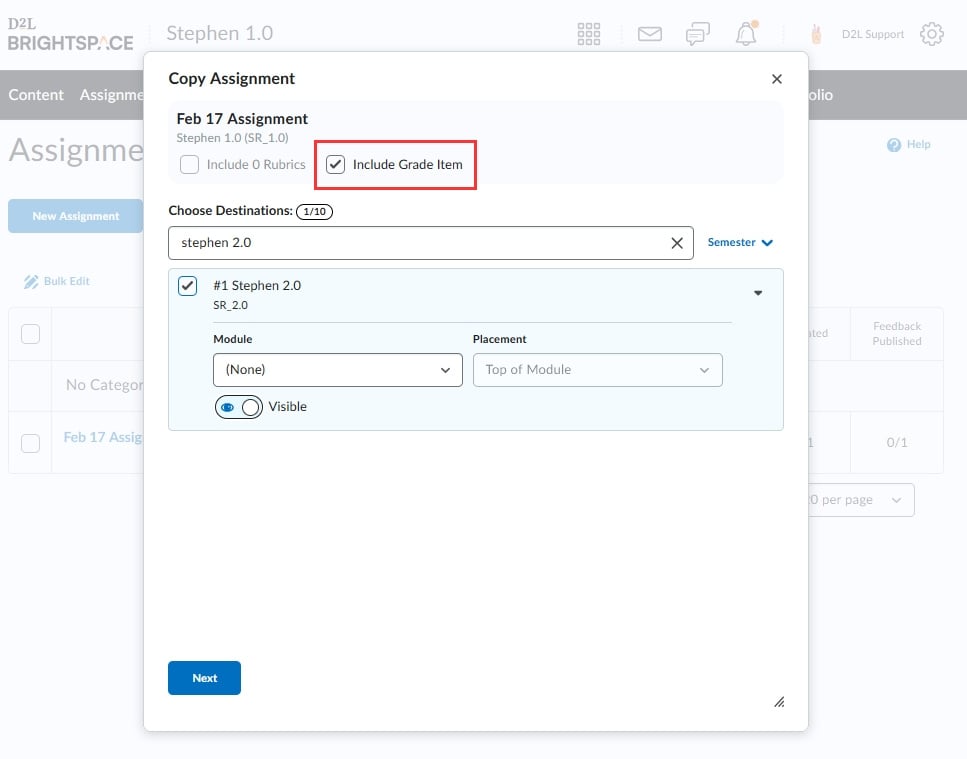
If you use the Copy Assignment tool, there's a 'Include Grade Item' select box you'll want to make sure you have selected:
If you used the Import/Export/Copy tool, I'm guessing that you didn't choose to also migrate your grade items, as they won't automatically copy with the Assignments. It would be possible to go back through Import/Export/Copy to bring those grade items over, or you could delete the Assignments you copied and use the Copy Assignment tool and include the grade items as well.
HERE is some more information regarding Copy Assignment.
Hoping that this helps. If you have any questions just let us know!
~Stephen