I'm looking to export a quiz into a Brightspace package (not copy, but export).
If I have images in the quiz, do I need to select ALL COURSE FILES in the export setting?
Hi, @Yi Yan.L.782.
I haven't tested this fully, but yes, I think so. Otherwise those images probably won't be included in the package. I would assume that this part of the export options functions somewhat similarly to when copying things from one course instance to another. I.e., if I select components to copy and pick quizzes, then I have the option to "Include associated files." If I don't tick that box, the associated files (images or whatever) aren't included and then my copy is missing things as compared to the original.
P.S. The export produces a zip file full of xml files. The quick test I just did without including all course files shows no evidence of images anywhere. If there were images I would expect there to be a subfolder with those types of files inside of it.
Hi @Yi Yan.L.782
Thankyou for reaching out to the Brightspace Community.
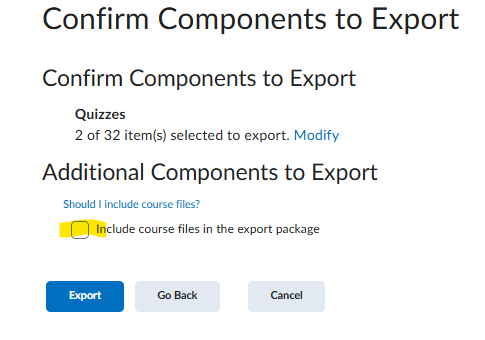
To copy the any attached images or files linked to the quiz wile exporting, you will need to select teh option to Include course files in the export package
For example: Here i have selected only 1 partticular quiz to export. You get this confirmation page at the end where you need to select the option to include files.
Hope this helps
Regards
Ashwin
Hi both, thank you for your inputs. :)
The issue I face with selecting "All Course Files" is that it seems like even files NOT RELATED to the quiz also get exported.
For e.g. When exporting a single quiz, the zip file was only 4kb. But when I included all course files, the file size became 3gb. A quick look into the exported file shows me that ALL course files were exported. This becomes a problem as I'm only able to import a package that's 2gb or less.
Any idea if there;s a way to increase the import limit size?
Else, looks like re-adding the images might be the only way…
PS. I vaguely remember coming across a chat/PIE request regarding this "All Course files" export thing
Hi @Yi Yan.L.782 ,
Thank you for sharing your query. My name is Tejas, and I have been assigned to assist you.
Regarding your question: yes, we can increase the file size limit for importing the Brightspace package. However, it is recommended to revert to the original limit afterward to avoid any potential performance issues.
Please note that any changes to the file size limit must be approved by your Account Team. I suggest reaching out to your TAM/CSM to discuss this. Once your CSM has approved the change and provided the new value, kindly create a support case through the ASC portal so we can track the changes.
Feel free to reach out if you have any follow-up questions.
Connect with our Known and Fixed Issue information to learn about improvements made to Brightspace.
Connect with leaders in pedagogy, accessibility, learning experience design and more
The Accessibility category serves as a single point of access to three avenues in Brightspace Community leading to the Accessibility Academy, Accessibility Library and Accessibility Discussions. These avenues offer courses and articles about accessibility to enhance accessibility knowledge and a group of accessibility enthusiasts to stay connected with.
Have questions about how to use Community? Stay tuned with updates, feedback opportunities and more for the Community here!
Connect with and ask questions on how to best use the Brightspace Product to transform the way your users learn!
Connect with product experts to learn more about tools frequently used by Brightspace Developers such as APIs and integrations!
Want to learn more about Brightspace Partners and Integrations? This is the place to be!
Stay up to date with product updates and announcements in this category.
Connect with our release information to learn about monthly improvements and updates to Brightspace.
Learn more about all the upskilling opportunities with courses and resources offered via the Brightspace Learning Center, Brightspace Guided Training and other training opportunities!