Best Of
Re: Who clicked "Like"?
Hi @Mike.B.559,
Thank you so much for your thoughtful feedback — we really appreciate you sharing your perspective!
We're excited to let you know that based on your suggestion, we’ve now enabled a new hover feature for reactions in the Community Corner. When you hover over a reaction (like a "Like"), you’ll see a pop-up with the names of the members who reacted to the post.
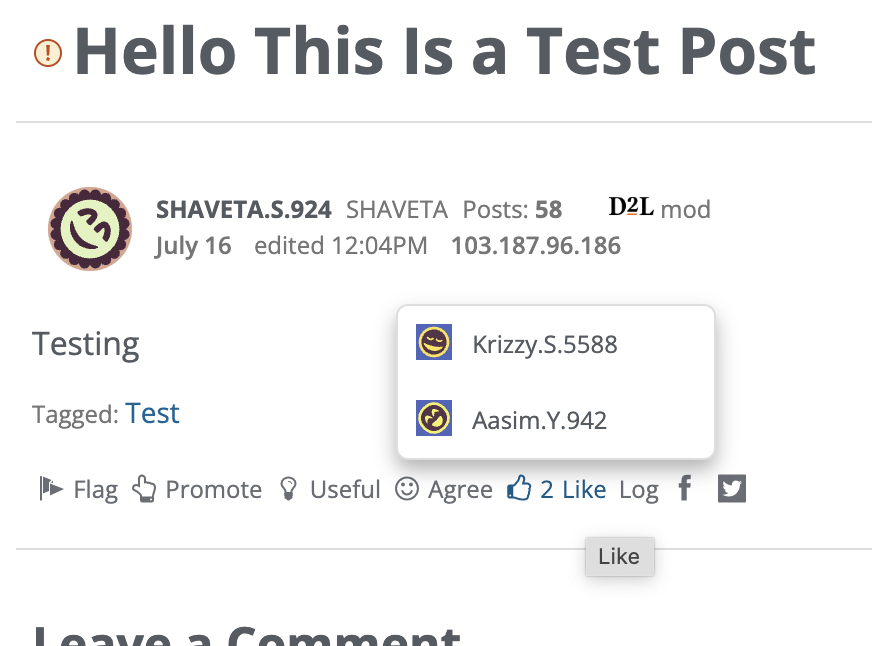
We hope this small enhancement helps build more connections within the Community and makes it easier to see who shares similar ideas and interests. Thanks again for helping us make the Community even better!
Community Team

Re: 'New Content is now available' message
Hello @Konrad.W.3312,
Thank you for reaching out to the Brightspace Community.
Unfortunately, Brightspace does not currently offer a built-in setting to disable these pop-up notifications when release conditions are met. These messages are part of the system's user guidance mechanism and are automatically triggered.
I would like to mention that if you have any suggestions for a better work flow you can submit a PIE idea: What is Product Idea Exchange (PIE)?
Thank you,
Camila

Re: Community Updates
Ignite the Joy of Learning Fusion 2025 Recap
Couldn’t make it to Fusion 2025 or just want to revisit your favorite moments? We've got you covered!
👩🏾🔬 Connect with Virtual Community, Knowledge and Localization Lab activities
🙌 Deep Dives and Client Presentation Sessions available on our YouTube channel and searchable from Community!
🎥 Fusion On-Demand connect you to the full lineup of inspiring sessions, including:
✨ CEO John Baker’s Welcome Keynote
✨ D2L Solutions Spotlight – [Review the product highlight summary 💡]
✨ Ryan Leak’s Closing Keynote (Available until August 22, 2025)
✨ Product Deep Dives and more!
📸 How to Watch: Log into Fusion On-Demand and use the scroll bar to explore sessions or navigate to Fusion On-Demand in the menu.
🔎 Haven't registered for Fusion On-Demand?

Re: Brightspace Data Sets Updates
🚀 The Keeping on Top of Brightspace Data Sets updates blog now includes a preview of the changes scheduled for August through October 2025.

Re: Fixed Issues List Updates
A new version of the fixed issues list has been published.
There following items were added.
- Reference: 02179394
Discussions - Discussion threads are marked as read when they shouldn't. - Reference: 02202546
Widgets - Unable to Copy Shared Widgets. - Reference: 02194318
Intelligent Agents - History page does not identify the email sent status correctly.

Re: Known Issues List Updates
A new version of the Known Issues List is now available. The most recently added known issues are flagged as *New* and relate to the following Brightspace tools:
- SIS - Course Merge
- Quizzes

Re: Can I choose which courses to display in the My Courses widget?
Hi Kathy, thank you for your question!
Currently, instructors cannot manually choose which courses appear in the My Courses widget — it automatically displays all courses they are enrolled in, including past ones.
However, there are a few ways to customize the widget experience:
- Pinning Courses: You can pin specific courses to the top of the widget for easier access.
- Using Course Images: Adding images to courses can help visually distinguish them.
- Filtering by Semester or Role: The widget allows filtering by semester or role, which can help narrow down the view.
You can find more details and tips in this Brightspace Community article:
https://community.d2l.com/brightspace/kb/articles/4358-customize-the-my-courses-widget?searchString=%22my%20courses%22%20widget#using-images-on-the-my-courses-widget
Let me know if this answers your question!
Best regards,
Raquel

Re: D2L is Reheating PIE!
I think you're dealing with "Desire Paths" here - people seem content to use PIE to raise non-urgent bugs. Perhaps rather than changing that behaviour, it will be easier to meet users where they are at - have PIE be an official route for making bug reports, with appropriate categories and metadata to be able to separate the different types of contribution and direct/prioritise them as such?
I know I have often seen things on the known issues list where the problem applies to a different use case or context to that listed. Being able to add that information to a PIE item might be useful (to developers in fixing it, or helping to prioritise by demonstrating that it's not a niche thing in one tool but has a wider impact.)

Re: How to search discussions
Hi @Peggy.R.1517,
Thanks for reaching out to us here at the Brightspace Community! I just came across your question as it pertains to the Community. Thanks for your patience.
Additionally, I would love to share how you could search for a question in the Community Discussions Area:
How to Search in the Brightspace Community
1.Go to the Brightspace Community Homepage
Navigate to the Brightspace Community homepage in your web browser.
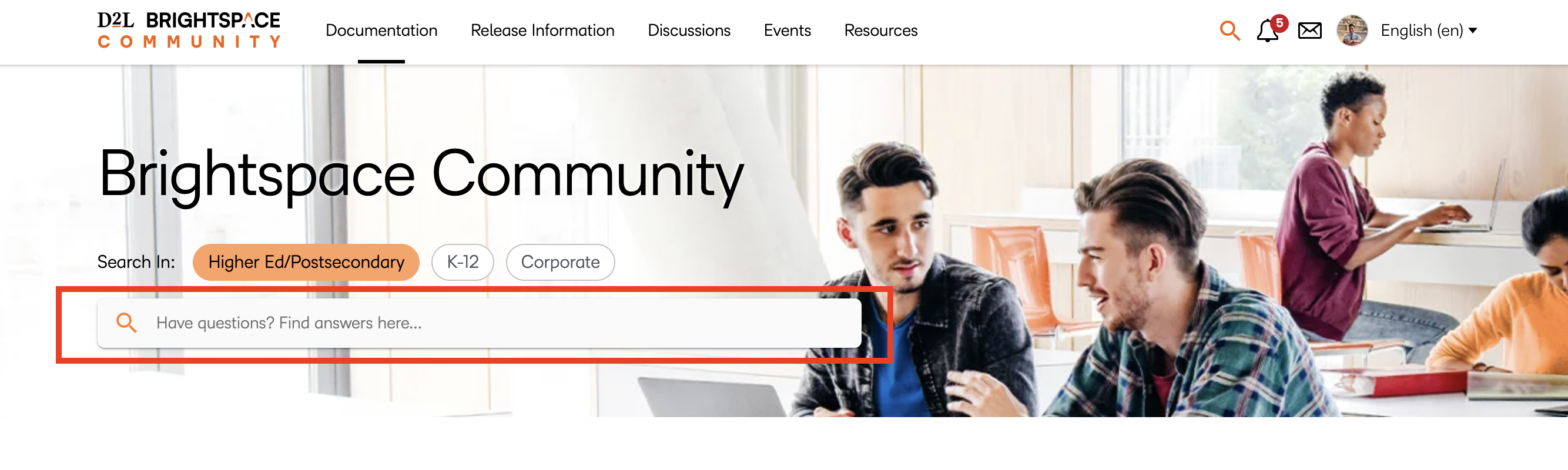
2. Enter Your Search Term in the Search Bar
Type your keyword(s) into the search bar at the top of the page.
💡 Tip: If you're looking for a specific question or document, place your search term in quotation marks (" ") to search for that exact phrase.
3. View the Search Results Page
After selecting Enter, you will be taken to the search results page displaying relevant content.
4. Filter by Discussions
Directly under the search bar on the results page, click the "Discussion" button to narrow results specifically to forum discussions.
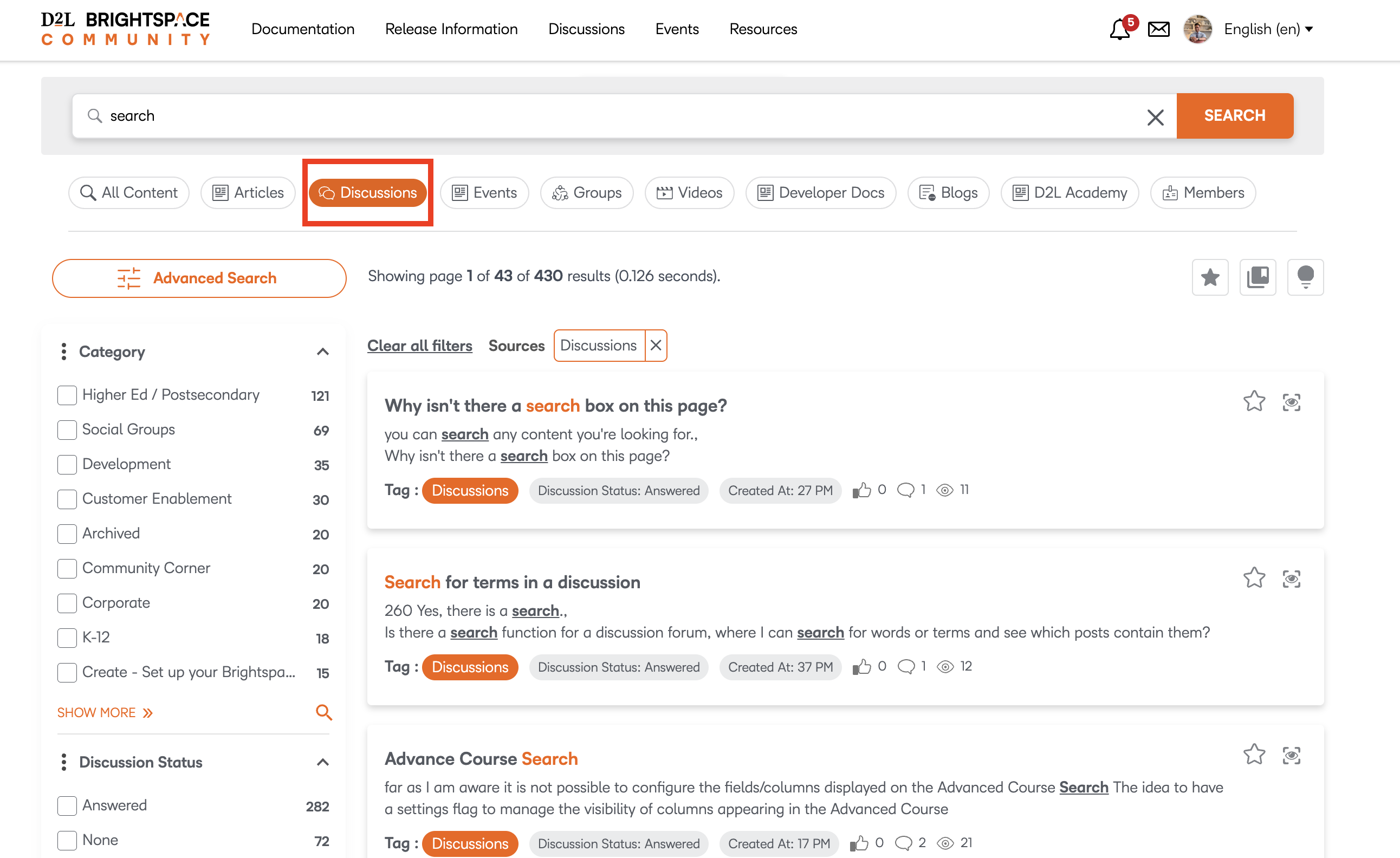
5. Refine Your Search Using Filters
On the left-hand side (or underneath, depending on your device), use the following filters to narrow down your results further:
- Category (e.g., Higher Ed, K12, Corporate)
- Discussion Status (e.g., Answered, Unanswered)
- Tags (topics associated with posts)
- Created Date (e.g., All Time, Past Year, etc.)
Additionally, for your second question, here is a short article outlining how to ask a question in the Community. There are no wrong tags and we aim to get your question connected with a SME as soon as possible.
Hope this information helps you better navigate the Brightspace Community! Let us know if you need any additional assistance.
Re: Classic View in the Quizzes
Thank you for directing me to PIE. That is what I have been trying to find for years. I will certainly look into that as I have many recommendations. However, some are school specific, and I am trying to get changes through them. For example, I use D2L at two different schools; one school has word count on discussions visible while the other does not. I do, also, have general D2L suggestions that I will pass along. Thanks again.
