Best Of
Lockdown Browser Error
My students are receiving this message: "There is a problem with the LockDown Browser setting for this exam. The instructor needs to use the LockDown Browser 'dashboard' to enable the settings for this exam," but I do not have a fix it button. It appears to be working fine on my end. Any suggestions?

What is Bright space?

Re: Grading is very slow in Brightspace
Hi Monica.M.241
Thanks so much for re-affirming my frustrations with Brightspace. It's really sad when a very old, outdated version of Blackboard is grades more smoothly and quickly than this new LMS my college just adopted. I also agree that it is not intuitive or user friendly AT ALL. Sure, D2L gave my college a huge discount, which is why they adopted it, but was it worth it? This was not an upgrade for us; it was a lateral move at best. When will administrators and LMS developers begin to actually listen to educators who have "boots on the ground" every day experiences OL and in the classroom with grading, our students' needs, etc.? I truly wish my institution would've adopted Canvas instead, even though that is not without its issues too.
This is to whomever is monitoring this discussion at D2L. Go see what Canvas is doing and adopt those feature to D2L, so it runs more smoothly, efficiently, and is far more intuitive than it is now.

Re: Grading is very slow in Brightspace
Hi @Regina.J.1448, Quick Eval is the most efficient and streamlined way to grade! It allows you to view all learner submissions, including assignments and quizzes in a single location, and filter by specific criteria.
You can find out more about Quick Eval here:
Hope this helps!

Re: Known Issues List Updates
A new version of the Known Issues List is now available. The most recently added known issues are flagged as
*New*.
- 02214491 - Insights Portal - 20.25.08 - Insights Portal: Org Unit filter does not display full list in Adoption Dashboard
- 02235760 - Assignments - 20.25.09 - Dropbox SA > Calendar view blocked when screen is smaller

Re: Known Issues List Updates
A new version of the Known Issues List is now available. The most recently added known issues are flagged as
*New*.
- 02229927 - Courses - 20.25.10 - Course Offering does not appear in the Create Source Course dialog when user is enrolled into a Course Offering with a role other than their org role
- 02229934 - Courses - 20.25.10 - Forward enrollment of source course unsuccessful if user is once enrolled and then un-enrolled from the current re-offered course
- 02002940 - Grades - 20.24.5 - A restricted instructor is able to add feedback to all students
Re: Release Notes Updates
The October 2025/20.25.10 release notes are now live and ready for review in all languages!

Re: Why are hidden topics/folders being counted towards course completion now?
Hi there,
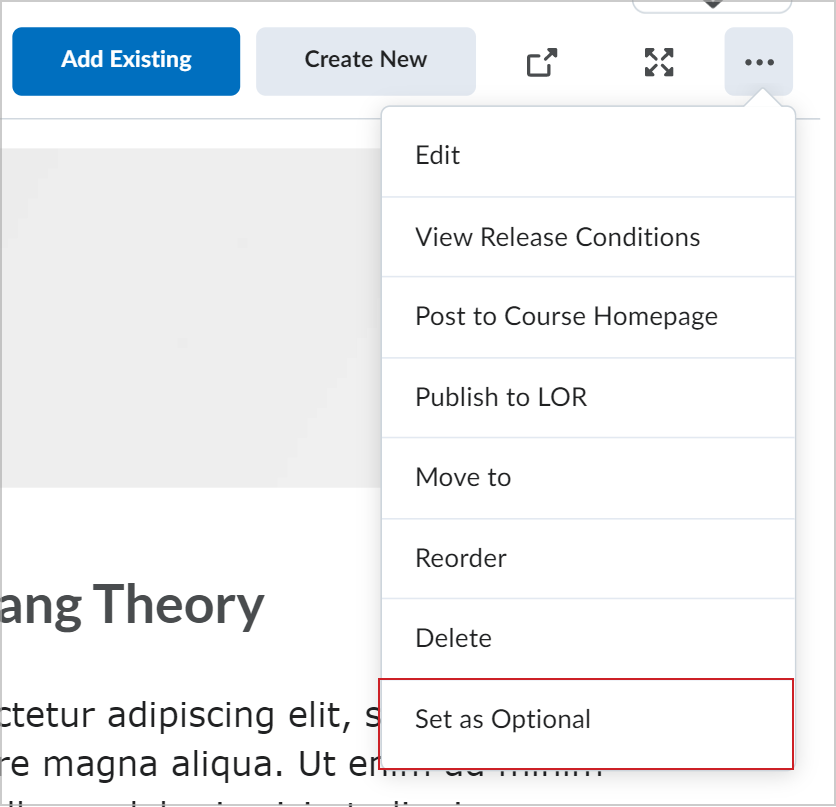
I am not sure which learning experience your organization you are using, but it is possible that you need to go through and set the hidden modules as being "optional" so that it does not count toward completions. It is possible that this was not done in the course offering. Check out this article for more information.

Re: how can i add an url to the course home page
Hi Frank,
I am assuming that you want to add a link to something important via a widget on the homepage of the course. The easiest way to do this would be via a custom widget (if you are able to manage those with your role). You could also consider creating an announcement which would show on the homepage, or even adding a custom link to your navigation bar so the link is always present.
Re: How to change question font size on multiple choice practice in Creator+
I can't seem to login to the Brightspace Community Idea Site. Nor receive a password reset. Is this a separate login from what I am using to be a part of this community discussion? Thank you.