Best Of
Re: When using the New Content Experience, how does the student easily navigate?
Hi @Brigette.B.143,
Thanks for reaching out to us here at the Brightspace Community.
Here is a Brightspace Tutorials video outlining the New Learner Experience.
We have a resource in the D2L Academy specifically New Learner Experience.
This resource is intended to provide a brief overview of the New Learner Experience that can be turned on inside of the New Content Experience in Brightspace. This offering demonstrates content that is familiar to many Brightspace Educators, our HTML Template V3.
Best,
Aasim Yacub

Re: Why are hidden topics/folders being counted towards course completion now?
Hello Olivia,
Apologies for that! As far as I know, the system has always required all content items, including hidden or conditionally released ones, to be counted toward completion. With the introduction of Completion Tracking, you now have more flexibility to define what counts as “complete” using Release Conditions. If you’re finding that hidden content is affecting completion, we recommend using these conditions to better control what completion means for your learners and how it displays in Manager Dashboard or Learning Groups.

Re: Is it possible to customize the pages in Brightspace where students reset their passwords
Hi @Pulkit.Y.864,
Thank you very much! This is very helpful.

Re: How to link a service user to an oAuth tool
Hi @Arald.d.320, thank you for your question! I’m currently looking into this and will get back to you as soon as possible. I’m aiming to provide a full response by tomorrow. Thank you for your patience!"

Re: Data hub reports
Do you have the Performance+ add on? If so, you can build your own custom reports using Analytics Builder. You need a bit of knowledge in how to merge and filter datasets, but it would help you to achieve that.
If not, then it would be a case of manually downloading the different datasets that contain the information you're after and building a query in something like Microsoft Access or PowerBI which will do the same thing.
Either way, it requires a bit of extra work as a dataset containing exactly that information already doesn't exist.

Re: Data hub reports
The course template code is the tricky one - as far as I know you would need to use the Organisational Unit Ancestors data set, which has several entries for each course offering depending on your site hierarchy, which you would need to match with the Organisational Units dataset filtered for Type="Course Template".

Re: How to Report on Students Who Have Not Submitted Assignments?
Thanks so much, Steve!
This works perfectly, and I was able to generate my complete report. I really appreciate your help getting this sorted out.
(Just to confirm, I used Domo for generating this report.)
Re: Fixed Issues List Updates
A new version of the fixed issues list has been published.
The following item(s) was/were added.
Reference/ SF Case | Tools | Title |
|---|---|---|
02028199 | Discussions | In Discussions, when an Instructor assesses a learner, uploads a file and saves as 'draft'. The file is revealed to the learner |
02236103 | Grades | Auto-Zero May Not Apply to Quizzes with Release Conditions After Course Copy |
02258974 | Quizzes | Quizzes - new / undocumented question type (Find the Hotspot) found in Question Editor |
02253264 | Data Purge | Data Purge Timeouts causing errors |
02253769 | Awards | Awards - Download Certificate error when no longer enrolled in Org Unit |
02256482 | Quizzes | More Action button for code editor missing in Quiz Question |
02254842 | Homepage Widget Expansion Pack | The Content Navigator Widget Breaks if Course has LOR item with Relative Path |
02233285 | Work To Do Widget | Work to do Widget > Some activities may not be displayed for users with large numbers of overdue items |

Re: Discussion topic due dates not Showing Up on Calendar
@Lydia.R.220 Hi Lydia, due dates on discussions should be available in December:

Re: Is there a way to hide the "Post to Course Homepage" option?
Hi April👋,
I hope you’re doing well! Thank you for reaching out to Brightspace Community with your question about hiding the “Post to Course Homepage” option.
If your organization is not using the Activity Feed widget in a particular org unit, you can disable this option by setting the following configuration variable to OFF at the org unit level:
- d2l.Tools.ActivityFeed.ShowWidget
When this variable is turned off for an org unit, the Activity Feed widget will no longer appear, and the “Post to Course Homepage” option will be removed.
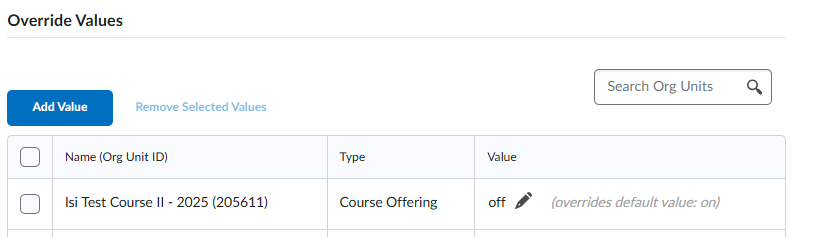
Please note that access to edit configuration variables depends on your role permissions. If you do not have access to make this change, you will need to contact your organization’s Brightspace administrator to request the update.
For more details, you can share this resource with your administrator. Let me know if you have any other questions—I’m happy to help!🙌
-Isidora
