Best Of
Re: Awards and how they present on Homepage
Hi @Michelle.L.3332
Thank you for your question.
If you are referring to the Learner Awards Widget on the Homepage, the Available Awards section lists the awards in alphabetical order. Unfortunately, Brightspace currently does not allow for manual reordering of awards.
A workaround would be to change the names to something like-
1 - Bronze
2 - Silver
3 - Gold
I would like to mention that you can submit new features or product ideas to our Product Idea Exchange on the Brightspace Community. The Product Idea Exchange is designed for users to send direct submissions to our Product Development team
Note: PIE authenticates through the Brightspace Community. From the Brightspace Community Navbar, click on Resources > Product Idea Exchange.
I hope you have found this information to be useful.
Thank you,
Ajith Joseph

Re: Parent org unit mapping not found
Hello Steve.G.9590,
Thank you for reaching out in the Brightspace Community.
This error occurs when a parent org unit is used that has not been successfully processed by IPSIS. Either the org unit with this exact org unit code has never been sent through IPSIS or it has been sent but received an error and has not successfully processed.
Resolution: If the org unit has not been sent through IPSIS, it must be included in its own CSV file prior to using it as a parent org unit. If it has been sent but received an error preventing successful processing, the error must be corrected prior to using the parent org unit.
I would like to share with you the following documentation:
https://community.d2l.com/brightspace/kb/articles/23822-about-d2l-standard-csv
The D2L Standard CSV documentation describes the required format of each file for use with SFTP and drag-and-drop in IPSIS Administration. It also describes the results of each action or command you send in the CSV files. A manifest is required when using version 1.1 or higher of D2L Standard CSV. The manifest is a JSON file that announces the version of D2L Standard CSV you are using.
Please review the following:
The CSV file format rules:
https://community.d2l.com/brightspace/kb/articles/23817-csv-file-format-rules
D2L Standard CSV File Org Formats and examples:
https://community.d2l.com/brightspace/kb/articles/26217-orgs
How to access the D2L Standard CSV dashboard:
https://community.d2l.com/brightspace/kb/articles/23765-access-the-d2l-standard-csv-dashboard
Please let us know if this helps!
Best, Ana

Re: What is "Active Display" in the Assignments tool?
Hi Jeffrey,
Thanks for your detailed response.
I'll keep an eye out for the update in the Release Notes.
I'll take a look at these resources as a part of our eventual migration to NCE. I wasn't aware of "New Display Pages for Assessable Activities", which adds some additional changes I wasn't aware of. That might be something that we consider implementing a little later (after NCE).
We'll definitely chat with our CSM about this, when we get closer to this change.
Best,
Shelley

Re: Single Sign ON Account
Hi @Mary-Lee.H.3744,
Thank you for reaching out to the Brightspace Community!
We can confirm that you have successfully registered your email with us. However, it seems that you have manually entered the name of your organization instead of selecting it from the dropdown list during registration. To access the D2L Academy, members are required to select their organization from the dropdown list on the registration page. You can update your profile following the steps outlined in this article – I can’t connect to PIE or D2L Academy.
Please let me know if you have any further questions.
Best,
Claire

Re: how do post my assignments on turnitin
Hello @Hamdawaihi.M.4823, thanks for your question.
If your institution is using TurnItIn, you would normally upload your file to the Assignment tool within Brightspace (sometimes also called dropbox), or using a link that has been added into your course content.
I would recommend connecting with your instructor for further guidance, since we are unable to see your course and how TurnItIn is set up.
Hope this helps!
~Stephen


Re: User enrollments API call not returning enrollments with role "Student"
Thanks, the issue has now been resolved :)

Re: Creating a Report for college-wide absentee students
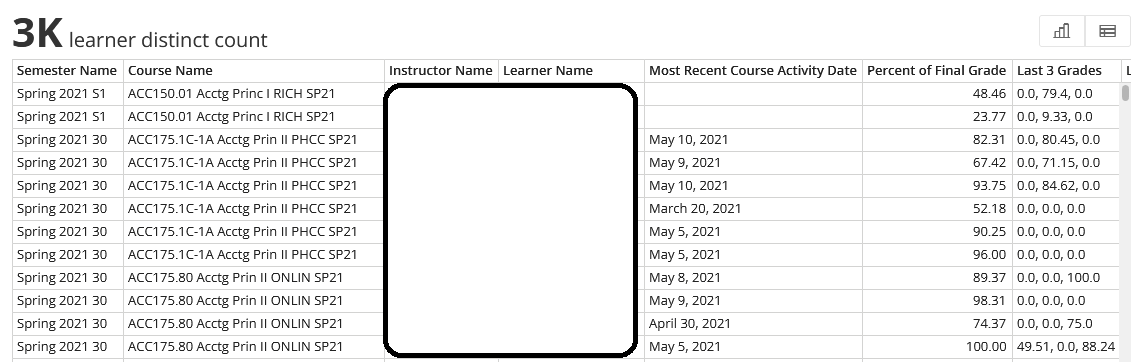
Hi everyone, I brought your ideas to our Senior Systems Analyst, and we found this Domo dashboard made by a previous database manager who is no longer with us. It fits the filtering ideas brought up by others, and we can organize by last accessed as well. It only goes up to December of last year, but we are working on changing the time frame.
I want to thank everyone for their help and suggestions!

Re: Hiding certain events in the Calendar
Thanks you for this response, Sreelakshmi
Unfortunately, although I can follow this workflow, it does not affect the visibility of events in the calendar
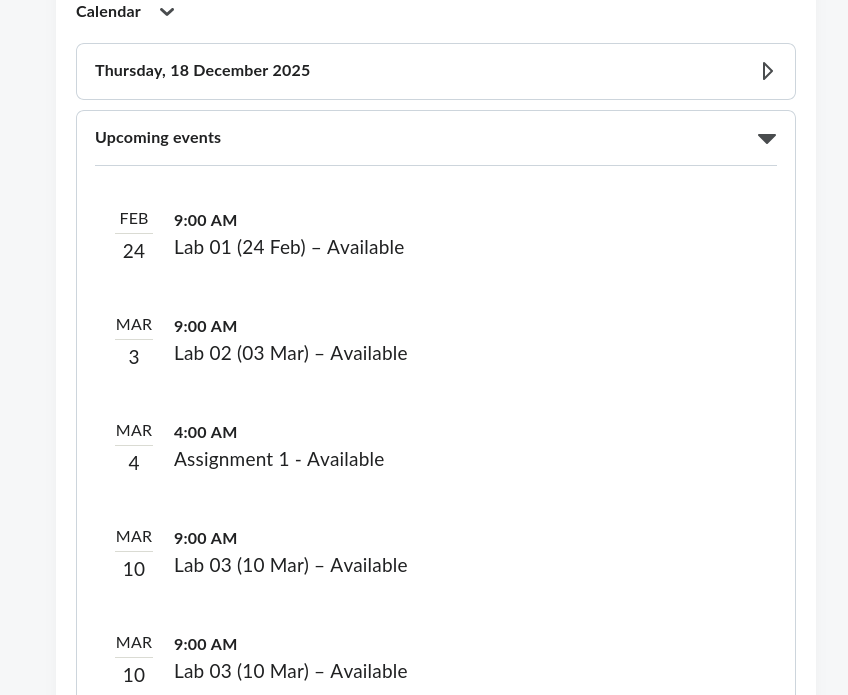
Are there any other workflows you can suggest to solve this issue?
Ngā mihi
Rhian

Hiding certain events in the Calendar
Kia ora, we are setting up a course in Brightspace and want to hide certain events in the calendar (it is getting quite cluttered). However, when using the Manage Dates tool, the option to hide these events in the calendar is greyed out:
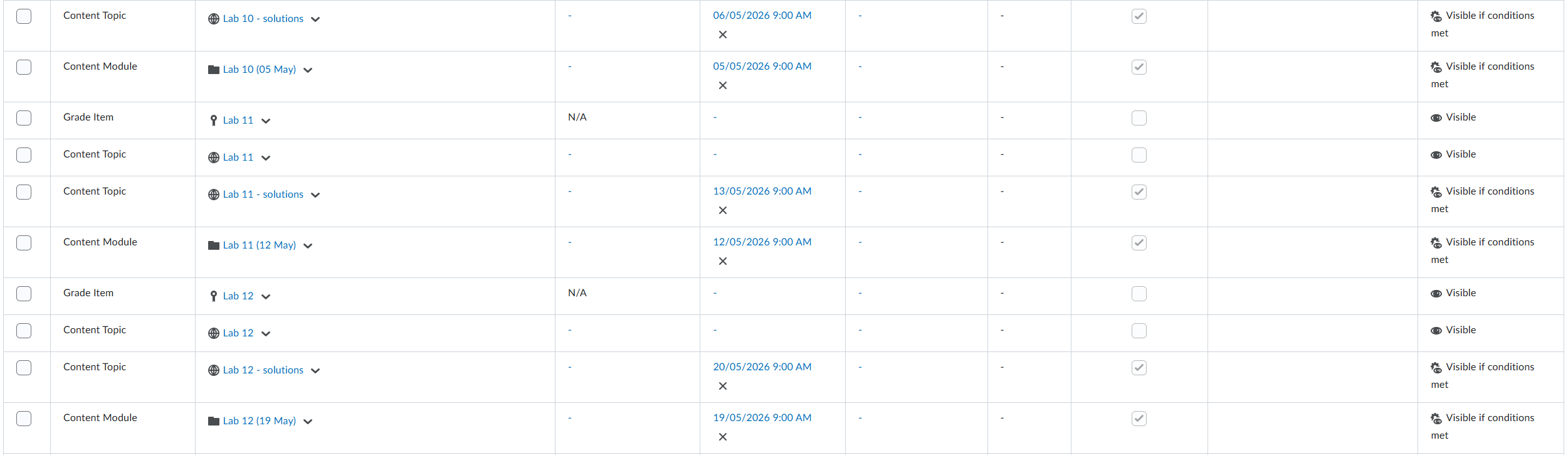
Is there a way to fix this? It is worth noting that elsewhere in the Manage Dates tool we are able to hide things in the calendar — notably the dates associated with assignments.
Cheers,
Rhian