How do I set up the criteria within the Intelligent Agent for an item that is observed in person?

I would like to send out an email reminder using the Intelligent Agent Tool to remind students who haven't submitted something that physically observable and not something that is handed digitally in through the drop box. How do I set up the criteria within the Intelligent Agent tool for an item a) those 'Submission Type' listed in the drop box is 'observed in person', b) a rubric wasn't used to grade the item within the dropbox, and c) the student have temporarily been given a grade of zero in the drop box and within grades, until they hand in the assignment?
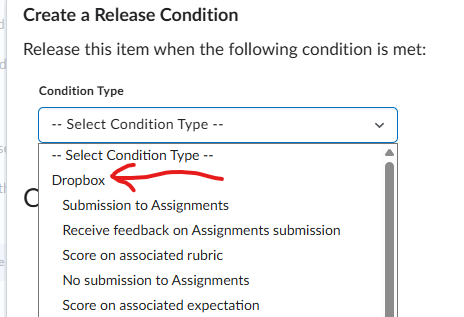
The Intelligent Agent release conditions for the Dropbox don't work for the following reasons: A) Submission to Assignments doesn't work since it is not handed in digitally, B) 'Receive feedback on Assignment submissions' doesn't work since I've added feedback to all the students, C) 'Score on associated rubric' doesn't work since there is no rubric, D) 'No Submission to Assignments' doesn't work because the assignment is not handed in digitally.
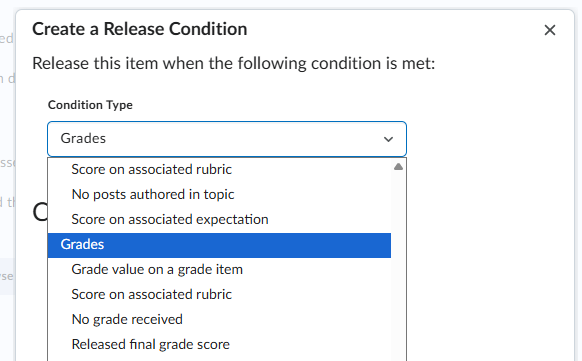
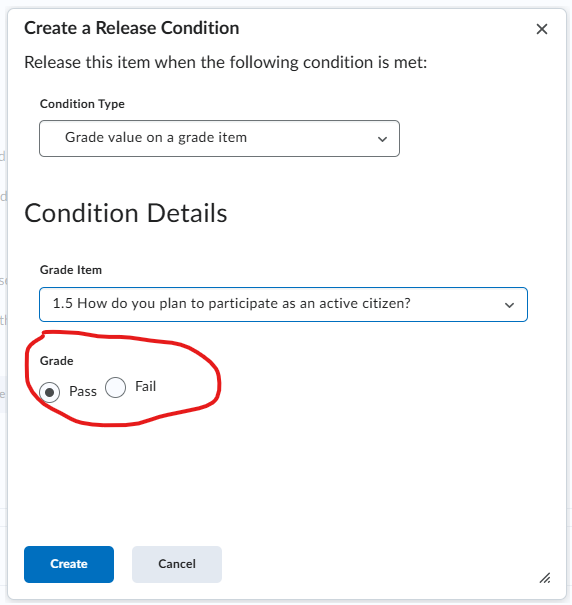
Setting up an Intelligent Agent using 'Grades' as a Condition Type (see screenshot below) doesn't work either since A) 'Grade value on a grade item' shows only a 'Pass' and 'Fail' options and I don't want to send a reminder for students that handed in the assignment but failed it (see third screenshot below), B) 'Score on associate rubric' doesn't work since there isn't a rubric used, C) 'No grade received' doesn't work either since they currently have a grade of 0%, and D) 'Released Final Grade Score' intelligent agent setting only sends email reminder students that have a 0% overall final grade within the Grades tool, and not specifically to students that didn't handed in the physical assignment.
Any suggestions on what Release Condition Criteria can be used?
Answers
-
Hi @Heather.H.1268, thanks for your question!
One of my initial thoughts was to set up a new grade scheme for this specific Assignment, and use that scheme with a grade item for a type of 'completed' or 'not completed' option, and then use the Intelligent Agent on that.
If you think a custom grading scheme with customized wording could be an option, I recently provided instructions in a similar post HERE.
Please let us know if this could be a solution for you, and if you have any questions!
~Stephen

