Pass/Fail Final Grade Behavior in Brightspace, Numeric Final Grade Fields vs Dropdowns

Heather.B.4264
Heather.B.4264 Posts: 14 🌱

I’m looking for some clarification around Pass/Fail workflows and Final Grades behavior in Brightspace.

Current setup:

  • Points grading system
  • Pass/Fail grading scheme
  • Selectbox grade items with dropdown associations
  • Final Grade Released = Adjusted Final Grade
  • Drop ungraded items enabled

The individual assignment grade items behave correctly. When opening a specific Selectbox grade item, instructors are presented with a dropdown menu where they can select the appropriate Pass/Fail-style option as expected.

However, when going into:
Grades → Enter Grades → Final Calculated Grade / Final Adjusted Grade

the final grade area still behaves as a numeric calculation field (showing values like “- / -” or numeric entry boxes) rather than presenting Pass/Fail dropdown selections.

At this point, I’m mainly trying to determine whether this is expected Brightspace behavior:

  • Are Final Calculated Grade and Final Adjusted Grade always numeric internally, even when using Pass/Fail schemes?
  • Is the intended workflow to enter Pass/Fail selections only at the assignment grade item level and allow the final grade to calculate automatically?
  • Or is there a recommended configuration/workflow that allows instructors to interact with Final Grades directly using Pass/Fail selections instead of numeric fields?

Thank you!

Tagged:

Answers

  • Gabriel.T.493
    Gabriel.T.493 Posts: 31 🤝🏼 image

    Hi, Heather.

    From my understanding, this seems correct.

    The Final Calculated Grade and Final Adjusted Grade are numeric calculation fields internally, they aggregate individual grade items mathematically (summing points or applying weights). Even when all your grade items use a Pass/Fail scheme, the final grade columns will still display as numeric fields (for example "- / -" or point values), not as Pass/Fail dropdowns. The grade scheme symbol (Pass/Fail) will only display to learners once a scheme is applied to the final grade and it's released, but the instructor-facing entry remains numeric.

    This seems to be further confirmed by the Pass/Fail grade item having a maximum number of points.

    The intended workflow is to enter Pass/Fail selections at the individual Selectbox grade item level and let the final grade calculate automatically based on the "Assigned Value %" defined in the grade scheme. For example, if "Pass" = 100% and "Fail" = 0%, the final grade will compute numerically from those values.

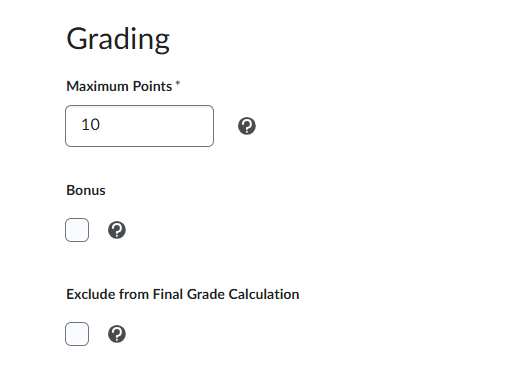
    A possible workaround could be creating a separate Selectbox grade item outside the final calculated/adjusted grade structure, which instructors can use to record the final outcome. You could just click on 'Exclude From Final Grade Calculation', as shown below.

    image.png

    Hope that helps!

    Regards, Gabriel.