How to make a new organization
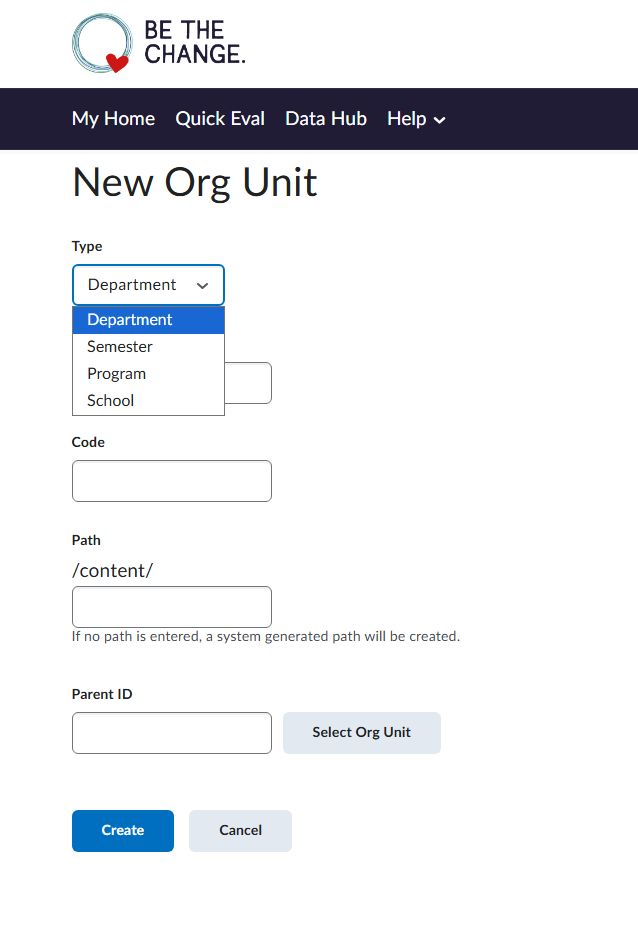
Hi, I just wanna ask how can I create a new organization? I have a superadmin access on my account but upon creating new Org Unit, I don't see the Organization type of Org Unit (see attached image). Here is my account email: jovicfelizardo@orendalearning.com and out d2l website is
Thank you.
Answers
-
Hi there! Here is how to manage and create new org unit types. Once you go into Manage Types, you'll be able to create the new type you want.
-
The Organization org unit is the top of the hierarchy, so I dont think you can make another one. What are you trying to accomplish as that would help us answer your question?
-
Hello @Jovic.F.434
Thank you for reaching out to the Brightspace Community
This is expected behavior — the "Organization" org unit type is a system-defined type that is pre-configured by D2L when the Brightspace instance is initially provisioned. It cannot be manually created through the Org Unit Editor.
The Organization is always the top-level root of the entire hierarchy, and there can only be one per Brightspace site. It's automatically set up to represent the entire institution.
If you need sub-organizational levels (e.g., divisions, campuses, tenants), you should create a custom org unit type via Admin Tools → Org Unit Type Editor → Create Org Unit Type. You can name it whatever fits your structure (e.g., "Division", "Campus", "Tenant"). Then you can create org units of that custom type under the existing Organization.
If you truly need a separate Organization (multi-tenant setup with completely independent sites), this must be done by D2L at the infrastructure level — it cannot be self-service. You would need to contact your Customer Success representative to request this.
The six default org unit types available for creating org units are: Semester, Department, Course Template, Course Offering, Group, and Section. Anything beyond these requires creating a custom org unit type first.
Hope this helps.
Regards,
Ashwin Ravi