Browser Find function no longer works on Enter Grades page

Alan.P.39
Alan.P.39 Posts: 25 Analytics Builder Transition
edited February 27 in Higher Ed / Postsecondary

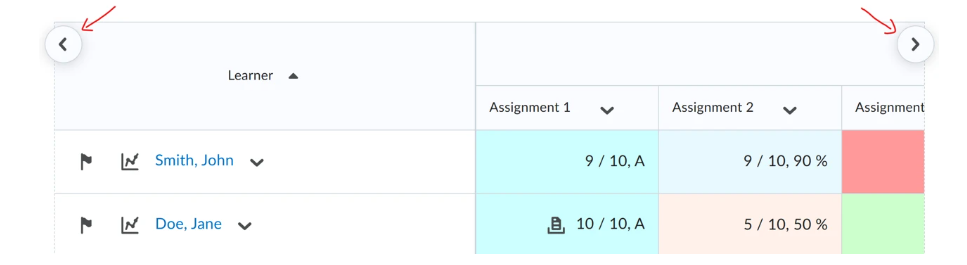
With the recent update to the Enter Grades page (scroll buttons), it seems instructors can no longer use the Find function in the browser (Ctrl+F) to jump to specific columns (grade items). Wondering if anyone has a work-around for finding a grade item quickly on the Enter Grades page?

Tagged:

Answers

  • Raquel.B.1893
    Raquel.B.1893 Posts: 29 🤝🏼 image

    Hello Alan,

    You’re right, according to our documentation, there isn’t a way to bring that functionality back, but there are a couple of built‑in options that can help you move around more quickly:

    1. Scroll sideways faster with SHIFT + mouse wheel
      The release notes say you can hold SHIFT on your keyboard and use your mouse scroll wheel to move left and right across the grade columns.
      This works on both Windows and Mac and is often quicker than clicking the new left/right arrow buttons.
      image.png
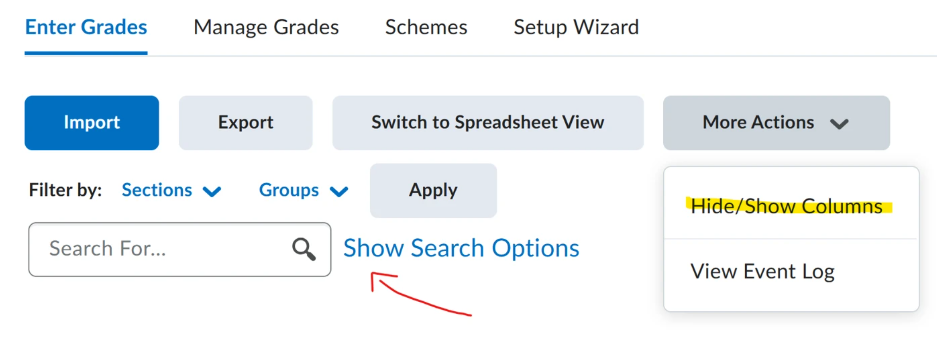
    2. Reduce how many columns you see at once
      • Hide/Show Columns: Temporarily hide grade items you’re not using so you have fewer columns to scroll through.
      • Search options: Filter which students you see (by user, group, or section) so there’s less information on the screen.
    image.png

    A practical workaround for now is to:

    • Hide any grade items you don’t need at the moment, and
    • Use SHIFT + scroll wheel to move sideways through the remaining columns.

    That’s the closest documented alternative to quickly getting to a grade item on the updated Enter Grades page.

    Let me know if you have any doubts!

    Raquel