How do I upload a new version of a scorm file?
Hello @nichole.g.355, thanks for your question!
As an administrator, to update a SCORM file with a new version, you should be able to go to any course offering, and navigate to Content.
The next steps depend on the content experience you're using:
Classic Content:
New Content:
Then:
Hope that this helps! If you have any questions please let us know.
~Stephen
It is published in the Manage versions but it is not updated for students. Do I need to do something to get the new version to students?
Hello @nichole.g.355,
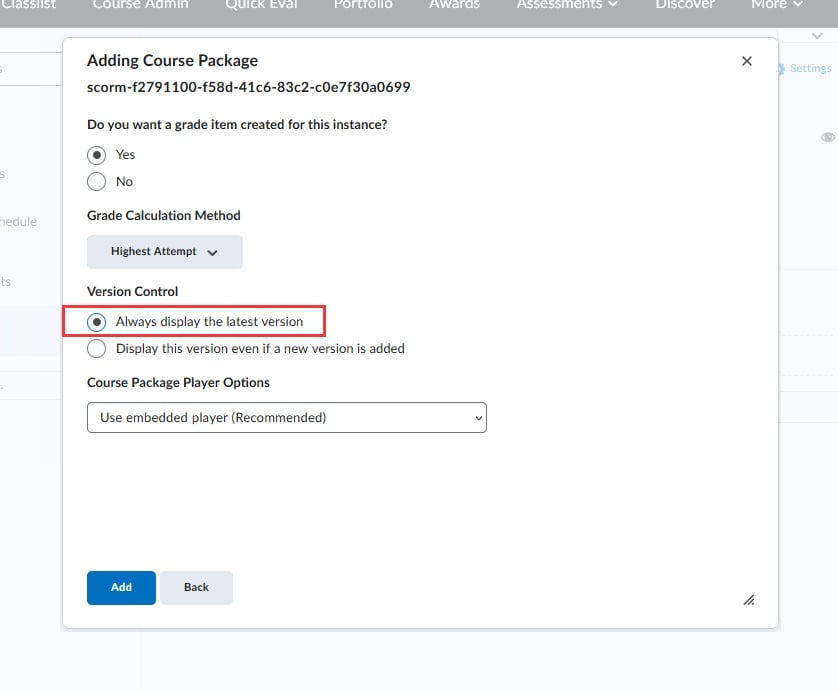
If users are not seeing the updated version, it's likely that when the SCORM file was added to the content area, it was locked to the version loaded at that time.
You will likely need to go back and add the new SCORM package. When you go through the steps to add the updated SCORM file, I would suggest selecting, under Version Control, "Always display the latest version" so that it's dynamically linked when an updated file is added:
Connect with our Known and Fixed Issue information to learn about improvements made to Brightspace.
Connect with leaders in pedagogy, accessibility, learning experience design and more
The Accessibility category serves as a single point of access to three avenues in Brightspace Community leading to the Accessibility Academy, Accessibility Library and Accessibility Discussions. These avenues offer courses and articles about accessibility to enhance accessibility knowledge and a group of accessibility enthusiasts to stay connected with.
Have questions about how to use Community? Stay tuned with updates, feedback opportunities and more for the Community here!
Connect with and ask questions on how to best use the Brightspace Product to transform the way your users learn!
Connect with product experts to learn more about tools frequently used by Brightspace Developers such as APIs and integrations!
Want to learn more about Brightspace Partners and Integrations? This is the place to be!
Stay up to date with product updates and announcements in this category.
Connect with our release information to learn about monthly improvements and updates to Brightspace.
Learn more about all the upskilling opportunities with courses and resources offered via the Brightspace Learning Center, Brightspace Guided Training and other training opportunities!