Calendar Tool - More Actions button not visible to some in same role

Trudy.H.857
Trudy.H.857 Posts: 8 🌱

Hi

Weird question- for our Super Admin group, in the Calendar Tool, 2 of us see More Actions drop down menu (has Change Event Visibility, Offset Dates, Import Events, Delete), but 2 of us do not see the More Actions drop down menu in the same course- we only have the Import Events button.

We are all Super Admins. Any idea why this may be?

thanks Trudy

Tagged:

Best Answer

  • Trudy.H.857
    Trudy.H.857 Posts: 8 🌱
    Answer ✓

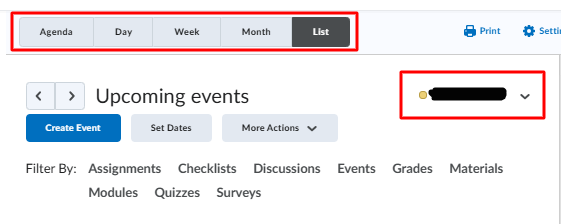
    Ajith at D2L was able to provide the answer: .  In order for the More Actions button to be visible in the List tab of the Calendar tool, at least one calendar must be added under All Calendars. Once this is done, the More Actions button will be visible.

    Thanks everyone!!!

Answers

  • Jeffrey.M.844
    Jeffrey.M.844 Posts: 97 image
    edited February 4

    Hello @Trudy.H.857 ,

    Are all of the Super Admin users using the same view? I believe the more actions menu appears when List view is selected. If this does not reconcile, I would also look at whether you all have the same calendar targeted within the calendar selector.

    image.png

    I hope that helps!

    Jeffrey

    Learning Administration Manager

  • Hi Trudy!

    It sounds like two of you may have different roles in the course you are referencing, compared to the other super admins who are looking at that course. All the permissions in Brightspace are role-based, and you will notice that throughout the org you may have different permissions in different places because you may be a student or an instructor in a course offering, where as at the top level you have your full superadmin permissions. If you do have the superadmin role in the specific course offering you are referencing, and still have limited permissions, i strongly recommend that you create a support case so we can fix what's going on. 😎

  • Trudy.H.857
    Trudy.H.857 Posts: 8 🌱

    Thank you both for your timely replies- yes we likely need to put in a Support Case :)

    Trudy

  • Jeffrey.M.844
    Jeffrey.M.844 Posts: 97 image
    edited February 5

    You're welcome @Trudy.H.857!

    If its not too much to ask — for the benefit of other community members like yourself who may stumble across this post in the future — feel free to leave another reply here with the root cause after you reach a resolution in the support case you open.

    Best of luck, and I hope (I know) our fantastic support team will be able to help you from here.

    Jeffrey

    Learning Administration Manager