students are not able to see the final calculated grade. Grades show as released. Grades show as not hidden. Not sure what else to change.
Hi James
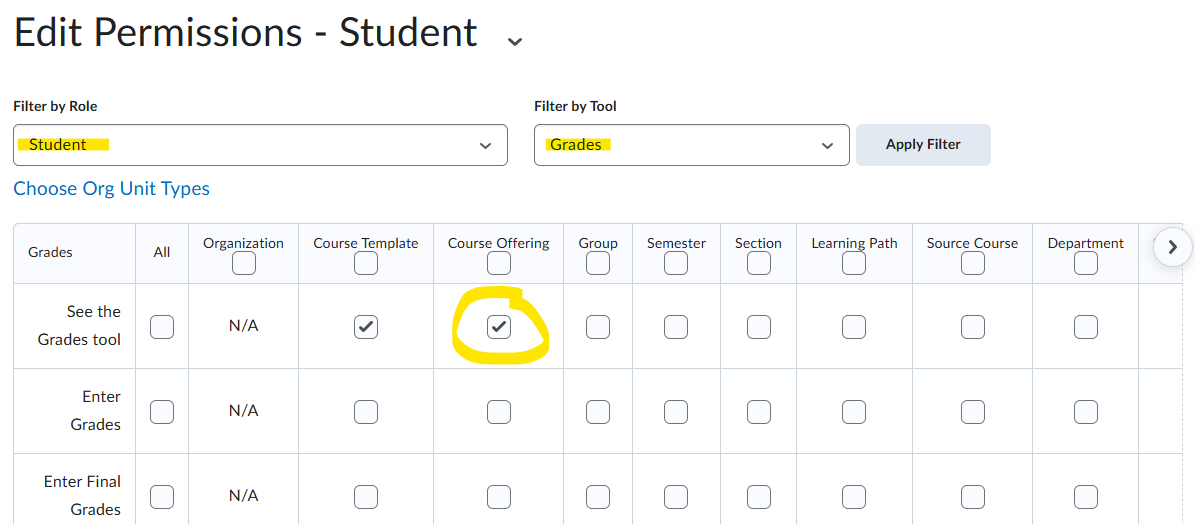
If Students cannot see their own Grades in their course then either the Grades link is not present on the navbar or they don't have permission to do so. Presuming it's the latter, go to Admin Tools > Roles & Permissions, choose the Grades tool for the Student role, and check the "See the Grades tool" permission at the Course Offering level.
If that doesn't resolve it then you may need your ASC to check in with helpdesk@d2l.com.
I hope that's helpful MattLearning Administration Manager
@James.D.1531 Are the students able to see the Final Calculated Grade item but not their scores? Edit the grade item and check the Display Options for the student view.
Connect with our Known and Fixed Issue information to learn about improvements made to Brightspace.
Connect with leaders in pedagogy, accessibility, learning experience design and more
The Accessibility category serves as a single point of access to three avenues in Brightspace Community leading to the Accessibility Academy, Accessibility Library and Accessibility Discussions. These avenues offer courses and articles about accessibility to enhance accessibility knowledge and a group of accessibility enthusiasts to stay connected with.
Have questions about how to use Community? Stay tuned with updates, feedback opportunities and more for the Community here!
Connect with and ask questions on how to best use the Brightspace Product to transform the way your users learn!
Connect with product experts to learn more about tools frequently used by Brightspace Developers such as APIs and integrations!
Want to learn more about Brightspace Partners and Integrations? This is the place to be!
Stay up to date with product updates and announcements in this category.
Connect with our release information to learn about monthly improvements and updates to Brightspace.
Learn more about all the upskilling opportunities with courses and resources offered via the Brightspace Learning Center, Brightspace Guided Training and other training opportunities!