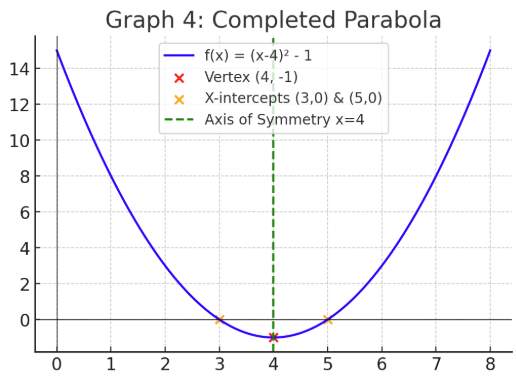
Help! I'm helping a math instructor who uses graphs like this:
With parabolas that have x & y intercepts, a vertex and axis of symmetry, all in different colors! Anyone have any ideas on how to make this graph accessible?
Hello @Jane.O.1385,
Thank you for reaching out to the Brightspace Community!.
Although there is no specific instructions related to Accessibility and Quadratic Functions Graphs, you may consider, for example, including detailed captions below such tables and graphs or even including alternative text descriptions (alt text) for all graphics.
Please kindly find below further information regarding the content and the accessibility standards in the following Community Article which provides some tips and best practices:
Meeting web content accessibility standards
Hope this helps!
Best regards
Miguel B.
Hi Jane, I realize your question was from back in September. Not quite D2L, but you could use a tool like Geogebra online - it can create an embed code that you could use on your HTML page in Brightspace. I haven't tested it out for accessibility on my own, but the platform claims to be accessible. Plus it is an expression of the formula as a graph through code instead of a flat image. Another tool I've been exploring for accessible math is UnderLeaf where they can generate MathML from images of handwritten math. Hope that helps. -Andrea
Miguel, Oh, duh. Alt text!!! Thank you very, very much!
@Andrea.A.706,
Thank you very much for these two suggestions! I will pass them along to our Math Coordinator. You ROCK!!!
Connect with our Known and Fixed Issue information to learn about improvements made to Brightspace.
Connect with leaders in pedagogy, accessibility, learning experience design and more
The Accessibility category serves as a single point of access to three avenues in Brightspace Community leading to the Accessibility Academy, Accessibility Library and Accessibility Discussions. These avenues offer courses and articles about accessibility to enhance accessibility knowledge and a group of accessibility enthusiasts to stay connected with.
Have questions about how to use Community? Stay tuned with updates, feedback opportunities and more for the Community here!
Connect with and ask questions on how to best use the Brightspace Product to transform the way your users learn!
Connect with product experts to learn more about tools frequently used by Brightspace Developers such as APIs and integrations!
Want to learn more about Brightspace Partners and Integrations? This is the place to be!
Stay up to date with product updates and announcements in this category.
Connect with our release information to learn about monthly improvements and updates to Brightspace.
Learn more about all the upskilling opportunities with courses and resources offered via the Brightspace Learning Center, Brightspace Guided Training and other training opportunities!