Hello,
How do I make widget so students can directly email their Professors/instructors by clicking on it? I tried creating using the HTML but found no replacement strings for instructors' email addresses. Is there any other ways?
Thank you
Hi @Jangchu.T.508! Although there's no clickable email link option, you can:
I also found a corresponding PIE (Product idea Exchange) item, which you can upvote to further support your idea:
Thank you, @Subul.I.322 for your answer. Actually, I'm looking to have a widget at the org level so that it will automatically be available in all course offerings.
Hi Janchu,
Thank you for your response and for sharing the details of your requirement.
I understand that you wanted to have the widget at the Org level that can be shared across the courses and that students can use to email instructors directly.
We identify your requirement as a feature request. The PIE idea that Subul shared already is similar to your request
https://desire2learn.brightidea.com/ideas/D7394
As you deem appropriate, kindly leave your comments and promote this idea.
The Product Idea Exchange is designed for direct submission by our clients and end users to our Product Development organization and has the following advantages: • allows you to receive direct updates on each request you submit • allows other community members to vote on ideas • allows other community members to contribute to and collaborate on each idea • ensures ideas that have the greatest impact on our clients and end users receive consideration for inclusion in future releases.
We look forward to hearing from you at the Product Idea Exchange!
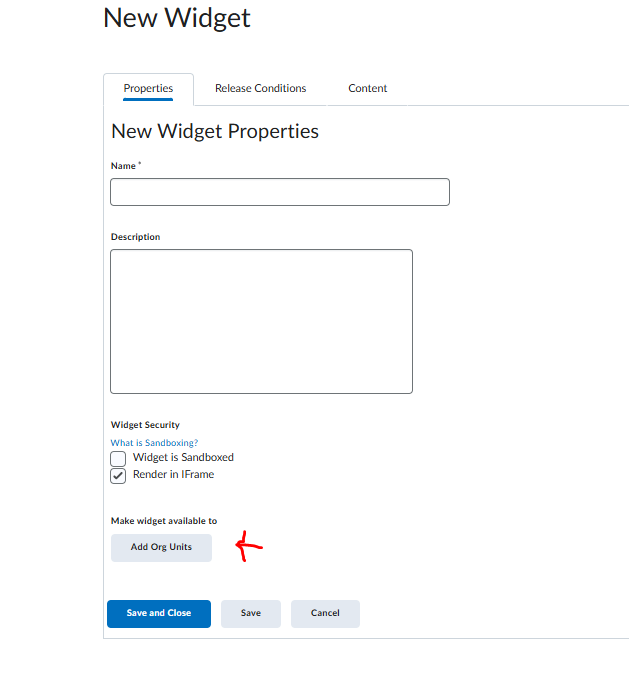
Meanwhile, to answer on your query on how to create a custom widget and share across the course offerings you can follow below steps
Hope this helps
Thanks
Sreelakshmi
Connect with our Known and Fixed Issue information to learn about improvements made to Brightspace.
Connect with leaders in pedagogy, accessibility, learning experience design and more
The Accessibility category serves as a single point of access to three avenues in Brightspace Community leading to the Accessibility Academy, Accessibility Library and Accessibility Discussions. These avenues offer courses and articles about accessibility to enhance accessibility knowledge and a group of accessibility enthusiasts to stay connected with.
Have questions about how to use Community? Stay tuned with updates, feedback opportunities and more for the Community here!
Connect with and ask questions on how to best use the Brightspace Product to transform the way your users learn!
Connect with product experts to learn more about tools frequently used by Brightspace Developers such as APIs and integrations!
Want to learn more about Brightspace Partners and Integrations? This is the place to be!
Stay up to date with product updates and announcements in this category.
Connect with our release information to learn about monthly improvements and updates to Brightspace.
Learn more about all the upskilling opportunities with courses and resources offered via the Brightspace Learning Center, Brightspace Guided Training and other training opportunities!