Best Of
Re: User enrollments API call not returning enrollments with role "Student"
Hello Lily, thanks for your question!
I was chatting with a colleague about this and we seem to think this may be a permission issue with the account that's being used to make the API call. Unfortunately without seeing your system/settings/etc. it's difficult to assess.
I would start by verifying that the role which will be completing this work does have full Roles & Permissions access to the Users tool > Search for all available roles, especially at the Course Offering level.
If that all looks fine, you may want to open a case with our Support team to have them also check where the problem may be.
Sorry we can't provide any more concrete answer!
~Stephen

Re: Help with Scheduled CSV Option in Analytics Builder
Hi @Mike.D.7,
Thanks for reaching out.
This feature (Schedule CSV Export of Data from Analytics Builder) request has already been logged with our Product team and is currently under consideration. To help prioritize it further, you can access the request through the Product Idea Exchange (PIE). The PIE is the best place to provide feedback, upvote ideas, and directly influence the Brightspace product roadmap.
How to Submit Feedback or Vote on the Feature
- Log in to the Brightspace Community.
- In the top navigation bar, go to Resources → Product Idea Exchange.
- Search for the "Schedule CSV Export of Data from Analytics Builder" feature request or access this link - and upvote it.
- You can also add comments or additional context to strengthen the case.
The Product team regularly reviews PIE submissions, and customer interest plays a key role in prioritizing development work—so your participation truly makes a difference.
Regards,
Vivek
Product Support Analyst

Re: User enrollments API call not returning enrollments with role "Student"
Thanks for the reply. We checked the service user permissions, and they are set to view enrollments for Course Offerings. We don't see any settings specific to Course Offering enrollments for students. Searching for students and their enrollment is enabled. We've made a ticket with support about the issue.
I noticed that when I get the classlist through /d2l/api/le/(version)/(orgUnitId)/classlist/, for students only, the "roleId" value is blank. It's very strange to us that it's limited to students and Course Offerings. We were able to enroll a student into a department, and it appeared when pulling the student's enrollments. Hopefully, support will be able to resolve the issue.

Re: Students within a group given the same grade: Want students to have individual grades
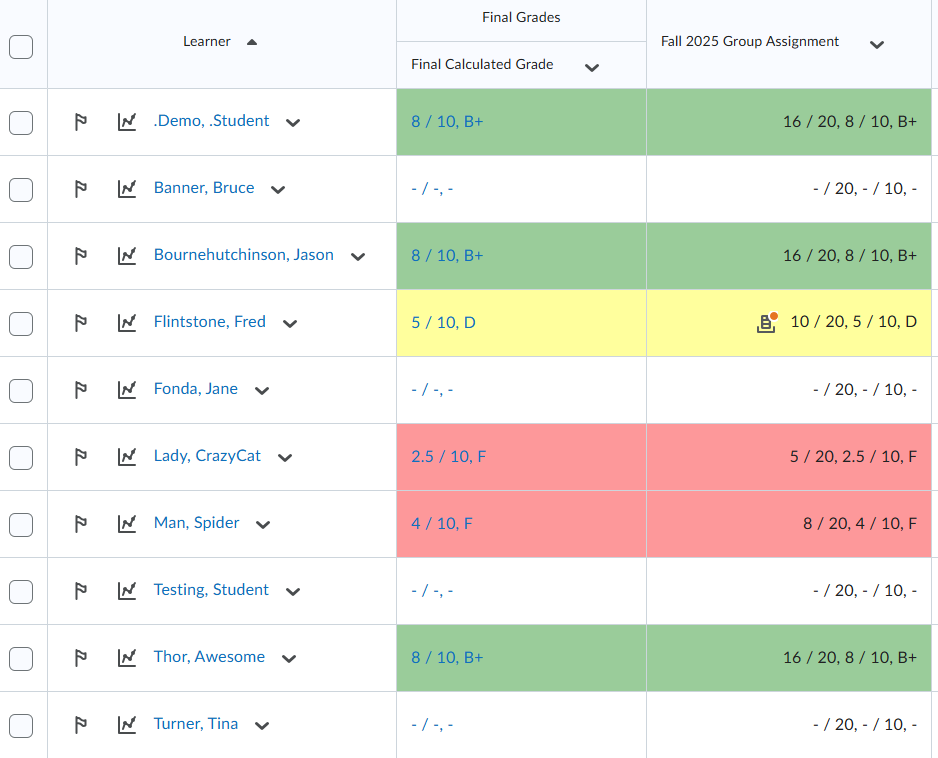
Hi @Kay.H.645 I followed those steps in one of my demo courses and it worked for me (see image): For my Groups you can see where each got an assigned score through groups all giving them the same score per group. Then, I just entered a different score for Fred Flintstone and the others did not change.
I also added different score for Crazy Cat Lady and Spiderman and those too are not changing the rest of their group marks. Is the instructor doing the grading via the Gradebook/Enter Grades?

Re: Is there a way to copy from one course to multiple other courses, rather than one by one?
Hello Julie, thanks for your question!
The Course Copy Bulk (CCB) tool could be used to do this. HERE is our information for Administrators.
One question I do have, which will dictate whether you use the CCB tool, is if your source course (where the content is coming from) will be modified to remove older content before you re-copy into the destination courses.
CCB works as an all-or-nothing. It is possible to manage what things are copied with a config variable, however (as one example) if Content is one thing that will be copied, it will copy everything, and duplicate items by appending them to the bottom of the Content area.
Another option I could suggest is to create a course package export and target only the updated items to be exported. You would of course still need to go into all courses and import it, but it would save some clicks vs going through the import process for each.
Hope this helps! If you have any questions please just let us know.
~Stephen
Is there a way to copy from one course to multiple other courses, rather than one by one?
I have selected content from one course that I would like to regulary export into 7 other courses on a weekly basis and I would love to save the time of going into each course and copying and importing one by one.

Re: Community Updates
❗️Update for our Approved Support Contacts (ASCs)
We’re happy to share that the ASC Support Portal has resumed normal operation, and full service was restored at 3:00 AM following maintenance.
Thank you for your patience while we worked to resolve the issue. For any additional questions, please don’t hesitate to reach out through questions@community.d2l.com.

Re: Multiple evaluator view when grading
Angela,
You are most welcome! Please let us know if you have anything else we can assist with :)
~Stephen
Re: How do you handle Incompletes?
Hi @Paula.C.2956,
I hope you are doing well.
If you prefer not to extend the course offering end date, you can update the student’s role settings to allow access to past courses. This can be done by enabling the “Access to past courses” permission within their role.
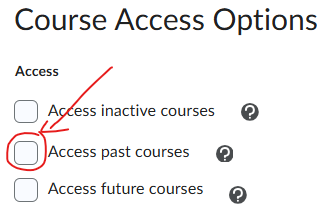
Alternatively, as Andrea mentioned, you can create a new custom role with this setting enabled and assign it to students as needed, so only they can access past courses.
I hope this meets your needs. Please let us know if you have any further questions or concerns.
Best regards,
Victor

🏆 Community Spotlight: Isadora Mok-Kulakova

Meet Isadora Mok-Kulakova, Senior Digital Learning Platforms Administrator at the University of Calgary. Isadora brings hands-on experience supporting faculty at scale and is the creator of Designing Microlearning Content for Brightspace Support.
In this D2L Academy course, she shares practical, real-world strategies for using short, focused videos to deliver just-in-time support, troubleshoot common issues, and help instructors build confidence with Brightspace without disrupting their teaching flow. A highlight of the course is the “Did You Know?” microlearning series, which demonstrates how small, well-designed videos can make a big impact on faculty development by delivering clear, actionable guidance exactly when it’s needed.
Learn more about Community Champions