Best Of
Release Notes Updates
Hi Community Followers!
Bookmark this discussion to receive an automated email when new Release Notes are posted.
The Release Notes are intended for clients to stay up to date with the improvements and updates made to the Brightspace platform on a monthly basis.

Re: How can I add an alt tag to an image?
Hi Emily! When you upload your image from your computer using the editor, Brightspace will prompt you to fill in an alt tag in a box called 'Alternative Text'. I have attached an image for your convenience. You can select 'decorative' if the image is not a teaching image. A teaching image would contain information that sighted learners acquire by viewing the image.


Re: Community Feedback🗨️
Hi @Ellen.Whybrow5727 ,
Thanks for reaching out to us here in our brand new space! We are excited to see your participation!
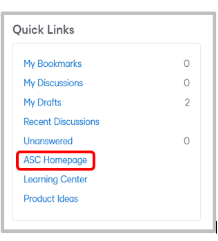
ASC's currently have the exact same experience for logging a ticket. You can access the ASC Homepage through our Quick Links found on the homepage.
A resource that may be helpful to answer some of your additional questions is our Community FAQ article. We invite you to use the On This Page feature to navigate to specific areas of the resource, depending what information you are looking for.

Looking forward to hearing more from you!

What permission enables the search bar?

What permission enables the search bar above? I do NOT want the Advanced Search features - I just want users to be able to search for a keyword in their course titles.
Reason: Our courses do not have start/end dates. We want users to be able to access the materials at any time. Eventually users self-enroll in a lot of courses, and it becomes a bit of a pain for them to have to find the specific course they're looking for. (There's a widget on our main course page that they can search on, but clicking the 9 square icon in the top-right of the screen is easier to find.)
