Assignment Due Dates Added to Calendar

Is it possible to add Assignment due dates to the Calendar? The only option I see is to add the start/end dates, but our due dates are not showing on the calendar, is that possible to do?
Answers
-
Hello @Rachel.T.9262, thanks so much for your question!
Due Dates should be appearing by default for your Assignments, as we don't have a specific setting to enable or disable them from showing up within the Calendar.
A few questions come to mind to try and sort this out:
- If you open the Calendar tool, is it also missing from inside the tool itself?
- Are other due dates appearing in your courses Calendar?
- Was this Assignment created within the Course Offering that you're working in? Or was it created in another Offering and shared, using the 'copy to other courses' option?
Thank you!
~Stephen
-
Hi Stephen,
This was brought up by our operations team, but I've done some additional digging and it looks like the due dates are being posted for the learner role only. Is there a way to have them show up for other roles as well?
-
Hello @Rachel.T.9262,
Thanks for that additional information.
I did a quick test and it appears that the two permissions which dictate whether or not a user can see the Due Date within the Calendar tool are "See and Submit Files to Assignment Submission Folders" and "See and Manage Assignment Submission Folders", both at the Course Offering level, for the Assignments tool:
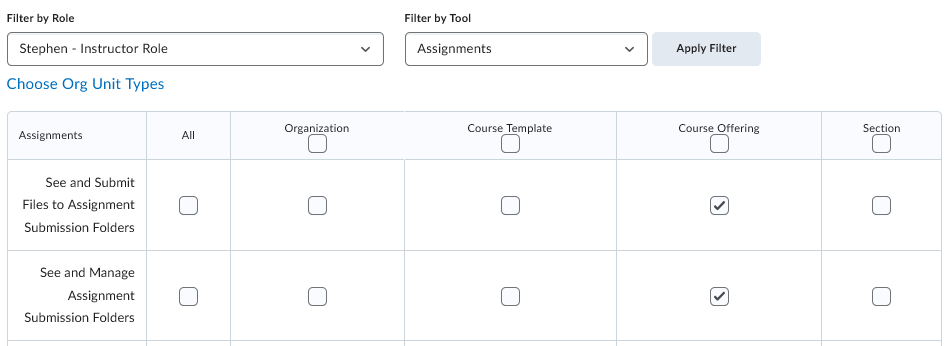
The role doesn't need both, but it's required to have at least one of these settings, depending on the role.
Could you check to see if these permissions are active for the role that's not seeing the dates?
I haven't found any other permissions that could prevent the dates from appearing, so I'm hoping this is what change is required!
~Stephen
-
Hi Stephen,
That fixed it! Thank you for your help!
-
Hello Rachel,
I'm very glad to hear! Thanks so much for letting us know.
Have a great day!
~Stephen

