Browser Find function no longer works on Enter Grades page

Alan.P.39
Alan.P.39 Posts: 25 Analytics Builder Transition

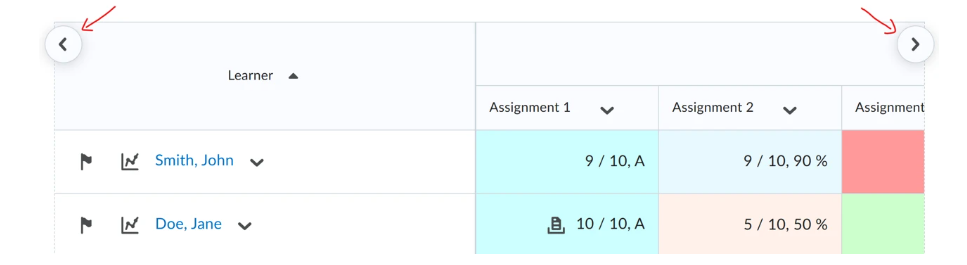
With the recent update to the Enter Grades page (scroll buttons), it seems instructors can no longer use the Find function in the browser (Ctrl+F) to jump to specific columns (grade items). Wondering if anyone has a work-around for finding a grade item quickly on the Enter Grades page?

Tagged:

Answers

  • Raquel.B.1893
    Raquel.B.1893 Posts: 30 🤝🏼 image

    Hello Alan,

    You’re right, according to our documentation, there isn’t a way to bring that functionality back, but there are a couple of built‑in options that can help you move around more quickly:

    1. Scroll sideways faster with SHIFT + mouse wheel
      The release notes say you can hold SHIFT on your keyboard and use your mouse scroll wheel to move left and right across the grade columns.
      This works on both Windows and Mac and is often quicker than clicking the new left/right arrow buttons.
      image.png
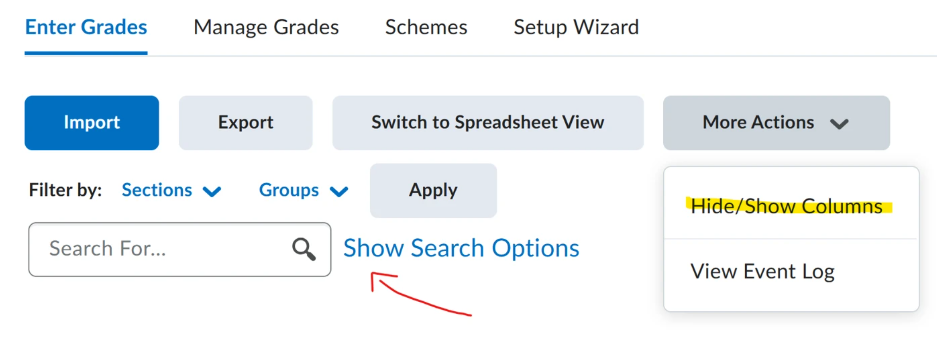
    2. Reduce how many columns you see at once
      • Hide/Show Columns: Temporarily hide grade items you’re not using so you have fewer columns to scroll through.
      • Search options: Filter which students you see (by user, group, or section) so there’s less information on the screen.
    image.png

    A practical workaround for now is to:

    • Hide any grade items you don’t need at the moment, and
    • Use SHIFT + scroll wheel to move sideways through the remaining columns.

    That’s the closest documented alternative to quickly getting to a grade item on the updated Enter Grades page.

    Let me know if you have any doubts!

    Raquel

  • Laura.H.334
    Laura.H.334 Posts: 2 Analytics Builder Transition

    We are K-12 and had the same question. I was directed to this discussion when I submitted a ticket. I'll share here what I responded in my ticket in hopes that D2L will reconsider this change.

    None of these suggestions brings the ease of navigation up to what it was prior to last month. Using the mouse wheel is not standard behavior at our institution, and I can't even confirm that all of our mice even have a scroll wheel. Our teachers' typical workflow involves adding grades for all students to a single assignment, so reducing the number of students showing in the gradebook doesn't really address this particular pain point. Hiding/showing columns is one strategy that we've shared, but even hiding items that are not in the current unit will not reduce the list enough to make specific items easy to find. With no visual indicator of hidden columns, I can foresee that teachers will easily lose track of which items they have hidden, which will create a new source of frustration.

    CTRL+F is a universal functionality in practically every browser and program that people use. Disabling/diminishing this functionality is not a positive; we would definitely like to see this functionality restored, even if it means reversing course on the February update. I don't think our teachers have found much added value even if CTRL+F wasn't an issue.

  • Hi @Laura.H.334,

    Thank you for sharing the feedback.

    We'll consider re-incorporating support for that or something similar in the future. At the moment, we suggest using the options suggested above.

    Should you have any questions, please feel free to contact us.

    Kind Regards,

    Pulkit

  • Laura.H.334
    Laura.H.334 Posts: 2 Analytics Builder Transition

    Hi, Pulkit. Thank you very much for your response. I appreciate it.

  • Steve.B.446
    Steve.B.446 Posts: 119 🎓

    @Laura.H.334 for the workflow you mentioned of entering all grades for a single assignment, use the Enter Grades option in the dropdown menu next to the grade item name, CTRL-F seems to work on that screen.