final calculated grades

students are not able to see the final calculated grade. Grades show as released. Grades show as not hidden. Not sure what else to change.
Answers
-
Hi James
If Students cannot see their own Grades in their course then either the Grades link is not present on the navbar or they don't have permission to do so. Presuming it's the latter, go to Admin Tools > Roles & Permissions, choose the Grades tool for the Student role, and check the "See the Grades tool" permission at the Course Offering level.
If that doesn't resolve it then you may need your ASC to check in with helpdesk@d2l.com.
I hope that's helpful
Matt
Learning Administration Manager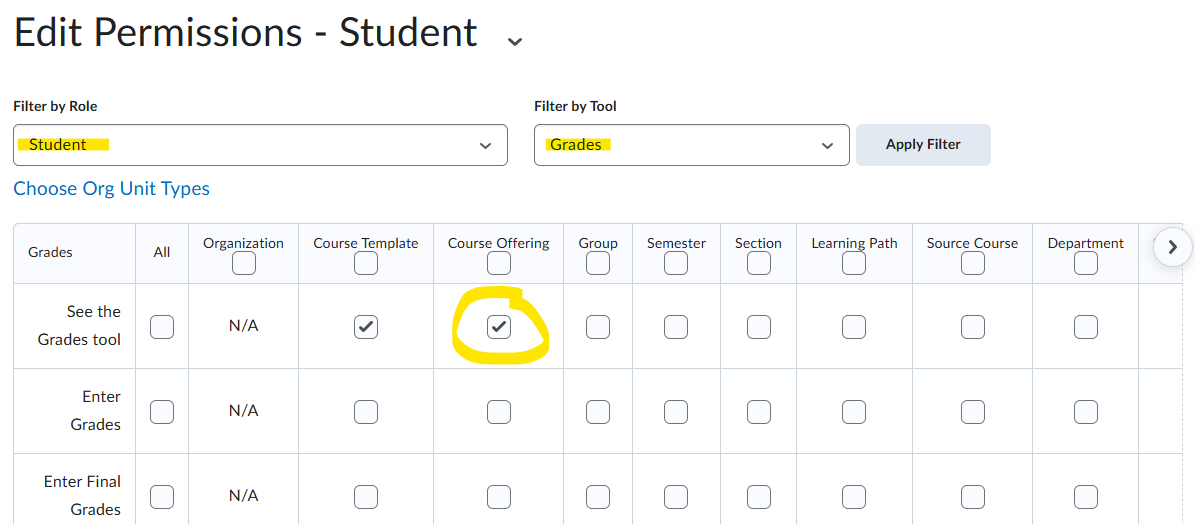
-
@James.D.1531 Are the students able to see the Final Calculated Grade item but not their scores? Edit the grade item and check the Display Options for the student view.


