How to Drop Lowest Subtotals in Brightspace When Using Category-Based Weekly Grading

Habeeb.A.5665
Habeeb.A.5665 Posts: 2 New Community Member
edited January 20 in Higher Ed / Postsecondary

Hi Brightspace community, I’m restructuring my gradebook and need help figuring out the best way to set up “drop the lowest 4” given my structure.

Course structure

  • Class meets two days each week: Tuesday and Thursday
  • Each class day has two graded items:
    • Quiz = 10 points
    • Activity = 10 points
  • So each class day totals 20 points
  • Example:
    • Jan 15 (Tuesday): Quiz Jan 15 (10) + Activity Jan 15 (10) → subtotal 20
    • Jan 17 (Thursday): Quiz Jan 17 (10) + Activity Jan 17 (10) → subtotal 20

What I built

  • I created a category per class day (e.g., “Week 1 – Tue Jan 15 (20 pts)”, “Week 1 – Thu Jan 17 (20 pts)”).
  • Inside each category are the quiz + activity items.
  • Brightspace automatically creates a category subtotal (20), which is exactly the view I want students to see (quiz, activity, subtotal).

What I want

I want to drop the lowest 4 class-day totals across the full semester (i.e., drop 4 of those 20-point day subtotals), not drop quizzes alone and not drop activities alone.The issue/limitation I’m facing

  • Brightspace “Drop lowest” seems to only work within one category, and only when the category uses Distribute points across all items and items have the same max points.
  • I can’t “move” category subtotals into a semester-level category because subtotals are automatic and not grade items.
  • It also seems I cannot nest categories (I can’t move a daily category inside an “umbrella” category).

My question

Given this structure, what is the recommended/standard Brightspace way to:1. keep the student-facing view as “quiz + activity within each class day category.2. But still automatically drop the lowest 4 class-day totals (20-point subtotals) across the term?

Thank you so much!

Tagged:

Answers

  • Stephen.R.50
    Stephen.R.50 Posts: 36 image
    edited January 19

    Hello Habeeb, thanks for your question!

    There's unfortunately no direct way you can do this within Brightspace, but you can technically make it work using multiple formula grade items, although I don't necessarily recommend making these calculations within Brightspace itself due to the complexity.

    I set up a test in my environment to verify the process using five 'days' or Grade Categories and had the system drop the lowest two 'days'.

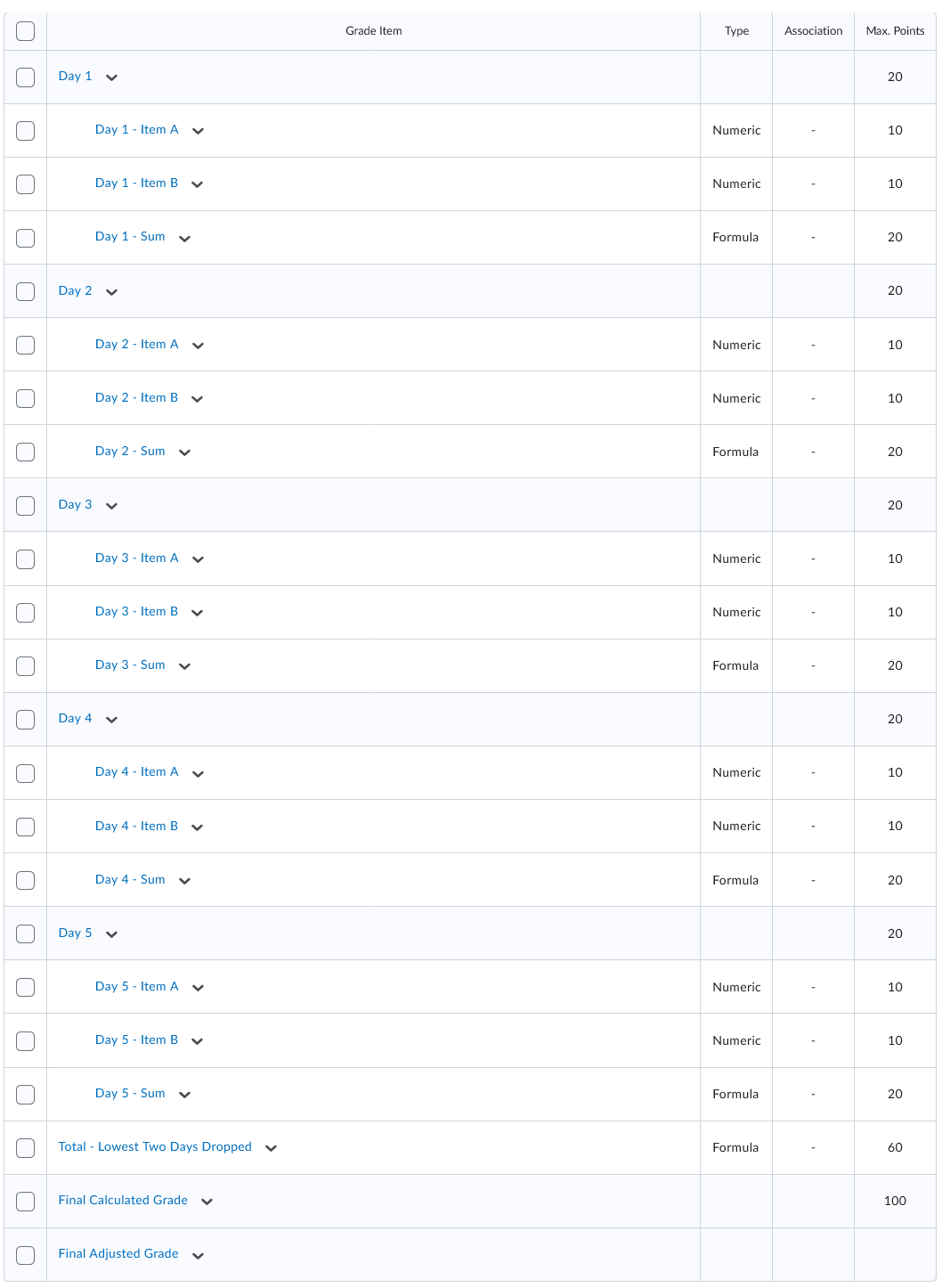
    Here is how my five categories look. You'll note that to make the overall calculation process easier (at least for myself), I also created a Formula Grade Item to calculate the sum into single usable number (e.g. Day 1 - Sum). I did this because the formula editor does not allow you to pull in the category points.

    image.png

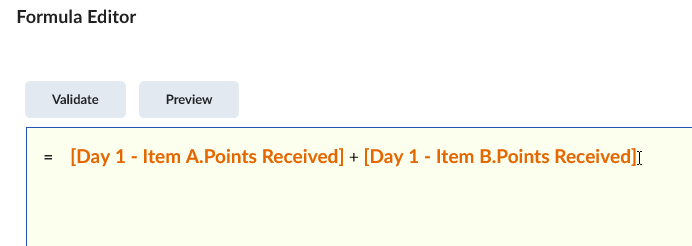
    The formula for 'Day 1 - Sum' is:

    image.png I then created the new Formula Grade Item to complete the final calculation. For my test, I made the Maximum Points of this new grade item to be 60, since at first I had 5 'days' x 20 points per day (=100) minus two 'days' (100 - 20 = 60).

    I used both the SUM and MIN functions in the formula. SUM calculated the total of all the 'days', and the MIN function looks for the smallest pair of 'days' and subtracts it from the SUM (SUM - MIN).

    The issue that makes this very complicated to set up is you need to build the formula within Brightspace, as it can't be pasted into the system. The larger your gradebook and the more items you want to drop, the more complex in size the formula is going to be.

    In the case of five 'days' and dropping the lowest two 'days', this is how the combined SUM & MIN function will look:

    Assuming that:
    a = Grade Item: "Day 1 - Sum.Points Received"
    b = Grade Item: "Day 2 - Sum.Points Received"
    c = Grade Item: "Day 3 - Sum.Points Received"
    d = Grade Item: "Day 4 - Sum.Points Received"
    e = Grade Item: "Day 5 - Sum.Points Received"

    Then:

    =SUM(
    a,b,c,d,e)

    -MIN(
    a + b, a + c, a + d, a + e,
    b + c, b + d, b + e,
    c + d, c + e,
    d + e)

    Here's how that looks within the Formula Editor itself, fully written out:

    image.png

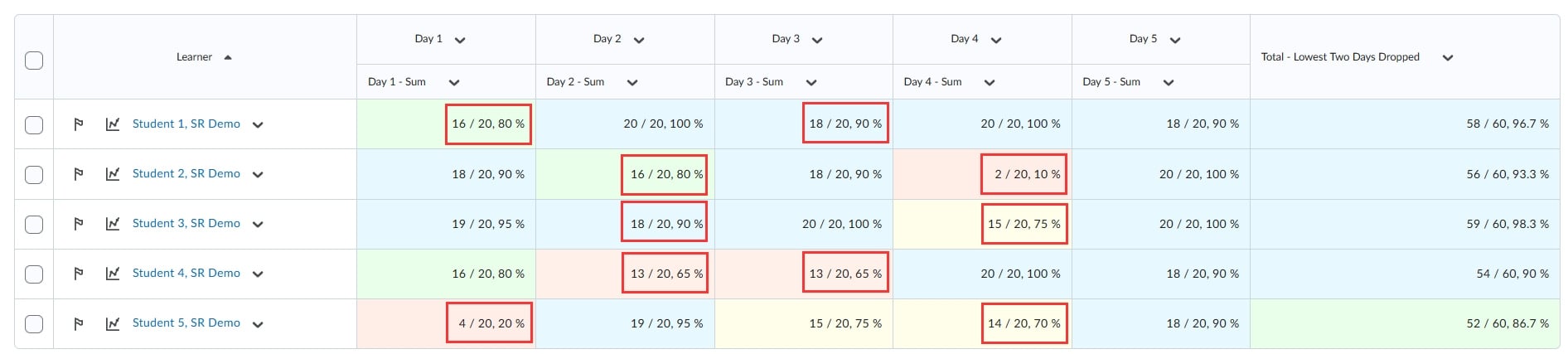
    I validated this in the image below and highlighted the two lowest 'days' with a red box. The remaining non-boxed items are added together to give the final grade in the item "Total - Lowest Two Days Dropped" on the right side:

    2026-01-19-000337.jpg

    It's very possible there's an easier way to do this, but it was the best I could come up with within the Gradebook itself!

  • Victor.B.4864
    Victor.B.4864 Posts: 15 🤝🏼 image

    Hi Habeeb,

    Thank you for contacting D2L Support.

    At this time, Brightspace does not natively support dropping the lowest category subtotals across a course. However, the following workaround will allow you to achieve the desired behavior.

    1. Create a semester-level category

    • Create a new category (e.g., Class Day Totals).
    • Inside this category, create one calculated (Formula) grade item per class day.
      • Each formula should calculate: Quiz + Activity (20 points total).
    • Set the category to:
      • Calculation method: Distribute points across all items
      • Drop lowest: 4 items
    • Hide this category and its grade items from students, if desired.

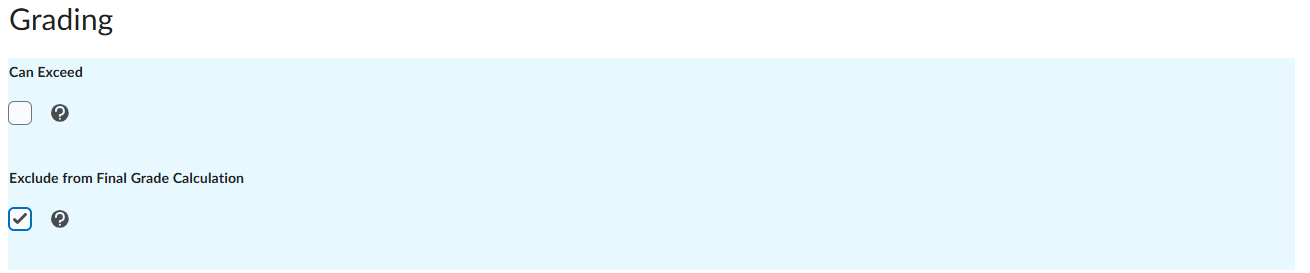
    2. Exclude other categories from the final grade calculation

    • For all other categories, select Exclude from Final Grade Calculation.
    • Leave only the new semester-level category included so it is used to calculate the Final Calculated Grade.
    image.png

    This approach preserves the student-facing view of quizzes and activities within each class day while allowing Brightspace to automatically drop the lowest four full class-day totals.

    Please let us know if you have any questions or would like assistance setting this up.

  • Unfortunately formula grade items don't get pulled into the final grade calculation as they don't hold weight or points like a numerical grade item, so using them within a category to drop the lowest items won't work for this scenario.