When you hear Brightspace Checklist, do you immediately picture it as a student-facing tool? Most of us do. But what if I told you the Checklist tool could actually make your life as an instructional designer easier, too?
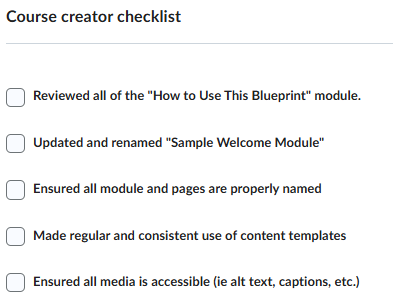
Inspired by its use in the Course Blueprint product created and delivered by D2L’s Learning Services team, I keep recognizing how this tool could fit into many different parts of the ID design and course-build workflow—and this could be a game-changer.
Instead of juggling sticky notes, spreadsheets, or a separate project tracker/kanban boards, you can create and embed a variety of ID Checklists right inside your course shell. Now everything lives in the same space, right where you’re building.
The Tool In Action
Here’s what it could look like in practice:
- Design phase: Add items for aligning objectives, drafting assessments, and ensuring consideration for consistent content structures across modules.
- Build phase: Track progress on uploading content, adding release conditions, and building with accessibility standards in mind.
- Review phase: Include quality assurance items like logical navigation, interactive and link functionality, and an effective learning flow to create a great learning experience.
- Bonus: Needing an instructor or administrator to apply certain settings after making a child course from your parent course, leave a checklist for them too!
- Include items for setting up widgets with due dates, instructor profile completion, or adding posts to the activity feed.
The best part? If you’re collaborating with other designers, the checklist can be your shared guide toward consistent course completion—add notes, key items, and more to keep tasks transparent and shared.
Of course, this doesn’t replace a full-scale PM platform, but it bridges the gap between “big picture planning” and “course shell execution.” And because it’s inside Brightspace, you’re working where the work actually happens.
Further Discussion
I’m interested to know:
- Have you used the Checklist tool this way?
- Do you see potential for your team’s workflow(s)?
- What other “hidden gem” Brightspace tools do you repurpose behind the scenes?
Sometimes the simplest tools we give students can end up being the most powerful for us, too.
Want to Learn More?
Connect with your institute's D2L Customer Success Manager or Client Sales Executive, or reach out to the D2L Sales Team for more information about how Learning Services can support you on your learning journey.