Is there a way to include attendance grades into a gradebook and to also be included in the final grading?
Hello @Richard.O.260
You could create a grade item named "Attendance" in your grade book, and manually fill it out with your students' attendance marks.
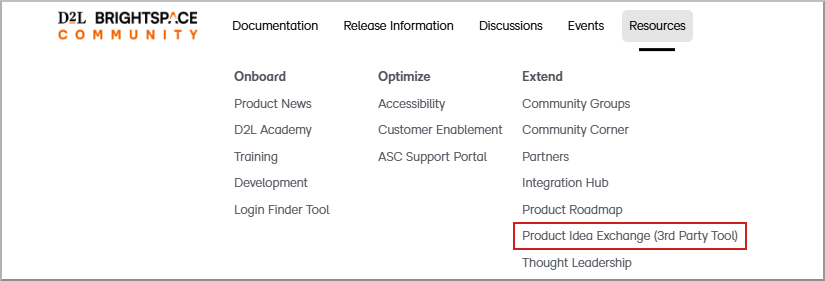
Now if you are looking for an automatic workflow between the Attendance and the Grades tools, unfortunately, that is not currently possible. In that case I advise you to reach out to our Product Idea Exchange (PIE) and put in your suggestion as a feature request: The Product Idea Exchange is designed for users like you to send direct submissions to our Product Development organization and has the following advantages:
We look forward to hearing from you at the Product Idea Exchange!
Hi @Richard.O.260 ,
Thanks for reaching out to the Brightspace Community with your attendance related question.
Currently, there is no way to push attendance information to gradebook automatically. Grades must be manually entered or manually imported into the attendance grade column. There is no way to do automated grading of attendance in Brightspace.
We recommend you connect with this item in our Product Idea Exchange [LINK IS NOW ARCHIVED - Update 2026] to vote it up or leave comments outlining your use case. Your feedback is important to us!😀
With You-Attend you can quickly setup your attendance registers and connect your attendance to the grade book. See https://you-attend.com for more
It's mind-boggling that in 2025 D2L doesn't do this automatically like literally every other grading platform out there. The fact that we teachers need to waste a huge amount of our time resorting to complex, labor-intensive processes just to calculate an attendance grade is inexcusable for a major educational platform.
@Julie.L.787
@Ricardo.S.110
The failure of your product to integrate attendance records with grades natively indicates an extreme level of disregard for your userbase. Your links to a Product Idea Exchange send me to a login page that does not accept my credentials for this message board and which has no option to register for an account.
Your attendance system doesn't even let us automatically assign missing students as absent. It's 2026 and you're telling me the most efficient way for me to use your platform to assign grades for attendance is to download attendance records for each class, calculate attendance rates in a spreadsheet, then manually insert grades for each individual student. It's ridiculous. Get a team on it and figure it out.
Hi @Oscar.L.151,
Thank you for taking the time to share your thoughts with us, we really appreciate you contributing to the conversation. Feedback like yours helps us better understand how we can continue improving the experience to support teaching and learning.
We have refreshed the PIE tool. For access to the new PIE please follow the instructions below:
You will need to be signed into the D2L Community and have appropriate permissions from your organization to access PIE.
If you haven’t already, we’d encourage you to add your feedback to the Product Idea Exchange by submitting or upvoting Item D12866: “Attendance push to Gradebook Item (D12866)”. Input there goes directly to our product team and plays an important role in shaping future enhancements.
Thanks again for being engaged and helping us improve.
Connect with our Known and Fixed Issue information to learn about improvements made to Brightspace.
Connect with leaders in pedagogy, accessibility, learning experience design and more
The Accessibility category serves as a single point of access to three avenues in Brightspace Community leading to the Accessibility Academy, Accessibility Library and Accessibility Discussions. These avenues offer courses and articles about accessibility to enhance accessibility knowledge and a group of accessibility enthusiasts to stay connected with.
Have questions about how to use Community? Stay tuned with updates, feedback opportunities and more for the Community here!
Connect with and ask questions on how to best use the Brightspace Product to transform the way your users learn!
Connect with product experts to learn more about tools frequently used by Brightspace Developers such as APIs and integrations!
Want to learn more about Brightspace Partners and Integrations? This is the place to be!
Stay up to date with product updates and announcements in this category.
Connect with our release information to learn about monthly improvements and updates to Brightspace.
Learn more about all the upskilling opportunities with courses and resources offered via the Brightspace Learning Center, Brightspace Guided Training and other training opportunities!