Best Of
Re: Fixed Issues List Updates
A new version of the fixed issues list has been published.
The following items were added.
- Reference: 02218924
Classlist - when trying to view a quiz attempt of a user that has been withdrawn you are re-directed to a different user - Reference: 02224140
Quizzes - sometimes an Internal Error is received when printing a quiz

Re: Limiting Dual Submission When Using Release Conditions for Midterm/Final Pairing
Hi Kendra,
Thank you for reaching out with this question.
Based on what you shared, I would suggest adding release conditions to both midterm assessments and using the following condition type: Quizzes, No completed quiz attempt.
For instance, in the Midterm Essay, select Midterm Exam as the quiz under Condition Details. With this, both assessments will be visible initially, then once a student completes the Midterm Exam, the Midterm Essay will be hidden.
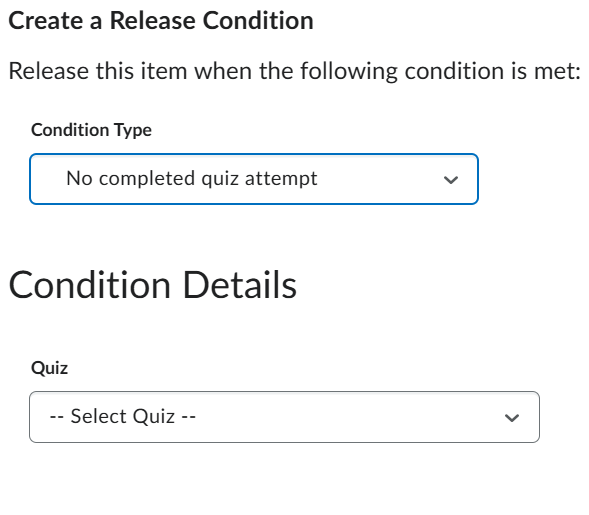
If using assignments, the same can be achieved using this release condition: Assignments, No submission to folder.
I hope this helps!🙂
Thank you,
John

SSO restricting complete logout
Our students and faculty connect via SSO - In our lab space on public machines, when students sign in, they cannot fully log out when they use the log-out feature. Another student logging on to Brightspace from the same machine will be brought to the prior user's account. The only way to correct this is to log off the browser or fully clean the cache. This is problematic in our simulation center when our students need to use two browser-based applications at once. Using Incognito or a different browser type does not fix the problem. Since this is a simulation lab, there is a short window of time between students, and killing both programs just to clear the cache is not sustainable. Is there a fix for this issue? I saw a similar writeup here from 2020

Re: SSO restricting complete logout
Hi clilly.c,
By default, the Brightspace logout action ends the Brightspace session only and sends the user to the value specified in the OrgLoginPath configuration variable. Typically this is the Identity Provider (SSO) sign-in URL.
You can specify a logout redirect URL which overrides this behaviour to ensure that the user isn't simply signed back in. This URL can be any URL. Some clients redirect the user to a page notifying them to close all open browsers.
If available, you can configure the logout redirect URL to your institutions IdP logout URL if the IdP has one available (these exist for ADFS, Azure, Okta, and possibly others).
Also important to note that our implementation of SAML does not support Single Logout (SLO).
If you need any assistance with any of the above please open a case with the D2L Support team who can assist you in making the changes.
Hope this helps!

Expand all discussion board posts in a topic
Hi, I am trying to figure out how to expand all posts in a topic so that I can print them out for review. I appreciate your help!

Re: How to edit Learning Path?
Hi @Avinashdeep.K.637 ,
I have reviewed your query and found some useful information regarding this option.
Please refer to the article: Access Learning Paths from the My Learning Widget
The Continue button links directly to the first uncompleted module in the learning path. I believe this is an important functionality for the users to access the learning path and link them to the uncompleted modules.
If you can specify your use case related to this request, then I can reach out to our team for the best feasible solutions.
Let us know your feedback. I'll be happy to assist you further.
Best Regards,
Tejas Masavkar

Re: How to embed Microsoft office documents (Word, PowerPoint, Excel etc) without turning into a PDF?
Hi @Yildiz.N.829 👋,
Thank you for reaching out to the Brightspace Community regarding the issue you're experiencing when embedding PowerPoint files into HTML pages.
First, I’d like to clarify that it is expected behavior for files uploaded to Brightspace to be rendered as PDFs. This ensures mobile responsiveness and accessibility, but it also means that interactive elements—such as videos and animations—will not function. In the Classic Content Experience, students were able to download files in PowerPoint format. However, in the New Content Experience (NCE), files are downloaded as PDFs. If you wish for students to download the original PowerPoint file, you may consider using the Insert Quicklink option.
There is a PIE item that covers this feature request: https://desire2learn.brightidea.com/ideas/D10625
If you're looking to embed a PowerPoint presentation directly into HTML Pages, we recommend using Office 365. Here is some relevant documentation. Additionally, some users have reported success using a PPT to SCORM converter to preserve animations and interactivity. If your goal is to maintain dynamic content, this may be a worthwhile option to explore.
If you believe the current behavior is not working as expected, we encourage you to create a support case. Please contact your Helpdesk to initiate one. Once the case is created, we’ll be able to review the specific content topic shown as a broken iframe in your screenshot.
-Isidora

Re: The change email is not working
Hi @Susan.F.819 -
Thank you for reaching out to the Brightspace Community! We can help you with this change directly.
Please send us an email at questions@community.d2l.com and let us know:
- Your reason for change
- The new email it should be changed to
Once we have that, our team can assist with updating your information on the backend. Thank you!

Re: Missing enrollment users
Hello @Colt.K.2845,
Thank you for contacting the Brightspace Community with your question.
Based on the situation you described, it seems that the role you used to enroll the user may be missing a setting that allows visibility in the Classlist. Please review the following path and image for guidance:
Admin Tools > Roles and Permissions > Your Role > Edit Settings
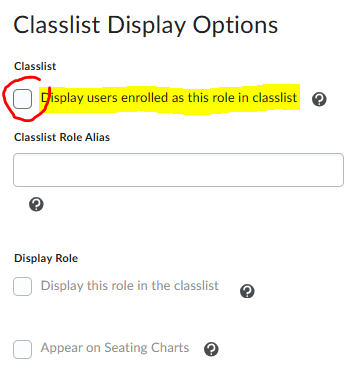
For more detailed guidance, please refer to the following article from the Brightspace Community
I hope this information is helpful.
Pilar Medina Norena
