Best Of
Re: What is the current stable version of D2L Brightspace API version?
Thank you so much for the quick response.


Re: Privacy concerns where sponsor/mentors are able to access the information of all students in a class
Hello @Francyne.M.8267!
I've been chatting with @Aasim.Y.704 regarding your question and what the best solution could be.
It doesn't seem that the Auditor tool is going to work for you, since it's not intended to have direct access to a course, nor do things like update grades.
There's a setup which may work for you, but it would require using sections within your courses, and creating a separate role for these sponsors. In each course where this type of setup is needed, you'd need to enroll your learners into a section along with their sponsor (you can enroll multiple learners into the same section who work with a single sponsor). That sponsor would then only have visibility into the learners in their section, and would not be able to see assessment items such as grades, assignments, quizzes, etc of learners in other sections who have their own sponsor.
Would this be a setup that could work for you? If so, I can provide details on what exactly you need to do to get it working!
Thanks
~Stephen

Re: Accessibility of Quadradic Functions Graphs
Thank you very much for these two suggestions! I will pass them along to our Math Coordinator. You ROCK!!!
Re: Unable to get endpoints to fetch Attendance for a course
Hello @Venkata.G.6239,
You would be able to query the data platform via API to obtain the Course Access and Course Access Log (for Pulse access) datasets, which would list the dates that a learner has accessed a course, but you'd need to cross reference it with the Organizational Units dataset (to get the specific course information) and the Users dataset to match the user ID with the specific user.
The best dataset would be the advanced dataset named Learner Usage. This gives the most information and a single entry for each learner in each Course Offering. However, the advanced dataset would need to be run manually.
~Stephen
Re: Can we turn a Discussion Forum into a Topic?
Hello @Jane.O.1385, thanks for your question!
You are correct, it is not possible to switch a created Forum over to a Topic.
Please let us know if you have any other questions!
~Stephen
Re: Activity shows completed but never visited
Hi Jessica,
Yes, I was able to replicate the behaviour if I impersonated the learner. If you login as the learner and complete the activity the completion etc is captured as expected.
Best to open a case with the D2L Support team to investigate the issue. They will can provide clarificaion on the expected behaviour, or identify if there is some other underlying issue.
Hope that helps!

Multiple External Tool Links
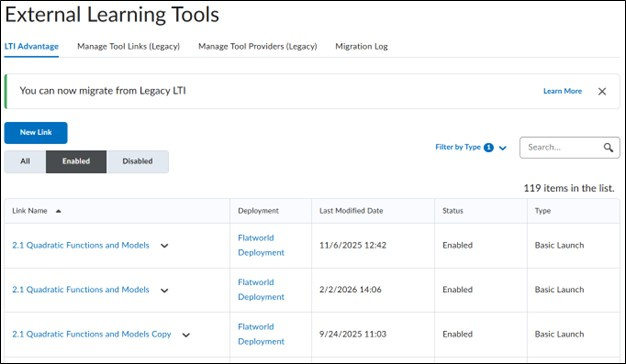
We are troubleshooting a gradebook issue tied to a third-party LTI (FlatWorld) after multiple course copies/imports due to issues with course material/book, and I’m hoping to confirm the best cleanup approach without impacting existing student grades.
Situation:
• The original LTI links worked correctly in a previous term.
• The course was copied multiple times into new shells.
• Content items were removed using the three-dot menu in Content, but may not have been permanently deleted at the LTI level.
• Instructors also manually synced some assignments from the vendor tool and were advised to manually associate grade items in Brightspace.
What we are seeing now:
• Multiple grade item/columns being created for the same assignment.
• Some grade items are greyed out and cannot be deleted. (I believe Content may have been deleted without selecting Permanently Delete)
• Different columns are receiving different grades depending on which link syncs.
• Each time the external tool syncs, a new grade item may be created if it cannot find the original placeholder.
My working theory:
There may be multiple LTI content links or deployments still active. Each one appears to be searching for its original grade item association, and when it cannot find it, Brightspace recreates a new grade item.
Questions:
- Is disabling duplicate External Tool Links the safest first step, or is there a better way to identify the “primary” deployment?
- What is the recommended process for safely removing orphaned or externally managed grade items mid-term?
- Is there a way to confirm which grade item is actively tied to the current LTI deployment before deleting anything?
Goal:
We want to consolidate back to a single grade item per assignment without breaking the integration or losing existing student grades.
Any guidance or best-practice workflows would be greatly appreciated. I have included a screenshot of the External Learning Tools links we currently see in this course under Admin Tools.

Re: H5P Interactive - Add Grade Item after creation
Thank you @Joey.S.348 that was very helpful and resolved the issue I was having!

Re: How to allow student(s) to opt-in/-out of an assignment
@Colt.K.2845 Hi Colt, I would use a quiz with one MC or T/F question, set to Not in Gradebook. Then you can use the score of that quiz as a release condition for the supplementary assignment so that only students who answered Yes or True (e.g. score = 100%) would then have access to it. You can also put the same release condition on the associated grade item so that it will be hidden to students who responded No or False. As long as your gradebook remains on the default setting of Exclude ungraded items, then the students who don't do the supplementary assignment/receive a grade are automatically exempt from that grade item.