
Dataflow is not runnable.

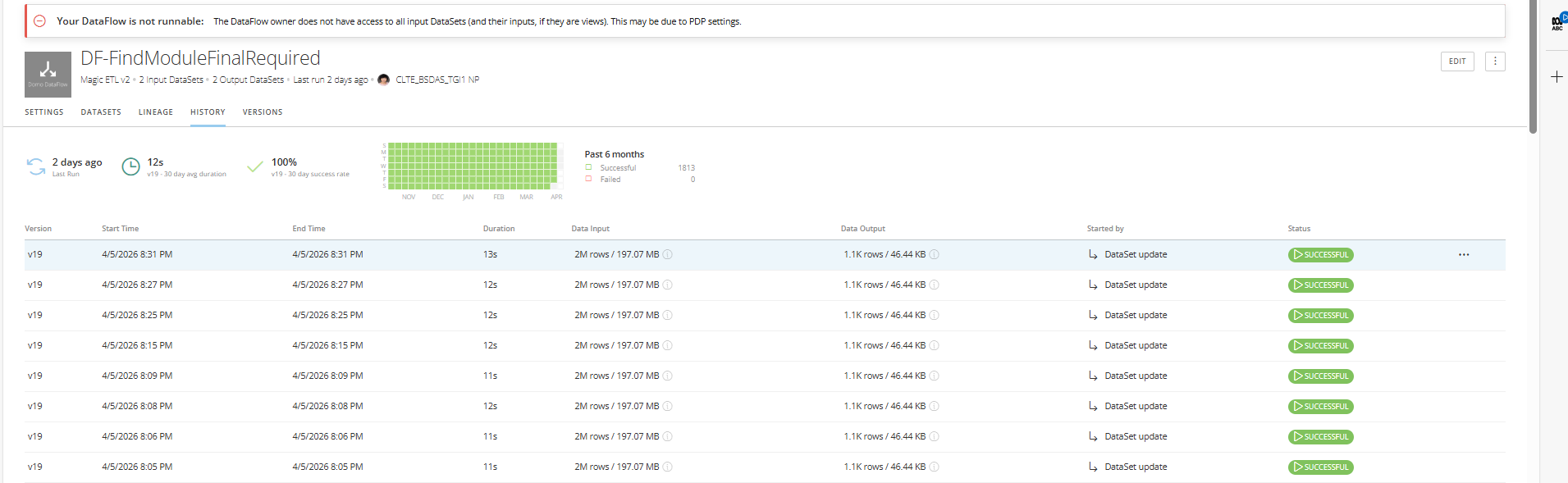
Hi! Posting here for the first time as I had to take over this role when a colleague left.
Why am I getting this warning/error message for some of my dataflows? (screenshot above)
Dataflow owner does not have access to all input datasets....THis may be due to PDP setting.
I checked the PDP and my name is added to those with AllRows policy, so am quite puzzled why I do not have access to the datasets.
Appreciate help on this!
Comentarios
-
Hello J.t.845,
I reviewed the Brightspace documentation for Insights Report Builder. Brightspace documents that access to Insights Report Builder is controlled through organization-level permissions, including Insights > See Insights Portal Tool, Analytics Builder > Can Use Analytics Builder, and Analytics Builder > Can Manage Analytics Builder for managing authors and activating the tool. Brightspace also documents that Trusted Attributes are part of Personalized Data Permissions (PDP) and that these policies can be applied to DataFlows created from existing data sets to filter data for specific users and groups.
Given that this warning is tied to a specific DataFlow, its underlying data sets, and the PDP configuration applied in that environment, the best next step would be to open a Support Case so the team can review the affected setup directly and confirm what is preventing the DataFlow from running. The Brightspace documentation for this area focuses on permissions, author access, and PDP applied to DataFlows, which is why reviewing the specific configuration in your environment would be the most reliable path forward.
Thank you for providing the details so clearly.

